
This is the print version of this page. All content is copyright Indezine.com 2000-2026.
Page 381 of PowerPoint tutorials, presentation essentials, personality interviews, and PowerPoint news.
Previous Archive Page | Next Archive Page
Author: Geetesh Bajaj
Product/Version: PowerPoint
July 24, 2024

In a previous article, we looked at waterfall charts. A simple waterfall chart contains just one parameter, represented by one series in your data. Such a chart is useful because it’s instantly intuitive, not to mention extremely powerful as a data visualization tool. Yes, stacked waterfall charts add a whole new dimension to data visualization. We will learn more about stacked waterfall charts and explore more example scenarios to understand where they are best used.
Learn more about stacked waterfall charts in PowerPoint.
July 22, 2024
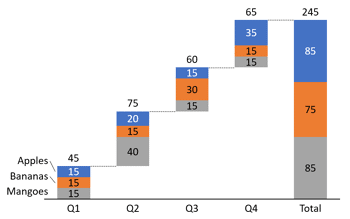
Stacked Waterfall charts are a little different than conventional waterfall charts. Such charts can be easily created using the think-cell add-in for PowerPoint. If you send a stacked waterfall chart, or any other chart created using think-cell to someone who does not have think-cell installed, then they will be able to view the chart in PowerPoint. They will also be able to edit partially.
Create stacked waterfall charts using the think-cell add-in for PowerPoint.
July 16, 2024

We first begin with an editorial piece co-authored with Kurt Dupont, about the impact and reach of PowerPoint in contemporary times. We then look at waterfall charts. We cover the entire gamut including history, use, scenarios, and unique components. We also look at creating waterfall charts in PowerPoint 365 for Windows.
John Baluka discusses his new concept, Multimodal Slides in an exclusive interview. We also bring you quotes, press releases, and templates from the last few days.
Stay informed about updated tutorials and happenings related to PowerPoint and presenting.
July 15, 2024

It struck a chord when the 2023 word of the year chosen by the Merriam-Webster dictionary was ‘authentic’. It seems to me that the strong need to understand and experience authenticity is a collective response to the increasingly artificial world we find ourselves in. Both the world of business and the wider world. As we become increasingly reliant on screened devices for communication and information, we need to be able to discern facts from misinformation, and reality from the augmented.
Learn more with Carol Mae Whittick of Toastmasters International.
July 11, 2024

PowerPoint, Microsoft’s famous presentation software, is used everywhere—in offices, schools, and just about any place you can imagine for digital presentations. So, you might wonder, just how many PowerPoint presentations are made every day around the world?
Read more with Geetesh Bajaj and Kurt Dupont.
July 10, 2024

John Baluka has been developing software within the Microsoft stack for 30+ years. He has been an independent software developer for the last 15+ years. Most recently, John has been focused on how he can help people use PowerPoint to elevate how they create documentation and training. In this interview, John discusses Multimodal Slides, a tool that will convert your PowerPoint files into a Multimodal website.
July 9, 2024

Waterfall charts may sound complicated, but they are among the easiest charts to understand. Just like a story that builds up layer by layer, the columns in these charts guide us through rising and falling numbers. It's almost as if you are on a journey, and by the time you reach your destination, you've understood the story hidden within the data.
Learn more about Waterfall charts in PowerPoint.
July 2, 2024

We first look at Aristotle, a historical figure and his role as a salesman. Jerry Weissman explores Aristotle and sales, a topic that's never been discussed before. In another story, we teach you how you can create full-featured waterfall charts with the think-cell add-in for PowerPoint.
In an exclusive interview, Richard Goring of BrightCarbon talks about their amazing, free add-in for PowerPoint, called BrightSlide. You can learn how to manage and remove connected services in PowerPoint for iPad. We also bring you quotes, press releases, and templates from the last few days.
Stay informed about updated tutorials and happenings related to PowerPoint and presenting.
July 1, 2024
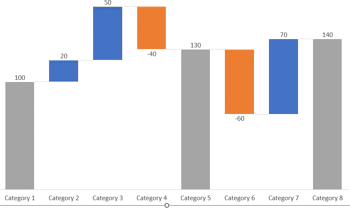
Waterfall charts do portray figures and numbers, but they also tell a story over a period. These stories relate to anything from inventories to staffing and sales to profits. While older versions of PowerPoint did not support creation of waterfall charts natively, newer versions can create some amazing waterfall charts. In this tutorial, we will explore creating waterfall charts in PowerPoint 365 for Windows, and will then look at some limitations that can be overcome with a third-party PowerPoint add-in.
Create waterfall charts in PowerPoint 365 for Windows.
June 26, 2024
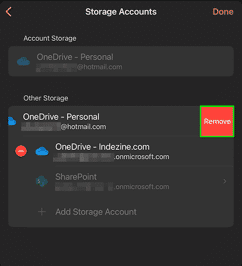
Once you add a Place in PowerPoint for iPad, you may want to remove it. This is especially true if a friend or colleague temporarily added their OneDrive or Dropbox location to work on an urgent file using your iPad or iPhone. Or you may have added a personal Place account to your organization’s device. Fortunately, it's easy to remove a Place.
Learn how to manage and remove connected services in PowerPoint for iPad.
June 25, 2024
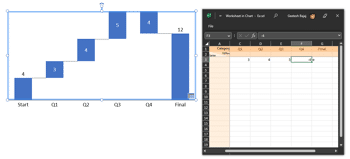
Creating a waterfall chart in PowerPoint without using the think-cell add-in is doable, but it can be more time-consuming and include fewer features than using think-cell, as it requires manual editing of both the data and formatting. If you are looking for a more straightforward, quicker, and efficient solution that you can reuse often, then downloading think-cell is a great solution that will help you create over 40 chart types.
Create waterfall charts using the think-cell add-in for PowerPoint.
June 20, 2024

Richard Goring is a Director at BrightCarbon, a presentation and eLearning agency. He enjoys helping people create engaging content and communicate effectively using visuals, diagrams, and animated sequences that explain and reinforce the key points, which is supported by plenty of resources and tips at the BrightCarbon site. In this interview, Richard discusses BrightCarbon’s BrightSlide, a design productivity add-in for PowerPoint.
June 19, 2024

They asked me in advance for a title. I suggested that it be "Aristotle on Salesmanship," a title I thought would be sufficiently shocking for them. It was. No one had ever before connected the name of Aristotle with salesmanship—or with advertising, which is the adjunct of selling.
Read more with Jerry Weissman.
June 18, 2024
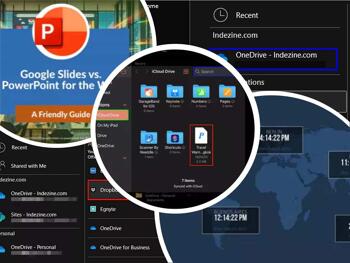
We look at how you can add more cloud locations including multiple OneDrive locations as Places in PowerPoint and Microsoft Office, so that you can easily open from and save files to these locations. We also look again at differences between Google Slides and PowerPoint for the Web. You can then decide which of these options work best for you.
iPad users can learn how to work with files saved on your Apple iCloud within PowerPoint. Plus, we look at a new beta feature that adds Dropbox support to PowerPoint 365 for Windows. We also bring you quotes, press releases, and templates from the last few days.
Stay informed about updated tutorials and happenings related to PowerPoint and presenting.
June 14, 2024
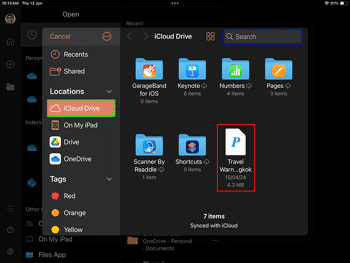
For OneDrive and Dropbox you can add them as a Place within PowerPoint for iPad to access and save files. Apple’s iCloud doesn’t work the same way. You can't add iCloud as a Place in PowerPoint for iPad. To access and save files on your iCloud Drive, you will have to work a little differently as explained in this tutorial.
Learn how to work with files stored on your iCloud in PowerPoint for iPad.
June 6, 2024
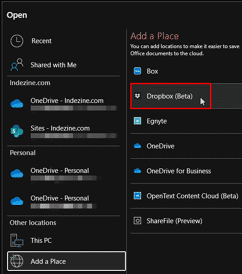
You know that PowerPoint and other Microsoft Office programs allow you to open and save files directly to your OneDrive folders. Other than OneDrive, PowerPoint also supports Dropbox as a cloud alternative.
Explore how to add Dropbox as a place in PowerPoint 365 for Windows.
You May Also Like: Full Circles PowerPoint Templates | Stand Out with a Direct and Dramatic Opening


Microsoft and the Office logo are trademarks or registered trademarks of Microsoft Corporation in the United States and/or other countries.
