
This is the print version of this page. All content is copyright Indezine.com 2000-2026.
Page 391 of PowerPoint tutorials, presentation essentials, personality interviews, and PowerPoint news.
Previous Archive Page | Next Archive Page
Author: Geetesh Bajaj
Product/Version: PowerPoint
February 3, 2026
This issue focuses on building confidence through clarity, structure, and the right tools. We begin with a conversation with Rick Altman, author of a new book on virtual presenting, where he shares practical advice on how to crush your next online presentation and connect with audiences in a digital-first world. We then turn to visual planning, exploring how Gantt charts created with the empower add-in for PowerPoint help transform complex timelines into clear, credible stories that align teams and reduce uncertainty. Finally, we look at common workplace fear factors and how thoughtful communication and transparency can help overcome them. Together, these insights show how confidence grows when ideas are well planned, clearly visualized, and confidently delivered.
Stay updated with the latest tutorials, tips, and news on PowerPoint and presentation techniques.
January 28, 2026
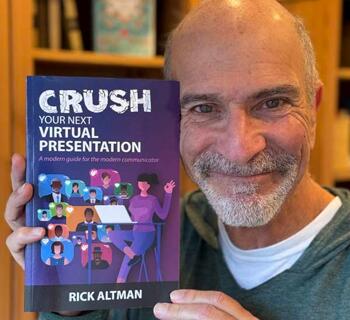
Rick Altman is the author of over a dozen books on presentations and graphics and is the host and creative director of the Presentation Summit, the world’s most prominent learning event for virtual presenters. He owes the success of this book to his daughter who allowed him to take over her childhood bedroom and convert it to a Zoom studio. In this conversation, Rick talks about his new book, Crush Your Next Virtual Presentation.
January 23, 2026
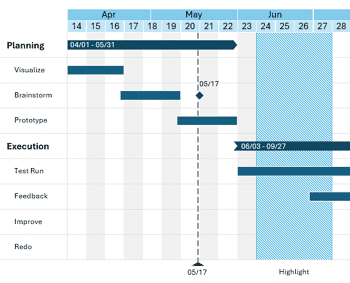
empower Charts is a PowerPoint add-in that simplifies the creation of a broad range of chart types, including bar charts, pie charts, and line graphs, while ensuring alignment with brand guidelines. In addition to standard charting capabilities, the tool supports project management visualizations such as Gantt charts. This feature allows users to build timeline-based graphics directly within PowerPoint, offering a practical alternative to external applications or manual formatting.
Learn how to create Gantt charts using empower in PowerPoint.
January 20, 2026
This issue explores how tools and perspective reshape your presentations. We begin with a look at PPTXtreme add-ins — powerful extensions that unlock new creative and productivity possibilities in PowerPoint. Then we take a step back to examine presentation advice inspired by the iPhone, reminding us that simplicity, focus, and user experience matter just as much as technical polish. Finally, our conversation with Lux Narayan of StreamAlive highlights how livestreaming and real-time engagement are redefining audience connection. Together, these stories show that whether you’re enhancing slides with add-ons, borrowing design wisdom from everyday tech, or expanding into live formats, great communication evolves with both innovation and intention.
Stay updated with the latest tutorials, tips, and news on PowerPoint and presentation techniques.
January 16, 2026
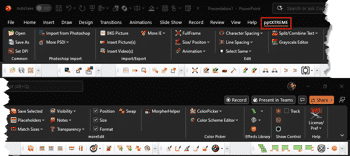
pptXTREME is a suite of professional PowerPoint add-ins that has been trusted for nearly two decades. Its user base spans a wide range of sectors—from management consultants and corporate professionals to educators, pharmaceutical teams, and creative specialists—all relying on its tools to streamline workflows and enhance presentation quality. In this feature, we will explore what this add-in delivers, we will look at some user personas and conclude whether this add-in can add value to your presentation workflows.
January 14, 2026

The colossal success of the iPhone and its big brother, the iPad, are due in large part to their superior technical functionality. But equal credit must go to the high-concept design of Apple products—and even to Apple packaging—driven by Steve Jobs and his chief designer Jony Ive. While Ive left Apple after 27 years to start his own company LoveFrom, I was privileged to be in the audience for one of his last presentations in which he described his attention to detail on the look and feel of every product that bears the Apple logo.
January 13, 2026
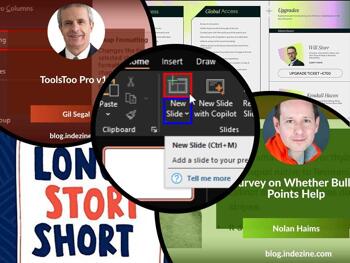
This issue is all about making your slides work harder for you — from powerful add-ins to simple built-in skills. We start with an in-depth conversation about ToolsToo Pro v12 with Gil Segal, exploring how thoughtful automation can save time and elevate design precision in PowerPoint. Then we zoom in on a foundational skill: inserting new slides in Microsoft 365, the building block of any presentation. Together, these pieces remind us that great slide decks aren’t just about ideas — they’re about using the right tools and mastering the basics so your workflow stays smooth and your message stays strong.
Stay updated with the latest tutorials, tips, and news on PowerPoint and presentation techniques.
January 12, 2026

Lux Narayan is a co-founder and the CEO at StreamAlive, the audience engagement platform that makes live sessions come alive, especially on PowerPoint in Zoom and Teams. A serial tech entrepreneur, he previously co-founded Unmetric, a company that was acquired by Cision. Explore Lux Narayan’s insights on transforming presentations into real conversations using StreamAlive’s frictionless audience engagement.
January 5, 2026

ToolsToo Pro v12 continues its long tradition of elevating PowerPoint productivity, and in this in depth conversation, creator Gil Segal shares what’s new and why it matters. From powerful additions like Make Same Shape, Swap Formatting, and Extract Comments to expanded chain tools that unlock deeper automation, Gil explains how user feedback and real world workflows shape each release. This interview offers a clear look at how ToolsToo keeps evolving to help presenters work faster and smarter.
December 23, 2025
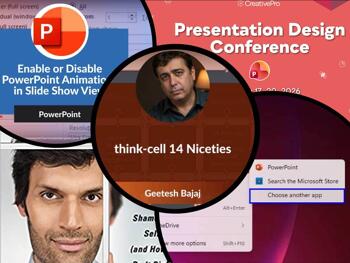
In this issue, we dig into the details that elevate everyday presentations into polished experiences. We begin with think-cell 14 niceties — the small but powerful features that help you work smarter and design cleaner slides. For those of you who haven't used think-cell, it is a PowerPoint add-in that with over 1.3 million users. Then, we explore how to use animations thoughtfully, enabling them to enhance rather than distract during your slideshow. And because even the best tools aren’t helpful when technical glitches strike, we include a practical guide to repairing file associations in Windows 11 so your workflow stays smooth. Together, these pieces remind us that mastering both finesse and fundamentals leads to presentations that feel effortless and professional.
Stay updated with the latest tutorials, tips, and news on PowerPoint and presentation techniques.
December 18, 2025
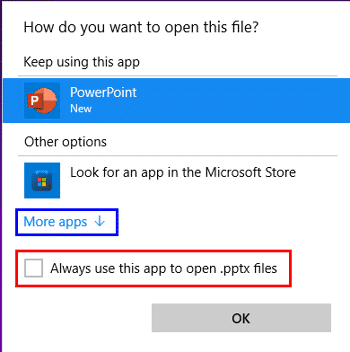
You may be certain that PowerPoint is installed on your computer, yet when you double-click a PowerPoint file, it either fails to open in PowerPoint or launches in an unexpected application. There is no cause for concern. This behavior typically indicates that Windows 11 is no longer correctly identifying which application should open that file type. It is similar to a delivery reaching the wrong address—the intended application is available, but the file is being directed elsewhere.
Learn how to repair PowerPoint file associations in Windows 11.
December 17, 2025

Discover the subtle yet powerful enhancements in think cell 14 that make PowerPoint smarter, faster, and more intuitive. This release builds on the add in’s tradition of “niceties”—small but impactful refinements that quietly transform your workflow. Features like Swap Objects, Scale Objects, and Save Slides streamline everyday tasks, helping you maintain polished layouts, resize elements proportionally, and extract client ready decks with ease. More than simple add ons, these tools reflect think cell’s vision of delivering a complete, end to end presentation solution. Whether you’re a consultant, executive, or educator, think cell 14 ensures your slides stay neat, efficient, and presentation ready.
Discover subtle yet powerful enhancements in think-cell 14.
December 16, 2025
PowerPoint’s renewed relevance reminds us that tools matter—but only when paired with strong ideas. In this issue, we explore why PowerPoint is suddenly cool again, not because of trends alone, but because it continues to support clear thinking and purposeful communication. That naturally leads to the art of storytelling, where structure, emotion, and intent turn slides into messages people remember. And behind every polished presentation is something more practical: ensuring the technology simply works, from file associations to smooth workflows. Together, these perspectives highlight a simple truth—great presentations succeed when creativity, narrative, and reliability come together seamlessly.
Stay updated with the latest tutorials, tips, and news on PowerPoint and presentation techniques.
December 12, 2025
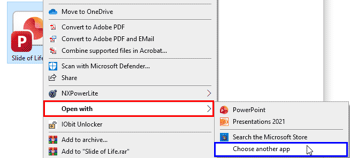
So, you’re absolutely sure PowerPoint is sitting nicely on your computer… but then you double-click a PowerPoint file and — ta-da! Instead of opening in PowerPoint like a well-trained puppy, it either refuses to open or jumps into some other random program you didn’t invite to the party. No need to scream “What is happening?!” This simply means your computer has gotten confused about who should open that file. Think of it like your mail carrier delivering your favorite pizza to your neighbor’s house — the pizza exists, but it’s not reaching you.
Learn how to repair PowerPoint file associations in Windows 10.
December 9, 2025
In this issue, we look at what it truly takes to present with clarity—without letting your cup overflow. From the practical reminder to keep content, ideas, and expectations in balance, we move to inspiration from Boris Hristov and the Present to Succeed platform, where focused messaging becomes an art form. Then we turn to understanding online tools—PowerPoint for the Web and Google Slides. Finally, we round things off with time-saving PowerPoint shortcuts that help you stay calm, confident, and efficient. Together, these ideas highlight that success comes from simplicity, intentionality, and good preparation.
Stay updated with the latest tutorials, tips, and news on PowerPoint and presentation techniques.
December 5, 2025

Boris Hristov is the Founder of presentation agency 356labs and a PowerPoint MVP. He has presented in 25+ countries and has been rated as the top speaker numerous times. Boris has years of experience as a trainer, mentor and consultant and works with many companies to help them craft and deliver truly effective presentations. In this conversation, Boris discusses the upcoming Present to Succeed 2026 online conference, being held in-person and online in London on May 21st, 2026, and in Sofia on June 12th, 2026.
You May Also Like: Snapdragon PowerPoint Templates | How to Make Your Feedback Inspiring


Microsoft and the Office logo are trademarks or registered trademarks of Microsoft Corporation in the United States and/or other countries.
