
This is the print version of this page. All content is copyright Indezine.com 2000-2026.
Page 394 of PowerPoint tutorials, presentation essentials, personality interviews, and PowerPoint news.
Previous Archive Page | Next Archive Page
Author: Geetesh Bajaj
Product/Version: PowerPoint
July 1, 2026
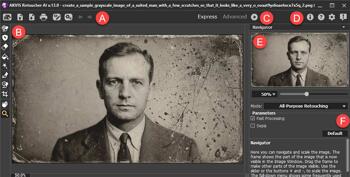
AKVIS provides a range of AI powered photo editing applications that make complex image enhancement tasks straightforward. AKVIS Retoucher AI 13 is designed to make photo restoration and object removal significantly easier and more accurate. The plug in uses AI powered algorithms to repair damaged areas, eliminate unwanted elements, and seamlessly reconstruct missing details in old or imperfect photos.
Explore AKVIS Retoucher AI 13, a Photoshop plug-in that intelligently restores old photographs.
June 30, 2026
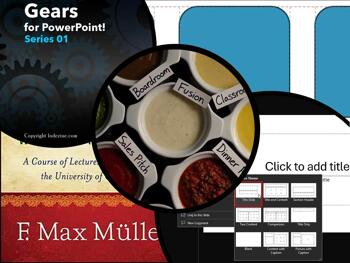
Good presentations don't happen by accident. They begin long before the first word is spoken, with decisions about structure, layout, and precision. This issue covers all three. Smart Dynamic Guides help you place and align objects on a slide without the guesswork. Slide layouts give every slide a purposeful foundation rather than a blank panic. So, we teach you how to change one layout to another. And the Presentation Formula article revisits the art of building a presentation that actually moves an audience. Three different topics, one underlying idea: when the fundamentals are solid, everything else gets easier.
Stay updated with the latest tutorials, tips, and news on PowerPoint and presentation techniques.
June 29, 2026

Picture your morning commute. Before you leave the house, you glance at the clock. You check the fuel gauge. Maybe you peek at your phone to see if the rain app is waving a yellow warning at you. None of that feels like data analysis. It feels like Tuesday. But here is what you are actually doing: you are tracking indicators that tell you whether you are on course, low on resources, or heading into trouble. That is precisely what a KPI does.
June 25, 2026
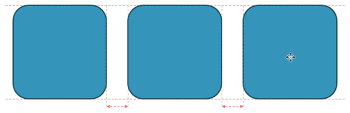
Smart Dynamic Guides in PowerPoint help you align, resize, and distribute objects with precision by showing real-time visual cues. They appear automatically as dotted red lines when objects are aligned or evenly spaced. This guide explains how to enable them, use them effectively, and troubleshoot when they don’t appear.
Learn about Smart Dynamic Guides in PowerPoint 365 for Windows.
June 18, 2026
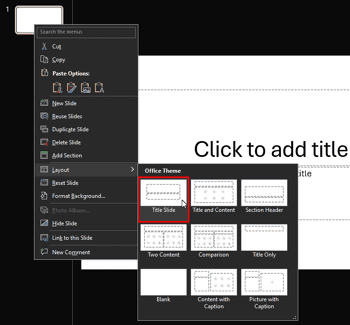
Changing a slide layout in PowerPoint takes just a few clicks. This tutorial shows you exactly how. Imagine you’re building a house. Would you start by arranging the furniture without first deciding where the walls, windows, and doors go? Of course not! The same goes for slides in PowerPoint. Before you start adding text, pictures, or charts, you need a good foundation. That’s where PowerPoint slide layouts come in.
Explore a step-by-step guide to changing slide layouts in PowerPoint 365 for Windows.
June 16, 2026
In this issue, we explore how structure and accessibility can unlock new possibilities for creators and communicators alike. We begin with PowerPoint guides and snap-to-grid features, which are simple tools that help bring order, alignment, and consistency to slide design. While these features may seem technical, they reflect a broader principle: great outcomes often start with a solid framework. That same idea extends beyond presentations to the world of digital media, where platforms like Flixora are working to democratize movie streaming and distribution, making it easier for creators to share their work with wider audiences. Together, these stories highlight how the right foundations can empower creativity, collaboration, and reach.
Stay updated with the latest tutorials, tips, and news on PowerPoint and presentation techniques.
June 12, 2026

Guides in PowerPoint 365 for Windows are alignment lines that help you position slide objects with accuracy. They don’t appear in Slide Show or when printing, but they quietly support your design process by keeping layouts balanced and professional. This page explains why designers rely on Guides and how to show or hide them in PowerPoint.
Learn about viewing and hiding Guides in PowerPoint 365 for Windows.
June 3, 2026

Mastering alignment is one of the simplest ways to elevate the professionalism of your PowerPoint slides, and Snap to Grid is a feature designed precisely for that purpose. This guide explains how PowerPoint’s grid system works, why it matters, and how snapping can help you position shapes, pictures, and text with greater accuracy.
Learn to use the Snap to Grid option in PowerPoint 365 for Windows.
June 2, 2026
In this issue, we explore how thoughtful presentation design is often built on the details people rarely notice—but always experience. We begin with three simple rules for slideshow animation, showing how movement can guide attention and support storytelling without overwhelming the audience. We then take a closer look at officeatwork, where productivity, brand consistency, and smarter workflows come together to help organizations create polished presentations more efficiently. Finally, we revisit PowerPoint’s snap-to-grid settings, a subtle yet powerful feature that helps maintain alignment, balance, and visual precision. Together, these stories remind us that great presentations succeed when creativity is supported by structure, consistency, and intentional design.
Stay updated with the latest tutorials, tips, and news on PowerPoint and presentation techniques.
May 28, 2026
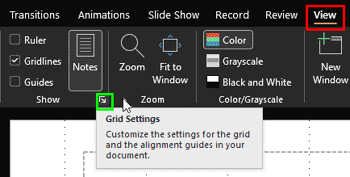
Once you turn on Gridlines in PowerPoint, you might think they are nothing more than a set of faint lines spread across your slide. It’s almost like graph paper from your school math notebook. And honestly, that first impression is not entirely wrong. Gridlines do give you a visual framework that helps you place pictures, shapes, and text boxes more neatly.
Learn how gridlines snap and help you position slide objects in PowerPoint 365 for Windows.
May 27, 2026

officeatwork brings a fresh, structured way for organizations to create brand consistent documents in Microsoft 365, helping teams stay visually aligned and professionally polished. Designed to support organizations of all sizes, officeatwork streamlines communication, supports team collaboration, and helps maintain brand compliance at scale.
May 26, 2026
In this issue, we focus on how precision and structure shape more effective presentations. We begin with a conversation with Laszlo Diewald about Gantt charts in presentaid, where project timelines become clearer, more visual, and easier to communicate to teams and stakeholders. From there, we revisit two often-overlooked PowerPoint essentials: rulers and gridlines. While simple on the surface, these tools help presenters align objects accurately, maintain balance, and create slides that feel polished and professional. Together, these stories highlight an important principle: whether you are managing projects or designing slides, clarity emerges when information is carefully structured, visually aligned, and thoughtfully presented.
Stay updated with the latest tutorials, tips, and news on PowerPoint and presentation techniques.
May 25, 2026

We’ve all been in the audiences of far too many presentations that unleash all the bells and the whistles of slideshow animation with a frenetic, pyrotechnic display that challenges a Fourth of July celebration or a night at Disneyland. That such excess happens is no surprise. The many options in the pull-down menus and ribbons of animation are as fascinating as are all the many joystick and button combinations on the keyboard or controller of a computer game. Microsoft PowerPoint Slide Transition has 48 effects grouped into three categories, with variable speed options for each. They cry out, “Try me!”
Learn more with Jerry Weissman.
May 21, 2026

Gridlines are non-printing horizontal and vertical reference lines that appear across the slide workspace to help position and align objects more accurately. These lines form a visual grid that makes it easier to arrange shapes, images, charts, text boxes, and other slide elements consistently.
Learn about working with gridlines in PowerPoint 365 for Windows.
May 18, 2026
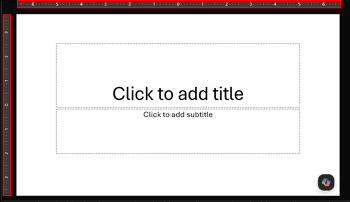
When working with multiple slide objects in PowerPoint, it is important to maintain proper alignment and positioning to ensure a clean and professional slide layout. Although PowerPoint provides precise coordinate-based positioning options, most design tasks only require a general visual reference for object placement. In such cases, the Rulers feature provides a convenient way to estimate positioning and alignment directly on the slide.
Learn about using rulers in PowerPoint 365 for Windows.
May 13, 2026

Laszlo Diewald has been working as a consultant for more than 10 years now. He started his career as an employee right after his study at the Technical University of Munich. Shortly after, he decided to become self-employed as a freelance consultant. In 2017, he founded his own consultancy, with a focus on large scale projects in the financial sector. In parallel, he started working on presentaid, which was finally launched in April 2022. In this conversation, Laszlo talks about presentaid’s new Gantt chart feature.
You May Also Like: Top 5 Tips For Remote Presentation Design | Five Stars: The Communication Secrets to Get from Good to Great: Conversation with Carmine Gallo


Microsoft and the Office logo are trademarks or registered trademarks of Microsoft Corporation in the United States and/or other countries.
