
This is the print version of this page. All content is copyright Indezine.com 2000-2026.
Page 395 of PowerPoint tutorials, presentation essentials, personality interviews, and PowerPoint news.
Previous Archive Page | Next Archive Page
Author: Geetesh Bajaj
Product/Version: PowerPoint
August 17, 2026
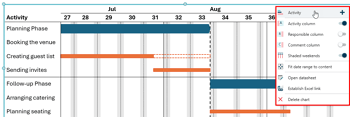
This tutorial walks you through creating Gantt charts in PowerPoint using Ampler or Ampler Charts. Native PowerPoint has never included a dedicated Gantt chart option, which means most users rely on makeshift workarounds. Ampler changes that with purpose-built Gantt functionality that covers everything from basic timelines to milestones, dependencies, Excel linking, and brand-consistent formatting.
August 13, 2026

Akash Choudhary is a Senior Product Marketing Manager at think-cell, the presentation software trusted by over a million professionals worldwide. At think-cell, he bridges product development, customer insights, and go-to-market strategy, leads product positioning, messaging, launches, and thought leadership initiatives, with a particular focus on AI-powered presentation workflows. In this conversation, Akash discusses findings from think-cell’s State of AI in Business Presentation Creation 2026 survey.
August 12, 2026

Bob Befus is an entrepreneur, presentation technology innovator, and recognized expert in regulatory presentations. For most of his career, he has focused on helping medical and pharmaceutical organizations communicate complex information clearly and persuasively in high-stakes settings. He works with leading pharmaceutical and biotechnology companies preparing for critical presentations, including FDA Advisory Committee meetings. In this conversation, Bob discusses ScriptAssist, a PowerPoint teleprompter that lets presenters hold eye contact on video calls while still reading their script.
August 11, 2026
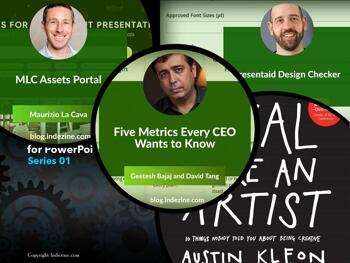
This issue is about the signal lost in the noise. David Tang and I look at five metrics every CEO actually uses, cutting through dashboards that show everything and decide nothing. Laszlo Diewald explains how presentaid's Design Checker catches brand drift before it reaches the boardroom. And Maurizio La Cava introduces the MLC Assets Portal, a single place for presentation-ready visuals that removes the usual detour through multiple stock libraries. The topics are different. The underlying problem is the same: too much friction between a good idea and a clear presentation of it.
Stay updated with the latest tutorials, tips, and news on PowerPoint and presentation techniques.
August 7, 2026

A dashboard is not a decision. It is raw material for one. A dashboard and a decision are not the same thing. One shows you the data. The other does something with it. Think of it like a kitchen full of ingredients. The ingredients do not make dinner. The cook does, and only after deciding what the meal needs to be. A CEO staring at thirty trend lines is akin to someone standing in a well-stocked kitchen with no idea what to cook. The best executives have quietly figured this out. They do not ask, What can we measure? They ask, What do I need to know to make the next call? That shift, from measurement to decision, is where KPIs earn their place. Not every number on a dashboard qualifies. A KPI is the number that actually changes what you do next.
August 6, 2026

Maurizio La Cava is Co-Founder and CEO of MLC Presentation Design Consulting, the leading presentation design agency in Italy. He is the author of Lean Presentation Design, Presenting Data, Startup Pitch Presentation, and AI Fluency, and teaches pitch and presentation strategy at Politecnico di Milano. He developed the Lean Presentation Design methodology, combining lean thinking, cognitive science and storytelling to help corporate teams communicate with clarity and impact. Before founding MLC, he worked at Accenture and Ferrero International. In this conversation, Maurizio discusses his new MLC Assets Portal.
August 3, 2026

Laszlo Diewald has been working as a consultant for more than 10 years now. He started his career as an employee right after his study at the Technical University of Munich. Shortly after, he decided to become self-employed as a freelance consultant. In 2017, he founded his own consultancy, with a focus on large scale projects in the financial sector. In parallel, he started working on presentaid, which was finally launched in April 2022. In this conversation, Laszlo talks about presentaid’s new Design Checker option.
July 28, 2026
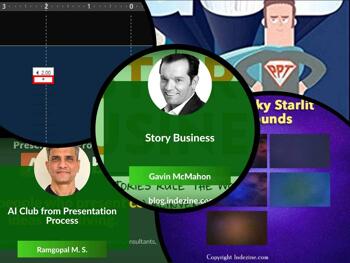
This issue has a quiet theme running through it: intention before action. Gavin McMahon's Story Business interview argues that good communication starts with the audience, not with slides. Ramgopal's Presentation Process AI Club is built on the same belief: clarity comes from thinking, not from generating. And the tutorial on adding guides in PowerPoint 365 is about exactly that, placing every element where it belongs, on purpose. Whether you are crafting a story, structuring an argument, or laying out a slide, this issue is about doing it with a plan.
Stay updated with the latest tutorials, tips, and news on PowerPoint and presentation techniques.
July 24, 2026
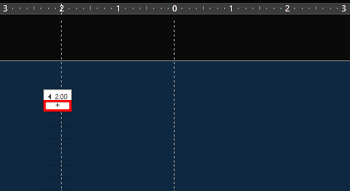
Have you watched an expert tailor at work? They start by marking the pattern on the fabric. They don't just slap down one chalk mark on the fabric and call it a day. There's one chalk mark for the hem, another for the waist, and yet another for the sleeve length. Every single mark earns its place on that fabric. PowerPoint hands you the design equivalent of that very first chalk mark: one horizontal guide, one vertical guide, crossing politely at dead center of your slide. That works well for simple layouts, but more complex designs call for a more complete guide structure. Just like the tailor who can add chalk marks as needed, you can add more guides to create a proper visual structure for your slides.
Learn how to add more guides in PowerPoint 365 for Windows.
July 23, 2026

Ramgopal M. S. is the founder of Presentation Process and author of Clear Slides. Over the past 20 years, he has helped millions of professionals communicate complex ideas through clear, engaging presentations. His YouTube channel has over 560,000 subscribers, where he shares practical PowerPoint and presentation design techniques. In this conversation, Ramgopal discusses the Presentation Process AI Club initiative.
July 22, 2026

Gavin McMahon is a founder and Chief Content Officer for fassforward consulting group. He leads the design and product development of fassforward’s services. This crosses diverse topics, including Leadership, culture, decision-making, information design, storytelling, and learning design. In this interview, Gavin talks about his new book, Story Business.
July 21, 2026
Every presentation problem has a root cause. Most of the time, it's structure. Jerry Weissman's piece on writer's block makes the case for starting with your goal, not your slides. The note on converting text boxes to placeholders tackles a structural problem that quietly undermines thousands of decks. And Peter Claus Lamprecht's PPTX Toolkit interview goes deeper still, into the XML layer that governs how placeholders behave when layouts change. Three topics at different levels of depth, all pointing to the same truth: get the structure right first, and everything else follows.
Stay updated with the latest tutorials, tips, and news on PowerPoint and presentation techniques.
July 17, 2026

Peter Claus Lamprecht is a presentation consultant based in Hamburg, Germany, with more than 37 years of experience. He helps self-employed professionals, sales and marketing teams, executives and consultants develop presentations that persuade and deliver results—from storyline to slide design to delivery. His specialty is PowerPoint slide masters, that work flawlessly on a technical level, implement the given design precisely and thus save time when working in PowerPoint. With the PPTX Toolkit, he is currently building a tool for direct access to the XML structure of PowerPoint files. In this conversation, Peter talks about PPTX Toolkit.
July 7, 2026
This issue is about what happens when the right tool removes the friction. Ampler Charts takes the repetitive work out of building and updating business charts in PowerPoint, so you spend less time fixing visuals and more time using them. The KPIs article makes the case that performance indicators are far less intimidating than the acronym suggests. And AKVIS Retoucher AI 13 shows how AI can quietly restore damaged photographs without demanding expert skills. Three very different tools, one shared idea: the best technology gets out of your way.
Stay updated with the latest tutorials, tips, and news on PowerPoint and presentation techniques.
July 6, 2026

Writer’s block is not limited to aspiring and professional writers who are trying to craft their next article on deadline or write The Great American Novel. Presenters, too, are frequently faced with having to crank out their next great pitch. Their bar is not as high as that of a solitary writer staring at a blank computer screen or a yellow legal pad. Most presenters belong to a team such as a business unit in a large company or a small start-up, and so, they have access to their colleagues’ slide shows. Therein lies the problem: businesspeople consider their presentations to exist primarily in their decks.
Read more with Jerry Weissman.
July 2, 2026
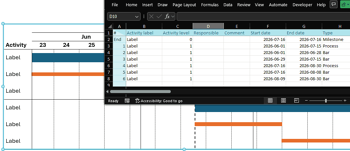
Walk into any consulting firm or planning meeting, and you’ll probably find someone fixing a chart in PowerPoint. It could be a Gantt chart where the timelines no longer align, a waterfall chart that shifts every time a statistic changes, or a Mekko chart that took so long to build that nobody wants to edit it again. Some of that may sound a little exaggerated, but the larger point still stands. For years, presentation professionals have looked for tools that make chart creation easier and less time-consuming. That’s where Ampler Charts steps in.
You May Also Like: Industries PowerPoint Templates | How You Can Make a High Impact in Meetings


Microsoft and the Office logo are trademarks or registered trademarks of Microsoft Corporation in the United States and/or other countries.
