This is the print version of this page. All content is copyright Indezine.com 2000-2026.
Page 380 of PowerPoint tutorials, presentation essentials, personality interviews, and PowerPoint news.
Previous Archive Page | Next Archive Page
Author: Geetesh Bajaj
Product/Version: PowerPoint
May 28, 2024

We first feature Elizabeth Jordan and Larry Lyons of Toastmasters International, who explore how you can improve the efficiency and effectiveness of everyday meetings using parliamentary procedure. Their main reference is Robert’s Rules of Order, first written in 1876 and relevant in present times as well. We also bring you an amazing offer for the upcoming Present to Succeed annual presentation conference. This is an annual event being held in Sofia, Bulgaria, but you can join this event online as well, at a discounted rate especially for Indezine readers. This is your last chance to book this event.
We then explore digital signage using Microsoft PowerPoint and an add-in called DataPoint. In this feature, Kurt Dupont looks at digital signage for car dealerships, but this concept can be used for any storefront. We also bring you quotes, press releases, and templates from the last few days.
Stay informed about updated tutorials and happenings related to PowerPoint and presenting.
May 27, 2024
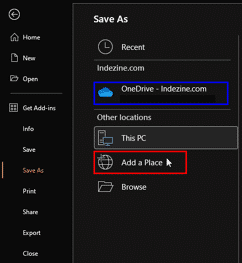
You can open and save files from any location on your computer or network, but did you know you can add even more places to access your files? In Backstage view, both the Open and Save As tabs give you options to add new file locations.
Learn to add places in PowerPoint 365 for Windows.
May 24, 2024

If you’ve ever attended a meeting and left feeling unsure what it was meant to achieve, or, for example, left frustrated when it ran overtime and made you late for your next appointment, you’ll have probably wondered how such issues can be resolved. One approach to improving the efficiency and effectiveness of everyday meetings and to boosting attendee satisfaction is to apply parliamentary procedure.
Read more with Elizabeth Jordan and Larry Lyons of Toastmasters International.
May 23, 2024

Digital signage is taking over almost every industry, and the automobile business is no exception. Today, we’re diving into how digital signage can revolutionize car dealerships. By using digital signage systems using PowerPoint and DataPoint, dealerships can significantly improve business operations, enhance customer experiences, and streamline communication within the dealership.
May 21, 2024
We first feature Luise Pelle, who is a partner in PPTmatters, a Danish agency focusing entirely on presentations and PowerPoint. Luise discusses her agency and talks about her clients. We also bring you an amazing offer for the upcoming Present to Succeed annual presentation conference. This is an annual event being held in Sofia, Bulgaria, but you can join this event online as well, at a discounted rate especially for Indezine readers.
GoSkills, an eLearning provider has just put up a very informative video course on Copilot for Microsoft 365. For those who are not aware, Copilot heralds the use of AI in Microsoft 365 programs such as PowerPoint. GoSkills has provided two free tutorials as part of an exclusive Indezine interview with Deb Ashby, who hosts this video course. We also get you an extensive tutorial on creating a product development timeline in PowerPoint 365, with just native PowerPoint shapes. We also bring you quotes, press releases, and templates from the last few days.
Stay informed about updated tutorials and happenings related to PowerPoint and presenting.
May 16, 2024

Luise Pelle is a template and presentation designer. She is a partner in PPTmatters, a Danish agency focusing entirely on presentations and PowerPoint. Before starting the business, Luise worked as a presentation designer at McKinsey & Company for 5 years. In her spare time, she enjoys being outdoors in the company of her husband and their three hunting dogs. In this conversation, Luise talks about PPTmatters.
May 15, 2024

On a mission to make everyone proficient in Excel, Deb Ashby enthusiastically teaches Microsoft Excel, Word, PowerPoint and other M365 Apps to businesses and individuals. Since launching her company in 2019, predominantly focusing on creating and designing online Microsoft courses, she launched her brand, Cellmates in September 2022. In 2023 Deb was awarded the Microsoft MVP for her contributions to the community. In this conversation, Deb talks about her new Copilot for Microsoft 365 course on GoSkills.
May 2, 2024
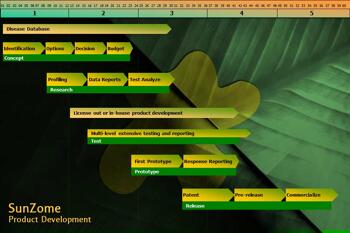
Thinking about creating a product development timeline in PowerPoint? Let's break it down for you. But first, what is a product development timeline anyway? Think of a product development timeline as your handy-dandy guide to bringing a new product from the "lightbulb moment" to its grand debut on the market shelves. It's like a road map that shows you all the essential stops along the way — from coming up with a brilliant idea to putting that idea into shoppers' hands.
Create a product development timeline quickly in PowerPoint 365 for Windows.
April 30, 2024

We first feature Kurt Dupont of PresentationPOINT, who talks about business presentation ideas that will help you deliver a successful presentation. We then bring you an amazing offer for the upcoming Present to Succeed annual presentation conference. You can join this event online as well.
And then, we bring you five ideas that will help you remember your speech or message easily while presenting. We also bring you quotes, press releases, and templates from the last few days.
Stay informed about updated tutorials and happenings related to PowerPoint and presenting.
April 24, 2024

Business presentations have a reputation for being boring. Too many slides with bullet points and reams of financial tables. Here are our creative business presentation ideas to help you break out of boring and into grabbing your audience’s attention.
April 16, 2024
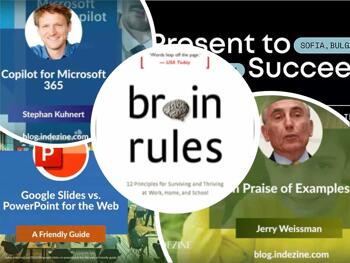
We begin with a friendly comparison of Google Slides and PowerPoint for the Web. Both are browser-based presentation programs. We then bring you an amazing offer for the upcoming Present to Succeed annual presentation conference. You can join this event online as well.
Stephan Kuhnert of empower next discusses their experiences while using Copilot for Microsoft 365. He also speaks briefly about their own product, the empower® AI Assistant. We also bring you renowned author, Jerry Weissman who talks about using examples effectively to further your message. We also bring you quotes, press releases, and templates from the last few days.
Stay informed about updated tutorials and happenings related to PowerPoint and presenting.
April 11, 2024

Stephan Kuhnert is a seasoned tech entrepreneur and Microsoft Office expert with a proven track record in the software industry. Passionate about intelligent business software and aesthetic design, he founded empower® as Co-CEO in 2005. Together with his team, he helps companies to increase productivity through the use of Microsoft Office and to ensure brand-compliant external communication. In this conversation, Stephan discusses Copilot for Microsoft 365.
April 5, 2024

Harvard Business School (HBS) established the gold standard for learning with its case study method. In that curriculum, students learn how to deal with real business situations in participatory exercises. In doing so, HBS is following the precepts coined by the ancient Chinese philosopher, Confucius, who wrote: “I hear and I forget. I see and I remember. I do and I understand.”
Read more with Jerry Weissman.
April 3, 2024

Here is a comparative guide between Google Slides and PowerPoint for the Web. It details the features, benefits, and potential drawbacks of each platform, emphasizing their respective suitability for different user needs. It's structured in a reader-friendly manner, discussing the core aspects of Google Slides' collaboration features and PowerPoint for the Web's familiar interface and integration capabilities.
For a comprehensive read, you can view the full guide here.
April 2, 2024
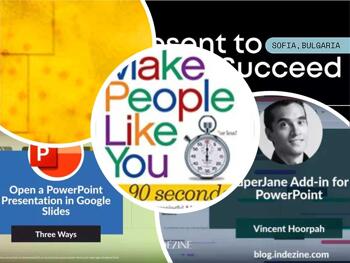
We begin by looking how you can open a PowerPoint presentation or deck within the web-based Google Slides. We look at three different ways, and you can choose the option that works best for you.
We then bring you an amazing offer for the upcoming Present to Succeed annual presentation conference. You can join this event online as well. We also feature Vincent Hoorpah, who discusses the new SuperJane add-in for PowerPoint that creates Gantt charts and timelines. We also bring you quotes, press releases, and templates from the last few days.
Stay informed about updated tutorials and happenings related to PowerPoint and presenting.
March 26, 2024

Vincent Hoorpah has been developing and leading technical teams for more than 15 years as CTO or co-founder. He loves building products with a focus on productivity and efficiency. When he was CTO of a company of more than 130 people, he had to regularly update macro roadmaps for the other C-levels, and it was always complicated and time-consuming to present them during meetings. This is how the idea for SuperJane was born. In this conversation, Vincent talks about the SuperJane Add-in for PowerPoint.
You May Also Like: Zodiac: Gemini PowerPoint Templates | Stand Out with a Direct and Dramatic Opening



Microsoft and the Office logo are trademarks or registered trademarks of Microsoft Corporation in the United States and/or other countries.