
This is the print version of this page. All content is copyright Indezine.com 2000-2026.
Page 382 of PowerPoint tutorials, presentation essentials, personality interviews, and PowerPoint news.
Previous Archive Page | Next Archive Page
Author: Geetesh Bajaj
Product/Version: PowerPoint
September 10, 2024

Ric Bretschneider spent 17 years working on the Microsoft PowerPoint team, building features you both love and fear. Along with his passion for software design, he has spent many years teaching users’ good presentation practices and fighting “Death by PowerPoint” through hard and soft skill building. In this conversation, Ric talks about his participation at the upcoming Presentation Summit 2024, being held on location in Oxnard, CA this year from October 20 to 23, 2024, and virtually from November 3 to 6, 2024.
September 9, 2024

Mike Parkinson is a geek. He is one of thirty-six Microsoft PowerPoint MVPs in the world, is an internationally recognized communication and presentation expert, best-selling author, and professional trainer. In this conversation, Mike talks about his participation at the upcoming Presentation Summit 2024, being held on location in Oxnard, CA this year from October 20 to 23, 2024, and virtually from November 3 to 6, 2024.
September 5, 2024

Sheila B. Robinson, Ed.D., of Custom Professional Learning, LLC, is a speaker, educator, program evaluator, and consultant with a passion for the science of teaching and learning, presentations, and asking questions. Through her talks, professional development workshops and university courses, Sheila teaches people how to create their own courses, how make learning stick, and how to ask good questions. She also teaches program evaluation, survey design, data visualization, audience engagement, and presentation design. In this conversation, Sheila talks about her participation at the upcoming Presentation Summit 2024, being held on location in Oxnard, CA this year from October 20 to 23, 2024, and virtually from November 3 to 6, 2024.
September 4, 2024

Rick Altman has been hired by hundreds of companies, listened to by tens of thousands of professionals, and read by millions of people, all of whom seek better results with their presentation content and delivery. He covers the whole industry, from message crafting, through presentation design, slide creation, software technique, and delivery. In this conversation, Rick talks about the upcoming Presentation Summit 2024, being held on location in Oxnard, CA this year from October 20 to 23, 2024, and virtually from November 3 to 6, 2024.
September 3, 2024

Chantal Bossé, president of CHABOS, is a presentation & visual communication leader, TEDx speaker coach, M365 MVP recognized for PowerPoint and Teams, expert trainer on the LinkedIn Learning platform, and author of Microsoft PowerPoint Best Practices, Tips, and Techniques. She helps speakers and small businesses improve their PowerPoint presentations and public speaking, and their Microsoft 365 & Teams skills. In this conversation, Chantal talks about his participation at the upcoming Presentation Summit 2024, being held on location in Oxnard, CA this year from October 20 to 23, 2024, and virtually from November 3 to 6, 2024.
September 2, 2024

Nolan Haims has decades of experience designing visual communications for the largest brands and organizations. He trains organizations to communicate more visually and create compelling stories with data. In this conversation, Nolan talks about his participation at the upcoming Presentation Summit 2024, being held on location in Oxnard, CA this year from October 20 to 23, 2024, and virtually from November 3 to 6, 2024.
August 28, 2024

Julián Magnone is a software engineer with a deep passion for presentation design. As the co-founder of SlideModel.com, an online platform that has been at the forefront of presentation design for over a decade, Julian has seamlessly blended his technical expertise with his creative vision. In this interview, Julián discusses SlideModel.
August 27, 2024

We bring you a feature from many years ago. Sandra Schrift explains that there is not one but almost a dozen ways for you to become a confident speaker. We also look at how PowerPoint 365 for Mac users can work with files on their iCloud drives.
We look at AKVIS Coloriage AI 15.5, a tool that magically recolors your grayscale images. We also bring you quotes, press releases, and templates from the last few days.
Stay informed about updated tutorials and happenings related to PowerPoint and presenting.
August 26, 2024

Thomas Eckhausen is a Presentation Communications Expert and Partner at the Danish presentation agency PPTmatters. With 12 years of experience at McKinsey & Company and 10 years at Danske Bank, Thomas has extensive expertise in all aspects of PowerPoint usage in a corporate environment. Today, his primary focus is on helping companies train employees in the art of structuring their presentations into cohesive and easy-to-follow storylines. In this conversation, Thomas discusses his training sessions.
August 19, 2024
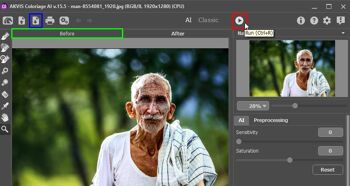
AKVIS is a software company known for creating various graphic and image processing tools, often using AI and advanced algorithms. They have developed several applications for tasks like photo retouching, artistic effects, and image editing. Their new version 15.5 of Coloriage AI is a standalone program as well as a Photoshop-compatible plug-in, designed to add color to black and white photos. It uses advanced artificial intelligence to automatically colorize images, producing realistic and vibrant results.
Explore AKVIS Coloriage AI 15.5, a Photoshop plug-in that adds color to grayscale images.
August 13, 2024
PowerPoint has been praised at times but criticized more often, for the most unimaginative reasons. So, it is quite amazing when a high-end media platform finds that PowerPoint is so cool. In the same unyielding spirit, Jerry Weissman explains why you should never say "never." He gets some inspiration from Winston Churchill.
Tom Robinson in this exclusive interview answers questions about his LegUpTools PDF to InDesign converter, that also converts PowerPoint-created PDFs to read-to-edit Adobe InDesign files. And the best part is that there's nothing to install, since everything happens online on their site. We also bring you quotes, press releases, and templates from the last few days.
Stay informed about updated tutorials and happenings related to PowerPoint and presenting.
August 12, 2024

If you are working with PowerPoint on a Mac, then you are working within an environment that’s designed to closely work with Apple’s product ecosystem, including cloud storage locations such as Apple’s iCloud. Unlike OneDrive and Dropbox, where you can Add a Place to access and save files in PowerPoint for iPad, Apple's iCloud does not work the same way. To access and save files on your iCloud Drive, you will have to work a little differently, as explained in this tutorial.
Learn how to work with files stored on your iCloud in PowerPoint 365 for Mac.
August 2, 2024

Sir Winston Churchill, the great British Prime Minister, prolific author, and distinguished orator who addressed some of the most august assemblies in the world, once delivered a speech to the boys at Harrow School in Britain, “Never, never, in nothing great or small, large or petty, never give in except to convictions of honor and good sense. Never yield to force; never yield to the apparently overwhelming might of the enemy.”
Read more with Jerry Weissman.
August 1, 2024

Tom Robinson is the developer of the LegUpTools PDF to editable InDesign conversion app. Previously he has been owner/manager of a printing company, and partner in a company that developed a web-to-print template editing application. He specialises in projects that automate graphic design production and publishing, in both digital and print formats. In this conversation, Tom talks about his LegUpTools PDF to InDesign converter.
July 31, 2024

Don’t get me wrong; I never thought that PowerPoint was not cool. I never bought into the idea that you could kill a presentation, just by using PowerPoint. It is just a tool—its success depends on the user. But that hasn’t stopped the death by PowerPoint crowd. Janay Kingsberry’s new Washington Post article suggests the media might finally think PowerPoint is getting cool.
July 30, 2024
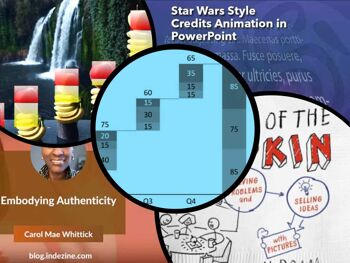
We begin with a post by Carol Mae Whittick of Toastmasters International, where she explores authenticity. She says, "It seems to me that the strong need to understand and experience authenticity is a collective response to the increasingly artificial world we find ourselves in."
Last week we looked at waterfall charts, and this week, we move to stacked waterfall charts and their benefits. Recognizing that it's not easy to create stacked waterfall charts in PowerPoint alone, we look how the think-cell add-in can help you create stacked waterfall charts in PowerPoint. We also bring you quotes, press releases, and templates from the last few days.
Stay informed about updated tutorials and happenings related to PowerPoint and presenting.
You May Also Like: Geometric PowerPoint Templates | Shining Online During Your Next Live Webinar




Microsoft and the Office logo are trademarks or registered trademarks of Microsoft Corporation in the United States and/or other countries.
