|
|
|
| |
| June 30, 2026 |
| PowerPoint and Presenting News |
|
| Precision, Structure, Purpose |
| |
| |
| Good presentations don't happen by accident. They begin long before the first word is spoken, with decisions about structure, layout, and precision. This issue covers all three. Smart Dynamic Guides help you place and align objects on a slide without the guesswork. Slide layouts give every slide a purposeful
foundation rather than a blank panic. So, we teach you how to change one layout to another. And the Presentation Formula article revisits the art of building a presentation that actually moves an audience. Three different topics, one underlying idea: when the fundamentals are solid, everything else gets easier. |
| |
|
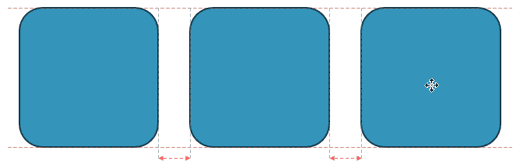
| Smart Dynamic Guides in PowerPoint 365 for Windows |
| |
 |
| |
| Smart Dynamic Guides in PowerPoint help you align, resize, and distribute objects with precision by showing real-time visual cues. They appear automatically as dotted red lines when objects are aligned or evenly spaced. This guide explains how to enable them, use them effectively, and troubleshoot when they don’t appear. |
| |
| Learn about Smart Dynamic Guides in PowerPoint 365 for Windows |
|
| Gears for PowerPoint (Series 01) |
|
| |
 |
| |
| All these gears are native PowerPoint shapes. You can recolor them, add effects, and do more, all inside PowerPoint. Results which would have taken hours to achieve now take less than a minute! Have fun using the gear graphics, and make your audience take notice! All these gears can be rotated and resized, as required. Since they are essentially
pictures, all types of edits that you can do with pictures work with them too! |
| |
| |
| |
| Get this complete kit now, you’ll save so much time that you can use doing something else! |
|
| Change Slide Layout in PowerPoint 365 for Windows |
| |
 |
| |
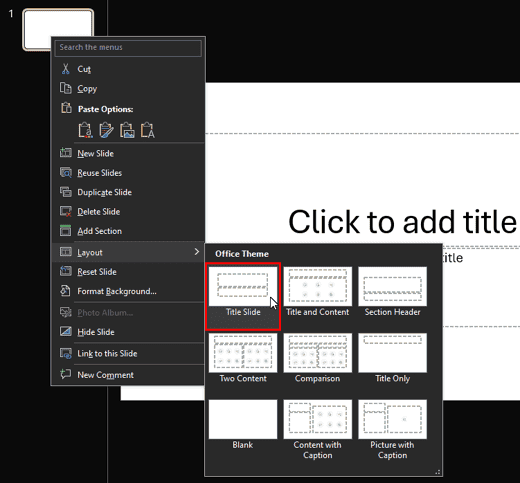
| Changing a slide layout in PowerPoint takes just a few clicks. This tutorial shows you exactly how. Imagine you’re building a house. Would you start by arranging the furniture without first deciding where the walls, windows, and doors go? Of course not! The same goes for slides in PowerPoint. Before you start adding text, pictures, or charts, you
need a good foundation. That’s where PowerPoint slide layouts come in. |
| |
| Explore a step-by-step guide to changing slide layouts in PowerPoint 365 for Windows |
|
| Quotes |
| |
A lecture, by keeping a critical audience: by F Max Müller
"A lecture, by keeping a critical audience constantly before our eyes, forces us to condense our subject, to discriminate between what is important and what is not, and often to deny ourselves the pleasure of displaying what may have cost us the greatest labor, but is of little consequence to other scholars. In lecturing we are constantly reminded of what students are so apt to forget, that their knowledge is meant not for themselves only, but for others, and that
to know well means to be able to teach well."
|
|
|
|
| PowerPoint Presentation Formula 01 |
| |
 |
| |
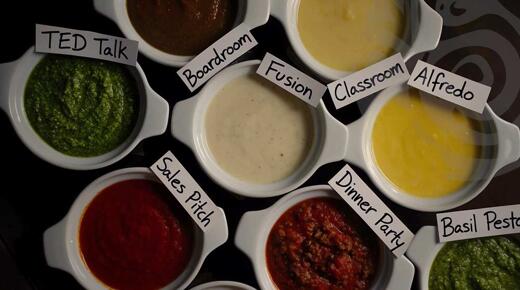
| There’s no official term called a PowerPoint presentation formula. You won’t find it in any dictionary, and nobody’s going to hand you a certificate for using one correctly. It’s simply a way of describing a structured approach to building presentations that actually work. |
| |
| Read more here |
|
| Indezine PowerPoint Templates |
|
|
|
|
| Medicine and Medical PowerPoint Templates |
|
|
|
|
| Legal and Law PowerPoint Templates |
|
|
|
|
| FreePPT PowerPoint Templates |
|
|
|
|
| Christian PowerPoint Templates |
|
|
|
|
| End Note |
| |
| © Indezine. Please do not reply to this message. |
| |
| Join this list |
| |
| Received this email from a friend? If you would like to receive your own copy, join our mailing list. Go here. |
|
|
| Previous issues |
| |
| Do you want to read older issues of this newsletter? Go here. |
|
|
|
| Privacy Policy |
| |
| We never share your info with anyone. Read our Privacy Policy. |
|
|
| Mail Provider |
| |
| This mailing list is powered by Aweber. |
|
|
|
| Change Subscription |
| |
| If for any reason, you no longer want to receive this newsletter with valuable tips, resources, and information about PowerPoint and presenting stuff, you can unsubscribe by clicking the link at the end of
this email. No hard feelings! |
|
|
|
|
|
|
|