
This is the print version of this page. All content is copyright Indezine.com 2000-2026.
Page 222 of PowerPoint tutorials, presentation essentials, personality interviews, and PowerPoint news.
Previous Archive Page | Next Archive Page
Author: Geetesh Bajaj
Product/Version: PowerPoint
January 7, 2016

The fourth Card type within the Group Cards category in Sway is the Slideshow Group Card. The Slideshow Group Card can only contain Picture Cards and displays your pictures one after the other in Slideshow mode, not too different than the Slideshow view of PowerPoint.
Explore how Slideshow Group Cards work in Microsoft Sway.
January 6, 2016

The third type within the Group Cards category in Sway is the Comparison Group Card. Like the Stack Group Card, the Comparison Group Card can also only contain Picture Cards. Further, you are limited to just two Picture Cards. After all, it would be difficult to compare more than two Cards!
Explore how Comparison Group Cards work in Microsoft Sway.
January 5, 2016
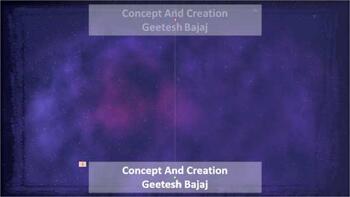
If you want to create movie-credits style animations in PowerPoint, you will miss the Crawl Entrance animation option that was available in older versions of PowerPoint. You can substitute Crawl with Fly In, and change the animation speed to something slower, such as 15 seconds, and also set the direction of the Fly In animation to From Bottom. The Star Wars credits style is a variant of the Crawl animation. In this style, the text crawls from the bottom to the top, as it also does with Crawl. Additionally, the text diminishes in size all the time until it fades into oblivion. It is a real neat effect, and it is possible to accomplish it in PowerPoint 2013 if you combine multiple animations.
Learn to create Star Wars-style credits animation in PowerPoint 2013 for Windows.
January 5, 2016

The Star Wars Style Credits Animation presentation includes a sample slide in which the credits animate in the Star Wars style. You can download this presentation and change the text in the animated text boxes as required.
Download and use these Star Wars like slides.
January 5, 2016

We begin by looking at the Social Share add-in for PowerPoint that enables you to share PowerPoint content on social media sites such as Twitter and Facebook. We then see what options are available to get a legitimate free or cheaper copy of PowerPoint. We then learn about the Handout Master and Notes Page view in the new PowerPoint 2016 for Windows. Sway users can learn more about the Stack Group Cards, and also how they can change any existing Picture Cards to a Group. Finally, don't miss the new discussions and templates of this week!
Read Indezine's PowerPoint and Presenting News.
January 4, 2016
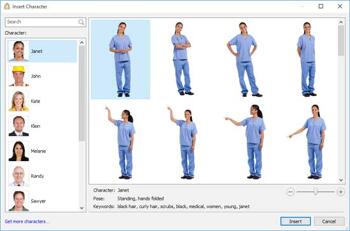
The newest iSpring Suite 8.1 is a unified bundle of PowerPoint add-ins that enables you to quickly develop courses, video lectures, and assessments that will work on any desktop, laptop, and mobile device. As such, iSpring Suite 8 includes the capabilities available in iSpring Cam, TalkMaster, Converter Pro, Presenter, QuizMaker, and Visuals.
Explore iSpring Suite 8 that allows you to use PowerPoint to create e-Learning content.
January 4, 2016

The interface of PowerPoint 2016 for Mac is quite similar to that of PowerPoint 2016 for Windows. When launched, PowerPoint 2016 for Mac opens the Microsoft PowerPoint window, which provides several ways to start your next presentation using a template, a Theme, a recent presentation, a not-so-recent presentation, or even a blank presentation.
Explore the interface for PowerPoint 2016 for Mac.
December 30, 2015
We all realize that nothing is really free in today's world, yet we all look for free stuff all the time. Well, maybe we were partially wrong when we said "nothing is free," because you can get a free, or at least a cheaper copy of PowerPoint and Microsoft Office. When we say free or cheap, we do not refer to bootlegged copies, but genuine, original software. Here are some options for you to get a free or cheaper copy of Microsoft Office.
December 31, 2015
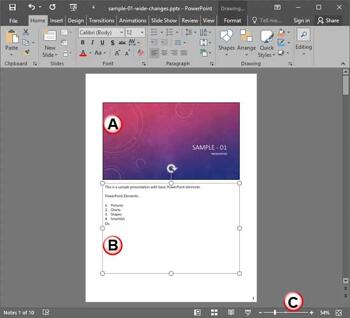
The Notes Page is one of ten views available in PowerPoint 2016. This view shows you how your printed notes will appear. In this tutorial, we'll explore this particular view for Notes Pages and learn about the benefits of this view. First of all, the Notes page shows the speaker notes that you add to the Notes pane for each slide. Moreover, these speaker notes are visible in three distinct places within PowerPoint, depending upon the view you choose.
Learn about Notes Page view in PowerPoint 2016 for Windows.
December 30, 2015
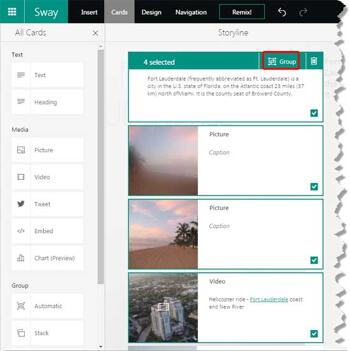
Do you find the Group Cards option in Sway very useful? But you may have already added a bunch of Picture Cards and formatted them as required! Not to worry, a Group Card is just a group of your regular Cards in Sway, and you can take a bunch of your selected Picture Cards, and place them all within a new Group Card.
Explore how you can group your Cards in Microsoft Sway.
December 29, 2015
We bring you an exclusive conversation with Susannah Shattuck of Prezi who talks about the 2015 Prezi Awards. We then explore Prisma, a multiline font that can be used effectively in slides. We explore interface options in the new PowerPoint 2016 for Windows. This week, we look at the Slide Sorter view, the Mini toolbar, the Reading view, and the Slide Master view. Finally, don't miss the new discussions and templates of this week!
Read Indezine's PowerPoint and Presenting News.
December 29, 2015

The second type within the Group Cards category in Sway is the Stack Group Card. This Card can only contain Picture Cards. You can add as many Pictures Cards as you want, and the resultant Stack Card renders as a conventional stack of pictures.
Explore how Stack Group Cards work in Microsoft Sway.
December 28, 2015

Social Share is a new add-in for PowerPoint that enables users to share their PowerPoint content on social media sites such as Twitter and Facebook. This sharing can be done right from within the PowerPoint interface. You can specify how your content should be shared: as an album, a photo, a photo snip, or a video. Additionally, you can also create shareable links via OneDrive. Moreover, you can also track and respond to other social media users who comment, favorite, or interact with content that you share, all from within PowerPoint itself!
Read the Indezine review of Social Share Add-in for PowerPoint.
December 28, 2015
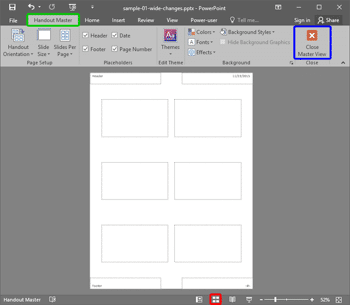
Handouts are documents you can print from within PowerPoint that include slide representations from your presentation. You can opt to include as many as 9 slides on each Handout page. Of course, with 9 slides on a page, your slides will look more like thumbnails. You can also choose to print just one slide on every handout page. Then, your Handout pages will look like individual slides printed on a page.
Learn about the Handout Master view in PowerPoint 2016 for Windows.
December 24, 2015
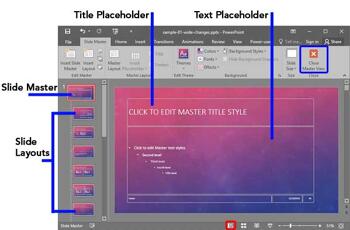
Slide Master view is an important view within PowerPoint 2016. Why? Because if you make any changes or edits within this view, these modifications will influence all slides within your presentation. For example, if you want to make your company logo appear on all the slides, you will have to add the logo within the Slide Master. If you want the font size of your slide titles to be a little larger or smaller, then those edits also need to be made in the Slide Master.
Learn about Slide Master view in PowerPoint 2016 for Windows.
December 23, 2015
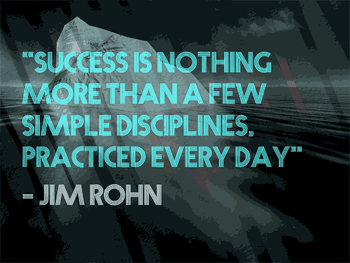
Multiline typefaces typically have several parallel lines and are best suited for heading text. Even better, these work well when the text is placed above a picture or textured background, as long as the visual is not too crowded. Prisma, one of such, fonts were created in the last century by Rudolf Koch, a German type designer.
Explore Prisma, a multilined font that is best suited for heading text.
You May Also Like: Pumpkin PowerPoint Templates | Tips for Using Storytelling in Presentations

Microsoft and the Office logo are trademarks or registered trademarks of Microsoft Corporation in the United States and/or other countries.
