This is the print version of this page. All content is copyright Indezine.com 2000-2026.

The Star Wars Style Credits Animation presentation includes a sample slide in which the credits animate in the Star Wars style. You can download this presentation and change the text in the animated text boxes as required.
This presentation accompanies our following tutorial:
Star Wars Style Credits Animation in PowerPoint 2013
The ZIP file that you will download contains:
Star Wars Style Credits Animation PowerPoint File in two formats:
Both formats include two variations of the animation:
Plus, we also include the background we used for this slide in both Widescreen and Standard resolutions.
You can replace existing text with your own. The text boxes you are looking for are below the Slide Area, as shown highlighted in red in the screenshot below.
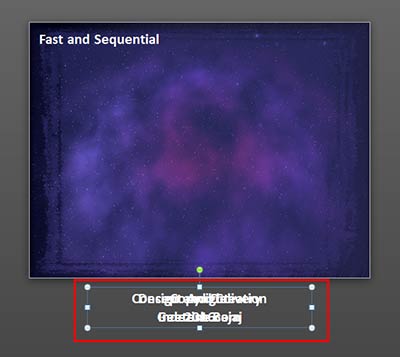
You will find multiple text boxes here that are placed one above the other. Please move them around so that you can find them all. You can then change the text in these boxes. Delete text boxes you don't need, and if you need more text boxes, just copy any text box and paste to create duplicates!
Once you are done, make sure you place all text boxes back in the same area overlapping each other, as they were when you started.
Want more night sky backgrounds? See our Night Sky Starlit Backgrounds for PowerPoint.
Just replace the text within the text boxes to create your animated presentations. You can also export your animated slides to video clips using PowerPoint’s Create Video option.
You can also upload the presentation to online sharing sites such as SlideShare or upload a converted video to video-sharing sites such as YouTube or Vimeo.
See how you can use the slides you buy and download:
All text is animated. We actually made a YouTube movie for you to see!
Microsoft and the Office logo are trademarks or registered trademarks of Microsoft Corporation in the United States and/or other countries.
 Download here (3.53 mb)