
This is the print version of this page. All content is copyright Indezine.com 2000-2026.
Page 397 of PowerPoint tutorials, presentation essentials, personality interviews, and PowerPoint news.
Author: Geetesh Bajaj
Product/Version: PowerPoint
October 15, 2026

Laszlo Diewald has been working as a consultant for more than 10 years now. He started his career as an employee right after his study at the Technical University of Munich. Shortly after, he decided to become self-employed as a freelance consultant. In 2017, he founded his own consultancy, with a focus on large scale projects in the financial sector. In parallel, he started working on presentaid, which was finally launched in April 2022. In this conversation, Laszlo talks about presentaid’s new Dynamic Grid 2.
October 14, 2026

Ramgopal M. S. is the founder of Presentation Process and author of Clear Slides. Over the past 20 years, he has helped millions of professionals communicate complex ideas through clear, engaging presentations. His YouTube channel has over 560,000 subscribers, where he shares practical PowerPoint and presentation design techniques. In this conversation, Ramgopal discusses his new book, Clear Slides.
October 13, 2026
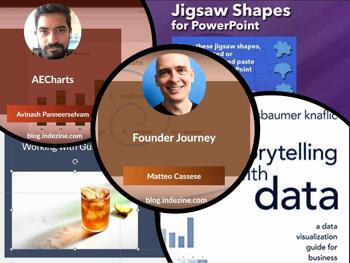
This issue is about what happens when you stop leaving things to chance. The guides tutorial shows how a line on a slide is never just a line: it snaps, it inherits, it governs, and it will quietly run your layout if you let it. Understanding that is the difference between slides that look deliberate and slides that look lucky. Avinash Panneerselvam's AECharts interview takes the same idea into charting: polished, animated, design-first charts that drop cleanly into any deck without negotiating with PowerPoint's own chart engine. And Matteo Cassese's Founder Journey conversation goes further still, asking what it means to move from telling stories to building myths, and whether your presentations belong to a bigger narrative you haven't named yet.
Stay updated with the latest tutorials, tips, and news on PowerPoint and presentation techniques.
October 12, 2026
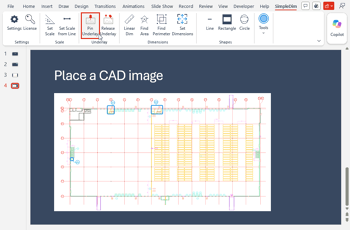
Picture this. You’re in a meeting, and someone says, “Can you just pull up the warehouse layout real quick?” Suddenly, everyone’s staring at you like you’re supposed to conjure a blueprint out of thin air. Here’s the dirty little secret: CAD software (the professional tool for this exact job) is basically a Formula 1 race car. Powerful, precise, and completely useless if you don’t know how to drive it. Most people outside the engineering department have never been seated in the driver’s seat. Half the time, they can’t even get the car out of the garage, because CAD files are notoriously fussy about how they are opened. This is where SimpleDim strolls in, hands in pockets, looking suspiciously relaxed.
October 5, 2026

Avinash (Avi) Panneerselvam graduated in Computational Engineering from IIT Madras in 2020 and spent the next five years as a data scientist, building prediction models, mostly at early-stage AI startups. As AI began reshaping software engineering, he left my job to build something of his own. He started working on AECharts in January 2026, and launched it in February, when it also got its first customer. In this conversation, Avi talks about AECharts.
September 30, 2026
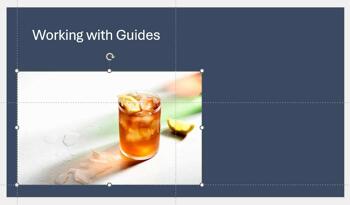
Let's start with the basics: what are guides? Picture a tailor's cutting table, marked with faint chalk lines that keep every cut straight and every seam aligned. Guides do the same job on a PowerPoint slide, except this time, you're the tailor, and the chalk never runs out. Every guide can be moved, added, or deleted entirely on your terms. Nothing is fixed in place unless you decide it should be. But here's the twist nobody warns you about: the moment guides show up on your slide, they stop being polite background lines and start quietly running the show. Snapping is built in, permanently switched on, no settings buried three menus deep. Let an object wander even a little too close, and it clicks into place before you've finished dragging, like a magnet that's been lying in wait the whole time. You won't aim. You won't nudge pixel by pixel. The guide will simply decide you're done.
Learn how to work with guides in PowerPoint 365 for Windows.
September 29, 2026
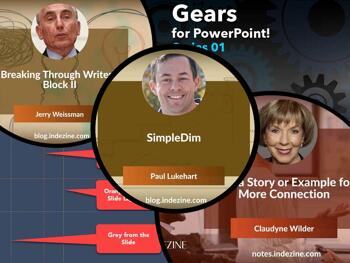
This issue starts with a mystery. You add a guide in PowerPoint, and it won't move. You didn't lock it. You didn't protect it. It just sits there. The hierarchical guide options tutorial solves that one. Then Paul Lukehart arrives with SimpleDim, a CAD add-in that gives PowerPoint the ability to measure real-world distances, which sounds impossible until you try it. Claudyne Wilder has a quieter provocation: your slides are fine, your data is solid, and your audience is still not connecting. A story fixes that faster than another bullet point ever will. And Jerry Weissman returns with Writer's Block II, because apparently the first one wasn't enough to unstick everyone.
Stay updated with the latest tutorials, tips, and news on PowerPoint and presentation techniques.
September 28, 2026

Matteo Cassese is a business coach for entrepreneurs and keynote speaker with over twenty years of experience across corporate, startup, and creative worlds. He has worked with Warner Bros., Netflix, Sony, LinkedIn, and Vinted, and spoken on stages like SXSW and Gitex. During seven years at Warner Bros. Pictures, he helped launch more than 140 films. Based in Berlin, he helps founders and executives build businesses on their own terms. In this conversation, Matteo speaks about his post, Founder’s Journey.
September 24, 2026

You have your presentation ready. The slides are prepared, and they include charts, tables, bullet points, and photos. You have rehearsed several times and feel comfortable with the content and flow. So, why does it feel like it’s falling a little flat?
Learn more with Claudyne Wilder.
September 23, 2026

The step-by-step process to get past the proverbial blank page is as applicable to presenters as it is to writers. Another method to break through the mental barricade is to just start talking. Jerry Weissman explains how you can break through writer’s block using verbalization techniques, historical examples, and practical presentation‑focused speaking strategies.
September 22, 2026

Paul Lukehart is founder and managing principal of PL Programs LLC, a project consulting firm founded in 2020. His background is in distribution and fulfillment operations, capital project management, and he has authored a book, Practical Floor Supervision on front-line operations leadership. Paul and his family live in Indiana, and in addition to slide decks for client needs, he works on projects like SimpleDim. In this conversation, Paul discusses SimpleDim, an add-in that lets you work with CAD within PowerPoint.
September 15, 2026
Looking prepared is not the same as being prepared. That gap is what this issue explores. ScriptAssist closes it on camera, giving presenters a way to read their script while holding eye contact, so the audience sees confidence rather than effort. The executive presence article from Suasive argues that this kind of perceived confidence is learnable and that it shapes career outcomes more than most people expect. Our pre-conference conversations with John Polk, Lori Chollar, and Troy Chollar ahead of Presentation Summit 2026 bring the same idea into the room, where how you stand, speak, and connect with an audience often decides whether the message lands.
Stay updated with the latest tutorials, tips, and news on PowerPoint and presentation techniques.
September 14, 2026
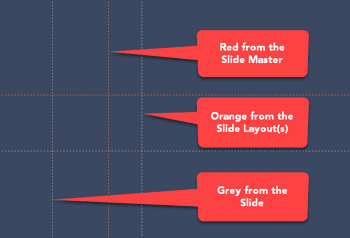
Marcus thought he'd cracked the code. First, he learned to enable guides. Then, he discovered the right-click menu, and now is adding, coloring, and deleting guides like a pro. Then a colleague mentioned something called guide hierarchy, and Marcus froze. Hierarchy? He thought guides were just... lines. Marcus was happy to learn more. Turns out, guides in PowerPoint have layers, a bit like a family tree. There are guides that belong to the whole family (the Slide Master), guides that belong to individual branches (Slide Layouts), and guides that belong to just one person (your actual slides).
Learn about hierarchical guide options in PowerPoint 365 for Windows.
September 8, 2026
Credibility is the thread running through this issue. INSYNCR, as Kurt Dupont explains, exists because a generated figure looks right but a bound figure is right, and the distinction is what boardrooms and client reports depend on. Laszlo Diewald's presentaid Charts interview makes a similar point: annotations that move with the data, charts that open correctly for anyone, and numbers that don't drift between tools. Then there is Presentation Summit 2026, September 13 to 16, where our conversations with Camille Holden, Chantal Bosse, Ilene Bergelson, and Sally Zimney remind us that credibility is just as fragile in the room as it is in the spreadsheet behind the slide.
Stay updated with the latest tutorials, tips, and news on PowerPoint and presentation techniques.
September 8, 2026

Troy Chollar is co-founder and a Sr. Designer of TLC Creative Services and awarded by Microsoft as an MVP for PowerPoint for 24 consecutive years. For more than two decades, Troy has helped organizations create presentations ranging from executive briefings and sales decks to large-scale live event experiences. A regular presenter at The Presentation Summit (he was an attendee at the very first conference!), host of The Presentation Podcast, and the voice of ThePowerPointBlog, Troy is passionate about sharing practical PowerPoint techniques, animation strategies, and workflow improvements that presentation professionals can immediately apply to their own projects. In this conversation, Troy talks about the upcoming Presentation Summit 2026, being held virtually from September 13 to 16, 2026.
September 7, 2026

Lori Chollar is co-founder and CEO of TLC Creative Services, Inc., a design studio that thrives in the presentation world, and the live and virtual event industry. Her diverse design background spans traditional graphic and print design, apparel and product design, and a whole lot of presentation, template, and multimedia design. Building from a formal degree in graphic design to a thriving freelance business, her company with husband Troy has grown into a successful corporate design studio. Lori is passionate about good design and good business. In this conversation, Lori talks about the upcoming Presentation Summit 2026, being held virtually from September 13 to 16, 2026.
You May Also Like: How to Find Your Market in PowerPoint | Preparing for Webinars: Conversation with Sharyn Fitzpatrick

Microsoft and the Office logo are trademarks or registered trademarks of Microsoft Corporation in the United States and/or other countries.
