|
|
|
| |
| September 29, 2026 |
| PowerPoint and Presenting News |
|
| The Issue That Unsticks |
| |
| |
| This issue starts with a mystery. You add a guide in PowerPoint, and it won't move. You didn't lock it. You didn't protect it. It just sits there. The hierarchical guide options tutorial solves that one. Then Paul Lukehart arrives with SimpleDim, a CAD add-in that gives PowerPoint the ability to measure
real-world distances, which sounds impossible until you try it. Claudyne Wilder has a quieter provocation: your slides are fine, your data is solid, and your audience is still not connecting. A story fixes that faster than another bullet point ever will. And Jerry Weissman returns with Writer's Block II, because apparently the first one wasn't enough to unstick everyone. |
| |
|
| Hierarchical Guide Options in PowerPoint 365 for Windows |
| |
 |
| |
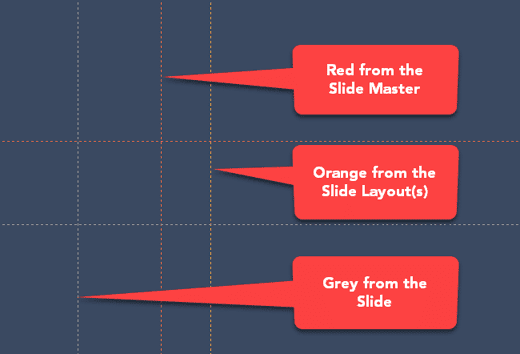
| Marcus thought he'd cracked the code. First, he learned to enable guides. Then, he discovered the right-click menu, and now is adding, coloring, and deleting guides like a pro. Then a colleague mentioned something called guide hierarchy, and Marcus froze. Hierarchy? He thought guides were just... lines. Marcus was happy to learn more. Turns out,
guides in PowerPoint have layers, a bit like a family tree. There are guides that belong to the whole family (the Slide Master), guides that belong to individual branches (Slide Layouts), and guides that belong to just one person (your actual slides). |
| |
| Learn about hierarchical guide options in PowerPoint 365 for Windows |
|
| Gears for PowerPoint (Series 01) |
|
| |
 |
| |
| All these gears are native PowerPoint shapes. You can recolor them, add effects, and do more, all inside PowerPoint. Results which would have taken hours to achieve now take less than a minute! Have fun using the gear graphics, and make your audience take notice! All these gears can be rotated and resized, as required. Since they are essentially
pictures, all types of edits that you can do with pictures work with them too! |
| |
| |
| |
| Get this complete kit now, you’ll save so much time that you can use doing something else! |
|
| SimpleDim CAD Add-in for PowerPoint: Conversation with Paul Lukehart |
| |
 |
| |
| Paul Lukehart is founder and managing principal of PL Programs LLC, a project consulting firm founded in 2020. His background is in distribution and fulfillment operations, capital project management, and he has authored a book, Practical Floor Supervision on front-line operations leadership. Paul and his family live in Indiana, and
in addition to slide decks for client needs, he works on projects like SimpleDim. In this conversation, Paul discusses SimpleDim, an add-in that lets you work with CAD within PowerPoint. |
| |
| Read the conversation here |
|
| Quotes |
| |
A lecture, by keeping a critical audience: by F Max Müller
"A lecture, by keeping a critical audience constantly before our eyes, forces us to condense our subject, to discriminate between what is important and what is not, and often to deny ourselves the pleasure of displaying what may have cost us the greatest labor, but is of little consequence to other scholars. In lecturing we are constantly reminded of what students are so apt to forget, that their knowledge is meant not for themselves only, but for others, and that
to know well means to be able to teach well."
|
|
|
|
| Add a Story or Example for More Connection |
| |
 |
| |
| You have your presentation ready. The slides are prepared, and they include charts, tables, bullet points, and photos. You have rehearsed several times and feel comfortable with the content and flow. So, why does it feel like it’s falling a little flat? |
| |
| Learn more with Claudyne Wilder |
|
| Breaking Through Writer's Block II |
| |
 |
| |
| The step-by-step process to get past the proverbial blank page is as applicable to presenters as it is to writers. Another method to break through the mental barricade is to just start talking. Jerry Weissman explains how you can break through writer’s block using verbalization techniques, historical examples, and practical presentation‑focused
speaking strategies. |
| |
| Read more here |
|
| Indezine PowerPoint Templates |
|
|
|
|
| Medicine and Medical PowerPoint Templates |
|
|
|
|
| Legal and Law PowerPoint Templates |
|
|
|
|
| FreePPT PowerPoint Templates |
|
|
|
|
| Christian PowerPoint Templates |
|
|
|
|
| End Note |
| |
| © Indezine. Please do not reply to this message. |
| |
| Join this list |
| |
| Received this email from a friend? If you would like to receive your own copy, join our mailing list. Go here. |
|
|
| Previous issues |
| |
| Do you want to read older issues of this newsletter? Go here. |
|
|
|
| Privacy Policy |
| |
| We never share your info with anyone. Read our Privacy Policy. |
|
|
| Mail Provider |
| |
| This mailing list is powered by Aweber. |
|
|
|
| Change Subscription |
| |
| If for any reason, you no longer want to receive this newsletter with valuable tips, resources, and information about PowerPoint and presenting stuff, you can unsubscribe by clicking the link at the end of
this email. No hard feelings! |
|
|
|
|
|
|
|