
This is the print version of this page. All content is copyright Indezine.com 2000-2026.
Page 270 of PowerPoint tutorials, presentation essentials, personality interviews, and PowerPoint news.
Previous Archive Page | Next Archive Page
Author: Geetesh Bajaj
Product/Version: PowerPoint
September 5, 2017
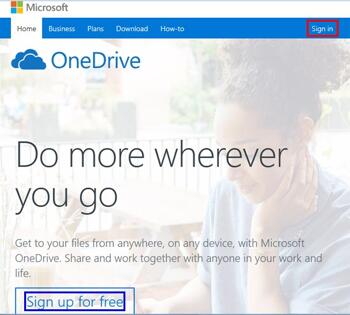
To use any of the options available within OneDrive, including the creation and editing of presentations using PowerPoint for the Web, you will have to first sign in with your Microsoft account. A Microsoft account is essentially your account on any of Microsoft's services, such as Hotmail, Outlook, Xbox, Skype, Live, Zune, etc. In this tutorial, we explain how you can sign in using any of these services to OneDrive.
Learn how to sign in to your OneDrive account.
September 1, 2017

Microsoft 365 is the new name for what was previously known as Office 365, and this is largely true. There are exceptions, and some offerings continue to be branded as Office 365. So, Office 365 is not dead and nowadays both brands, Microsoft 365 and Office 365 exist. We discuss these brands in more detail in our Microsoft 365 Versions page.
Explore differences and similarities between Microsoft 365 and desktop versions of Microsoft Office.
August 31, 2017
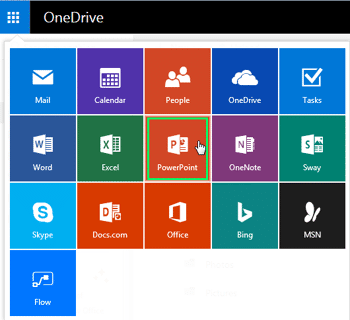
Although PowerPoint originated as a desktop program, Microsoft has made impressive strides in porting the entire program to function as a web-based program that works inside a browser. This web version of PowerPoint called PowerPoint for the Web, lets you create and edit PowerPoint presentations online, and can be easily accessed on OneDrive, Microsoft’s cloud platform. Even better, PowerPoint for the Web is completely free for anyone to use.
Explore the interface for PowerPoint for the Web.
August 30, 2017
We all realize that nothing is really free in today's world, yet we all look for free stuff all the time. Well, maybe we were partially wrong when we said "nothing is free," because you can get a free or at least a cheaper copy of PowerPoint and Microsoft Office. When we say free or cheap, we do not refer to bootlegged copies, but genuine, original software. Here are some options for you to get a free or cheaper copy of Microsoft Office.
August 29, 2017
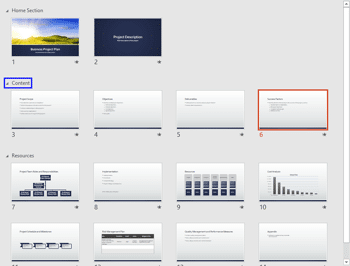
PowerPoint’s implementation of the Widescreen aspect ratio has changed somewhat over the last few versions. If you work with multiple versions, it is critical that you are aware of these differences. On a related note, we bring back a conversation with Steve Rindsberg about PPTools Resize, his PowerPoint add-in that resizes slide dimensions. We also look at the Curtains transition effect, introduced in PowerPoint 2013 for Windows. Plus, we feature two speakers who talk about their sessions at the upcoming Presentation Summit: Echo Swinford and Taylor Croonquist. For users of PowerPoint 2016 for Windows, we look at Sections. Tutorials include Getting Started with Sections, Adding and Renaming Sections, Moving Slides Between Sections, and Removing Sections. Finally, do not miss the quotes, press releases, and templates of this week.
Stay informed about updated tutorials and happenings on Indezine.
August 29, 2017
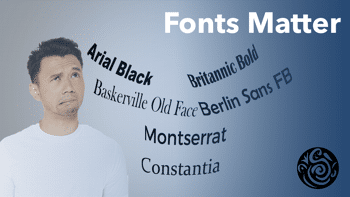
Observe people creating PowerPoint decks, and you can easily divide them all into two distinct groups, based on their usage of fonts. First are those who never change fonts and use whatever PowerPoint defaults to. The second group comprises those who change fonts all the time! People in the former group are those who just need to finish creating their slide decks, or those who have strict corporate guidelines that prevent them from changing fonts. Everyone else is part of the second group.
August 29, 2017
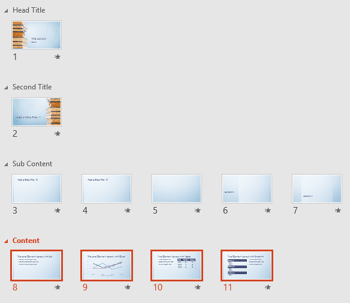
In PowerPoint, Sections are not just for effective and easy management of your slides, but they can also let you quickly reorder large blocks of adjacent slides. All you have to do is to place all the slides you want to reorder within a single section, and then move that Section.
Learn how to reorder Sections in PowerPoint 2016 for Windows.
August 28, 2017
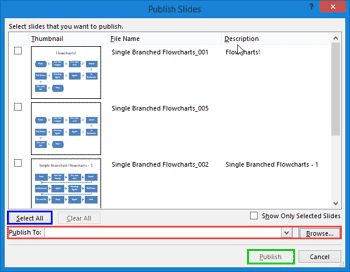
A friend reached out to me a while ago and said, “I have a 500-slide presentation, and have been asked to save each slide as a single-slide presentation. Do I really have to do this task, one slide at a time? Do tell me that there is a better answer.”
August 28, 2017
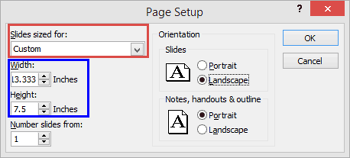
Have you ever wanted to use PowerPoint as a graphic program to create posters, web-banner ads, YouTube cover art, etc.? You will then have run into some limitations, especially when you try to export a PowerPoint slide to a picture with exact size dimensions. In this tutorial, we will explore how a small improvement that Microsoft added in PowerPoint 2013 is providing significant returns.
August 25, 2017

Taylor Croonquist is a co-founder of Nuts & Bolts Speed Training, a website delivering actionable PowerPoint training and speed strategies, helping busy professionals make it to Happy Hour. Prior to Nuts & Bolts, Taylor lived and worked in China for 10 years in finance and consulting. When he’s not busy crafting PowerPoint training, you can find him traveling and scuba diving. In this conversation, Taylor talks about his sessions at the upcoming Presentation Summit 2017 in Clearwater Beach, FL.
August 25, 2017
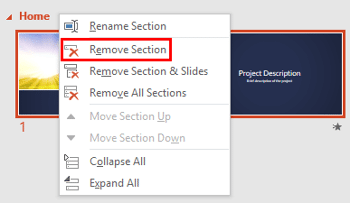
To logically categorize your slides so that they can be easily managed and grouped, you should use the Sections option. You are not just limited to adding and renaming Sections. You can also move slides from one Section to another, change the order of Sections, or collapse/expand Sections, etc. Of course, you can also remove a Section.
Learn how to remove sections in PowerPoint 2016 for Windows.
August 24, 2017

Steve Rindsberg has been associated with PowerPoint since the product originated more than two decades ago—his PowerPoint FAQ site is a treasure trove of PowerPoint information. When he’s not updating his site, he’s creating new PowerPoint add-ins that expand possibilities within PowerPoint. Steve’s also into a lot of print technology-related stuff. In this conversation, Steve discusses PPTools Resize, his new PowerPoint add-in that resizes slide dimensions.
August 24, 2017
Sections make your presentation slides easy to manage. Plus, adding and renaming Sections enables you to logically categorize your presentation slides. But what happens next in a logical workflow may give you some worries. Even after dividing your slides into Sections, you will want to move slides from one Section to another.
Learn to move slides from one section to another in PowerPoint 2016 for Windows.
August 23, 2017
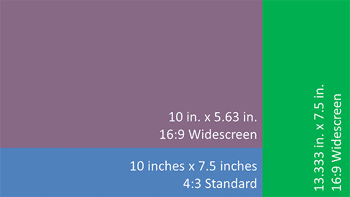
PowerPoint’s implementation of the Widescreen aspect ratio has changed somewhat over the last few versions. Although this is a small change, it is important to understand what is happening behind the scenes.
Explore widescreen slide implementations in PowerPoint.
August 22, 2017

Dividing a large number of slides into Sections helps you to manage them better. And even for presentations that do not have a large number of slides, you can benefit from Sections. However, the mere act of dividing slides into Sections will not achieve much unless you create and name these Sections in a proper manner to represent what the slides within each Section contain. In this tutorial, let us learn how to add Sections and also how to rename them.
Learn to add sections in PowerPoint 2016 for Windows.
August 22, 2017

Do you know the real cost of presentations? What if you knew that it could be as high as 50+ hours each month? Learn more in this guest post by AlexAnndra Ontra. Adam Chapman, from a design agency based out of Hongkong, talks about his new infographic that looks at Tips to Improve Yourself at the Art of Delivering Presentations. We explore another font that is bundled with PowerPoint as part of our Safe Fonts series. This time, we explore Bell MT. We feature three speakers who talk about their sessions at the upcoming Presentation Summit: Rick Altman, Julie Terberg, and Doug Thomas.
For users of PowerPoint 2016 for Windows, we look at trimming video clips, the Format tab for audio clips, animating slide objects when a media clip on the same slide is playing, and open/close options in Backstage view. Finally, do not miss the quotes, press releases, and templates of this week.
Stay informed about updated tutorials and happenings on Indezine.
You May Also Like: Slip Ons PowerPoint Templates | Possibilities 01: Static PowerPoint vs. Dynamic PowerPoint


Microsoft and the Office logo are trademarks or registered trademarks of Microsoft Corporation in the United States and/or other countries.
