
This is the print version of this page. All content is copyright Indezine.com 2000-2026.
Page 390 of PowerPoint tutorials, presentation essentials, personality interviews, and PowerPoint news.
Author: Geetesh Bajaj
Product/Version: PowerPoint
December 4, 2025

In the previous blog, you read about how presentations that go on too long bore audiences; but presentations that go too deep have an even worse effect: audiences forget the content. James Collins, author of the novel Beginner’s Greek, addressed the phenomenon in a New York Times Book Review essay titled The Plot Escapes Me. Mr. Collins described how much he likes to read books, but that once he finishes, “I remember nothing about the book’s actual contents…all I associate with them is an atmosphere and a stray image or two.”
Read more with Jerry Weissman.
December 2, 2025
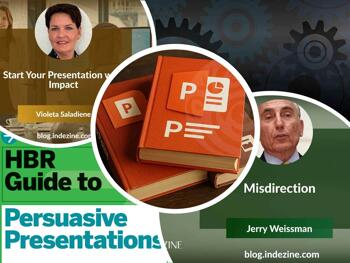
A powerful presentation doesn’t happen by accident — it’s shaped by intention, clarity, and a touch of creative mastery. In this issue, we explore how to start your presentation with genuine impact, setting the tone before the audience even settles in. We also look at the role of misdirection — not as a distraction, but as a storytelling tool that keeps attention focused where it matters. And for those wanting to deepen their craft, our curated collection of PowerPoint books offers pathways to sharpen technique and broaden perspective. Together, these themes remind us that great presenting blends structure, surprise, and continuous learning.
Stay updated with the latest tutorials, tips, and news on PowerPoint and presentation techniques.
November 25, 2025

The opening of a presentation is your one chance to grab your audience’s attention – don’t waste it. Whether you’re pitching an idea, delivering a keynote, or giving a team update, those first few seconds set the tone for everything that follows. To help you make the most of that moment, here are 10 compelling ways to start your presentation and instantly spark curiosity. Think of these as tools in your toolbox—you won’t use them all at once, but having the right one ready can make a big difference when it counts.
Read more with Violeta Saladiene of Toastmasters International.
November 24, 2025
PowerPoint has become a standard tool for sharing ideas, but the way we use it continues to evolve. This page brings together books that look beyond software versions and focus instead on how people present and communicate. The collection includes practical guides on building templates, using stories, and structuring information so that slides support the message rather than distract from it. Whether you work with clients, teach groups, or prepare reports, these books offer approaches that can be applied in many settings. The aim is to help presenters use PowerPoint more effectively and with greater confidence.
Gain insights from expert PowerPoint books offering strategies for impactful presentations.
November 18, 2025
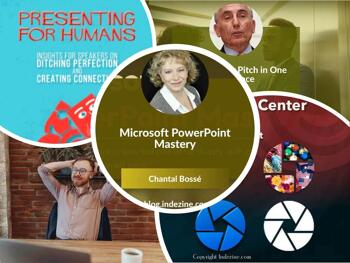
This newsletter brings together three ideas that shape how we communicate, create, and collaborate. Chantal Bossé’s insights on mastering PowerPoint remind us that clarity on the screen begins with clarity of thought. A strong elevator pitch builds on that foundation, distilling a message into one memorable line. And when we look at history’s most creative teams, we see how shared purpose and smart collaboration amplify both storytelling and execution. This issue explores how these elements work together — clear messages, sharp visuals, and collaborative thinking — to help you communicate with impact and create work that stands the test of time.
Stay updated with the latest tutorials, tips, and news on PowerPoint and presentation techniques.
November 11, 2025
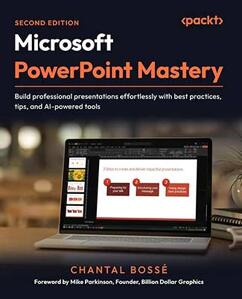
Chantal Bossé is a presentation and virtual communication specialist, author, and founder of CHABOS, a training and consulting company dedicated to helping professionals elevate their presentation skills. With over two decades of experience, Chantal has coached speakers, business leaders, and educators to craft compelling stories and deliver them with confidence. In this conversation, Chantal talks about her new book, Microsoft PowerPoint Mastery.
November 5, 2025

Too many speakers test their audiences’ patience and tolerance by delivering speeches or presentations that go on too long. Beleaguered audiences have little recourse other than tuning, or walking out. Nowhere is prolixity more counterproductive than in “The Elevator Pitch”—the single sentence that defines a company’s business— named to refer to the way you’d describe your business if you stepped into an elevator and suddenly saw a potential client that you’ve been trying to land.
November 4, 2025
Every great presentation begins long before the first slide appears or the first word is spoken. This issue of our newsletter connects those building blocks — understanding placeholders in PowerPoint helps you organize ideas visually, while mastering public speaking essentials ensures those ideas resonate aloud. And for new business owners, both skills translate directly into confident communication that inspires clients, teams, and investors alike. Whether you’re refining your storytelling on stage or structuring your message on screen, this edition reminds us that effective presentations, and successful ventures — start with clarity, confidence, and the courage to share your story well.
Stay updated with the latest tutorials, tips, and news on PowerPoint and presentation techniques.
October 27, 2025

I joined the Experience French Toastmasters Club and was excited and eager to present my first speech. Having been a Toastmaster for twenty years I had given hundreds of speeches, but this would be my first in another language. I was well-prepared, checking my pronunciation and grammar. Memorization is not something I am good with, nor do I consider it helpful in giving a speech. However, since I was presenting this in French, and not my native English, I thought to try it. Spoiler alert: it was not a good idea and increased my anxiety.
October 23, 2025
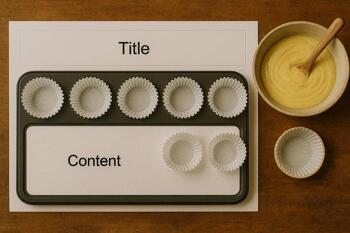
Imagine you’re getting ready to bake cupcakes. Before you start, you line up your bowls—one for flour, one for sugar, and one for sprinkles. Each bowl has a special job, right? PowerPoint placeholders are just like those bowls! They show you where to put things on your slide—your title at the top, your content in the middle, and your footers at the bottom. These placeholders can be easily identified because they have some boilerplate text such as Click to add title or Tap to add title, or similar.
October 21, 2025
Explore the October 21, 2025, edition of Indezine's PowerPoint and Presenting News newsletter. Inside you’ll find insightful commentary on how metaphors sharpen communication, a deep-dive conversation with Jamie Garroch about the Social Media Canvas add-in for PowerPoint, and highlights from the upcoming Presentation Summit 2025 featuring experts like Julie Terberg, Ilene Bergelson and Chantal Bossé. Plus: shape-packs, templates, quotes and more ready to help elevate your next slide, feed, or pitch.
Stay updated with the latest tutorials, tips, and news on PowerPoint and presentation techniques.
October 17, 2025

Jamie Garroch is a Technical Consultant at BrightCarbon, the specialist presentation and eLearning agency. He develops PowerPoint automation solutions and add-ins that enable presentation authors to work smarter. He also trains people to present more effectively using visuals and animated scenes that explain and reinforce key messages, which is supported by free resources and tips at their site. In this conversation, Jamie talks about the new Social Media Canvas add-in for PowerPoint.
September 29, 2025

Julie Terberg is a designer, author, speaker, and LinkedIn Learning instructor. She is the founder of Terberg Design, a creative studio focused on crafting presentations, templates, reports, and other visual communication materials. With decades of experience in the industry, Julie has trusted partnerships with other presentation professionals and valued clients around the world. Since 2005, she has been recognized as a Microsoft PowerPoint MVP for her contributions to the presentation community. With Echo Swinford, Julie co-authored the book on templates: Building PowerPoint Templates V2. In this conversation, Julie talks about her participation at the upcoming Presentation Summit 2025, being held virtually from October 19 to 22, 2025.
September 26, 2025

Ilene Bergelson is a NYC-based presentation coach who specializes in supporting speakers to embrace their adventurous side. Drawing on her experience as a performer on Broadway, film, and TV, Ilene blends best practices of the arts with biomechanics, mindfulness, and applied improvisation techniques for unconventional, immersive 1:1 coaching and group training sessions. When she’s not designing or delivering programs, Ilene is likely on the move, hiking, dancing, or in search of chocolate. In this conversation, Ilene talks about her participation at the upcoming Presentation Summit 2025, being held virtually from October 19 to 22, 2025.
September 24, 2025

Chantal Bossé is a presentation and virtual communication specialist, author, and founder of CHABOS, a training and consulting company dedicated to helping professionals elevate their presentation skills. With over two decades of experience, Chantal has coached speakers, business leaders, and educators to craft compelling stories and deliver them with confidence. In this conversation, Chantal talks about her participation at the upcoming Presentation Summit 2025, being held virtually from October 19 to 22, 2025.
September 23, 2025
This issue focuses on presentation structure, visual storytelling, and slide clarity—offering helpful tutorials, templates, and thought leadership for PowerPoint users at every level.
Stay updated with the latest tutorials, tips, and news on PowerPoint and presentation techniques.
You May Also Like: Poppy PowerPoint Templates | Differences in PowerPoint Usage in Microsoft Teams and Zoom: Conversation with Dave Paradi


Microsoft and the Office logo are trademarks or registered trademarks of Microsoft Corporation in the United States and/or other countries.
