
This is the print version of this page. All content is copyright Indezine.com 2000-2026.
Page 384 of PowerPoint tutorials, presentation essentials, personality interviews, and PowerPoint news.
Previous Archive Page | Next Archive Page
Author: Geetesh Bajaj
Product/Version: PowerPoint
December 3, 2024
We first feature Mike Power of Neuxpower, who discusses new features in Slidewise 2.6, a PowerPoint add-in that helps users to find, edit, and control their presentation content more efficiently. Jerry Weissman reminisces about Vin Scully, the radio voice of the Los Angeles Dodgers for 67 astounding years, and what we can learn from him about communications.
Author and coach, Clare Norman explains that coaching is not something you can do without some preparation. She explores how you can make your clients coaching-ready. We also bring you quotes, press releases, and templates from the last few days.
Stay informed about updated tutorials and happenings related to PowerPoint and presenting.
November 27, 2024

Whether a coach is working in-house or coaching external clients, it is important that attention is paid to the coaching readiness of the person being coached. It is also crucial to remember that not every issue is coachable and not every person is ready.
November 25, 2024

The world recently lost one of its best human beings when Vin Scully, the radio voice of the Los Angeles Dodgers for 67 astounding years, died at the age of 94. Note that I said the world, and not just the sports world, because Scully’s impact and influence on all humankind went far beyond stadiums and areas.
Read more with Jerry Weissman.
November 13, 2024

Mike Power owns and runs Neuxpower, the company behind the popular file compressor NXPowerLite and the amazing PowerPoint add-in, Slidewise. He has been running Neuxpower for more than 25 years, which makes him feel a tiny bit old. When at work he enjoys designing useful software, and is really loving the challenge of making Slidewise powerful, yet easy to use. Slidewise is a PowerPoint add-in that helps users to find, edit, and control their presentation content more efficiently.
In this conversation, Mike talks about Slidewise’ new version 2.6.
November 12, 2024
We first look at areas where PowerPoint can be used. We look at both conventional and unconventional uses. We then feature Violeta Saladiene of Toastmasters International who shares 7 tips about podcasting presentations.
Laszlo Diewald discusses presentaid's new Library feature. We also bring you quotes, press releases, and templates from the last few days.
Stay informed about updated tutorials and happenings related to PowerPoint and presenting.
November 4, 2024

Podcasting has become a hugely popular, powerful, and flexible way of sharing ideas, stories and the host and guests’ expertise. Whether you plan to pursue podcasting to support your business, or as a hobby or side hustle, having a platform where your voice can be heard is appealing.
Learn 7 tips about podcasting from Violeta Saladiene of Toastmasters International.
October 30, 2024

Laszlo Diewald has been working as a consultant for more than 10 years now. He started his career as an employee right after his study at the Technical University of Munich. In 2017, he founded his own consultancy, with a focus on large scale projects in the financial sector. In parallel, he started working on presentaid, which was finally launched in April 2022. In this conversation, Laszlo talks about presentaid‘s new Library feature.
October 29, 2024
We begin with a feature by Clare Norman, who explains why coaching is something that needs to be customized. Joey Dudley from BrightCarbon talks about the role of Google Slides in presentations, and why it is a significant presentation platform. We next look at why education about using PowerPoint effectively is important.
We next bring you a review of SmartMask AI 13, a Photoshop plug-in from AKVIS. We also bring you quotes, press releases, and templates from the last few days.
Stay informed about updated tutorials and happenings related to PowerPoint and presenting.
October 24, 2024

In coaching, a solution that works for one person almost certainly will not work for you. Your ways of seeing the world require something tailor-made for you. If there was a one-size-fits all answer, you would be able to find that on the internet with a quick search. And for some problems, that might serve you. No need for a coach at all in that instance.
October 23, 2024

Joey Dudley is a Senior design consultant and lead Google Slides trainer at BrightCarbon, the specialist presentation and eLearning agency. He creates beautiful graphics and design layouts for use in presentations, infographics, animations, and eLearning to ensure that they are both professional and communicate effectively.
October 22, 2024
We first explore how you can create a proper Gantt chart in PowerPoint using the think-cell add-in for PowerPoint. Such Gantt charts are easy to create, edit, and share. We then bring you Kurt Dupont, who explores the creation of dashboards in PowerPoint using Excel data.
Do you ever ask this question, "How do I create presentation content in PowerPoint that can at first glance look professional and agency-like?" We focus on some key areas for you to get started. Jerry Weissman ponders in his "Does That Make Sense?" post whether any expressions you regularly use have negative implications? We also bring you quotes, press releases, and templates from the last few days.
Stay informed about updated tutorials and happenings related to PowerPoint and presenting.
October 21, 2024
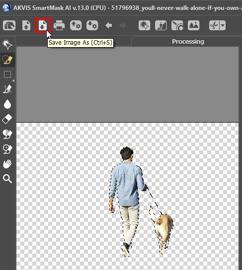
AKVIS is a company that makes cool software for working with pictures. They use fancy stuff like AI and smart algorithms to create tools that make your photo editing life easier. Whether you want to touch up photos, add artsy effects, or just tweak your images, AKVIS has an app for that! They just released the new version 13 of their SmartMask tool designed to make selecting and cutting out objects from photos super easy.
Explore AKVIS SmartMask AI 13, a Photoshop plug-in that intelligently creates masks.
October 16, 2024

Ready to level up your data game? In today’s business world, you need more than just rows and columns—you need to turn raw data into smart, actionable insights fast. Sure, spreadsheets have been the go-to tool for organizing and analyzing data, but they can only take you so far. If you’re looking for real-time updates and eye-catching visualizations, spreadsheets just don’t cut it anymore.
Learn more about using DataPoint to create dashboards with Kurt Dupont.
October 14, 2024
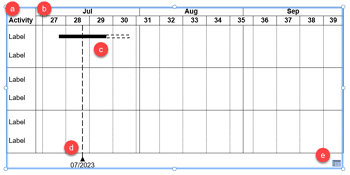
Gantt charts are among the most useful visualizations you can use to show a process with concurrent tasks. Such tasks are not easy or even practical to create within PowerPoint, and we did explore a proof-of-concept tutorial. Now, let us explore how think-cell, a well-known PowerPoint add-in can make this task simpler. With think-cell, it’s also easier to update Gantt charts as needed.
Learn how to create Gantt charts using think-cell in PowerPoint.
October 8, 2024
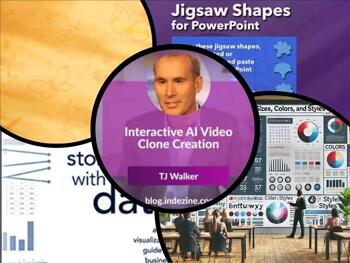
Knowledge is always an asset and sound knowledge about PowerPoint is something that cannot be underestimated. But what are the necessary PowerPoint skills you need? We cover it all. Next, we feature TJ Walker, a trainer who just created a course on interactive AI video clone creation.
We next feature speakers from the upcoming Presentation Summit: Sally Z, Julie Terberg, and Ilene Bergelson. We also bring you quotes, press releases, and templates from the last few days.
Stay informed about updated tutorials and happenings related to PowerPoint and presenting.
October 7, 2024

Language is alive, a dynamically evolving and changing entity. One of the newest expressions to gain momentum in American speech is, “Does that make sense?” The phrase is most often used by a speaker in the middle of a conversation—or a presenter in the middle of a presentation—to check whether the listener or audience member has understood or appreciated what the speaker has just said. Unfortunately, the expression has negative implications.
Learn more with Jerry Weissman.
You May Also Like: Lily PowerPoint Templates | Visme: Conversation with Payman Taei
Microsoft and the Office logo are trademarks or registered trademarks of Microsoft Corporation in the United States and/or other countries.
