
This is the print version of this page. All content is copyright Indezine.com 2000-2026.
Learn how to change the location of Slide Numbers in PowerPoint 2013 for Windows.
Author: Geetesh Bajaj
Product/Version: PowerPoint 2013 for Windows
OS: Microsoft Windows 7 and higher
When you insert Slide Numbers on your slides, you may discover that the location of the Slide Number changes depending upon the active Theme of your slides. With some Themes, the Slide Number may be placed at the bottom right. With other Themes, it may be located at the top right, as shown highlighted in blue within the slide on top in Figure 1, below, or even in some other place (highlighted in blue within the slide on bottom in Figure 1, below). The location of the Slide Number may seem to be influenced by the Theme -- and that's almost true. However, a Theme is a larger concept -- it's only the Slide Master, a subset of your Theme that's influencing the position of your Slide Numbers.

Figure 1: Applying a different Theme may change the position of Slide Numbers
Follow these steps to change the location of Slide Numbers in PowerPoint 2013 for Windows:
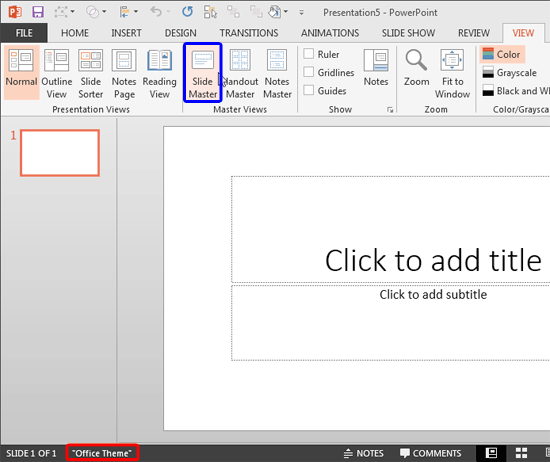

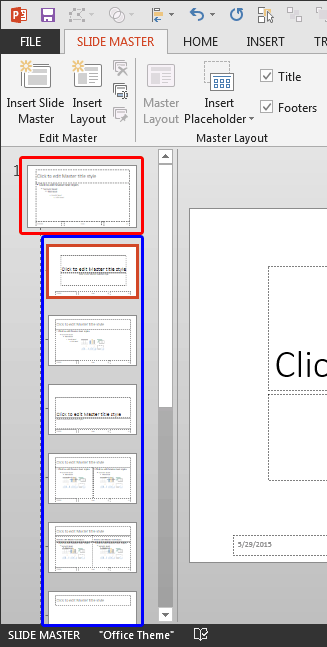
In hierarchy terms, Slide Layouts are dependent for their appearance on the Slide Master although you can individually override these dependencies.
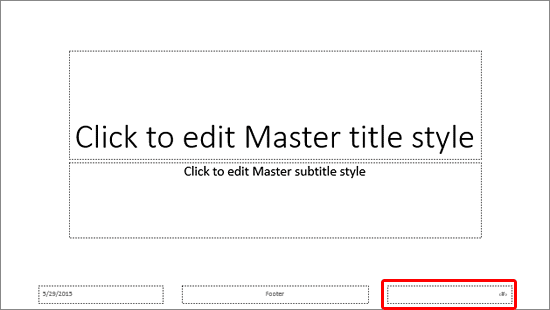
Cannot see any Slide Number placeholder? Make sure you select the larger thumbnail representing the Slide Master, as shown highlighted in red within Figure 4, above. Thereafter, within the Slide Master tab of the Ribbon, click the Master Layout button. In the resultant dialog box, select the Slide number check-box, as shown in Figure 6, below.
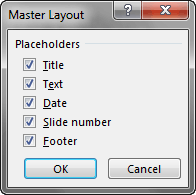
Figure 6: Slide number check-box to be selected
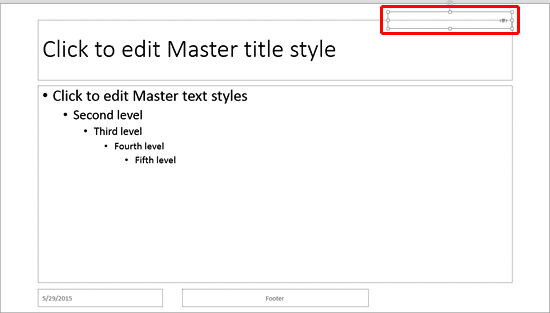
Want to know more about how you can reposition and resize the Slide Number placeholder? Explore our Reposition and Resize tutorials. The linked tutorials pertain to text boxes, but the concepts are identical.

Still cannot see Slide Numbers? Make sure you insert them. The Slide Master only influences the location of the Slide Numbers -- it does not insert them. Learn how to enable the Slide Numbers in our Working with Slide Numbers tutorial.
See Also:
Slide Master and Slide Layouts: Changing Location of Slide Numbers in PowerPoint (Index Page)
Changing Location of Slide Numbers in PowerPoint 2011 for MacYou May Also Like: 12 Engaging Presenter Behaviors to Keep Your Audience Awake | Apple Juice PowerPoint Templates


Microsoft and the Office logo are trademarks or registered trademarks of Microsoft Corporation in the United States and/or other countries.
