
This is the print version of this page. All content is copyright Indezine.com 2000-2026.
Learn how to insert a new slide in PowerPoint 2003 and 2002 for Windows. We use multiple methods, including keyboard shortcuts and layout options.
Author: Geetesh Bajaj
Product/Version: PowerPoint 2003 and 2002 for Windows
OS: Microsoft Windows XP and higher
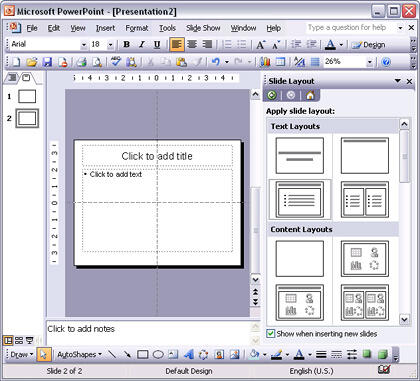
Follow these steps to insert a new slide in PowerPoint 2002 and 2003:
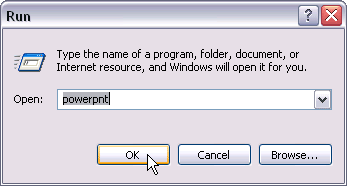
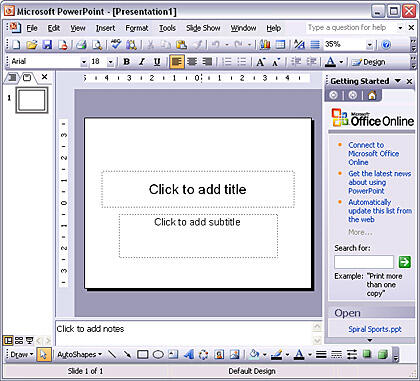
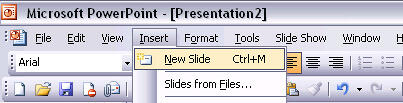
Ctrl + M is the shortcut key for inserting a new slide.

Do you want more keyboard shortcuts?
Explore our PowerPoint Keyboard Shortcuts and Sequences Ebook that is updated for all PowerPoint versions.
01 09 01 - Working with Slides: Inserting a New Slide in PowerPoint (Glossary Page)
Inserting a New Slide in PowerPoint 365 for Windows
Inserting a New Slide in PowerPoint 2016 for Windows
Inserting a New Slide in PowerPoint 2016 for Mac
Inserting a New Slide in PowerPoint 2013 for Windows
Inserting a New Slide in PowerPoint 2011 for Mac
Inserting a New Slide in PowerPoint 2010 for Windows
Inserting a New Slide in PowerPoint 2007 for Windows
Inserting a New Slide in PowerPoint for the Web
You May Also Like: Use Your Breath to Become More Expressive When Public Speaking | Emotions PowerPoint Templates




Microsoft and the Office logo are trademarks or registered trademarks of Microsoft Corporation in the United States and/or other countries.
