This is the print version of this page. All content is copyright Indezine.com 2000-2026.
Learn how to change the Ribbon Labels from CAPs to Title Case in PowerPoint 2013 for Windows.
Author: Geetesh Bajaj
Product/Version: PowerPoint 2013 for Windows
OS: Microsoft Windows 7 and higher
PowerPoint 2013 for Window's user interface has many new changes. As soon as the application is launched you see the new Presentation Gallery. Then, when you create a new presentation, you'll notice that all the slides are now set by default to widescreen 16:9 aspect ratios.
Another very obvious change that does not make too many people happy is the new bright orange interface. Fortunately, this can be changed to a more subtle gray. Optionally you can get tattooed interfaces by applying Office Backgrounds.
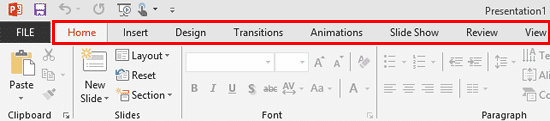
If these cosmetic changes were not enough, have you noticed that the tab names on the Ribbon are all in CAPs, as shown highlighted in red within Figure 1, below. It's almost as if PowerPoint is shouting!
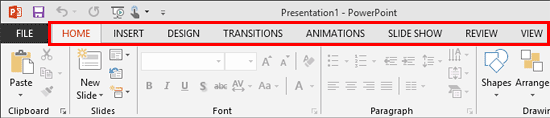
Figure 1: Ribbon labels in CAPs text case
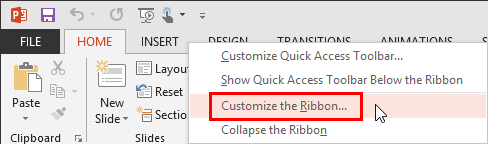
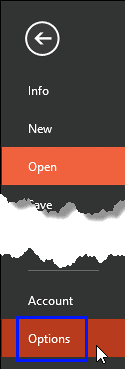
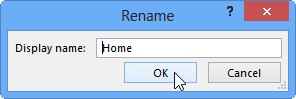
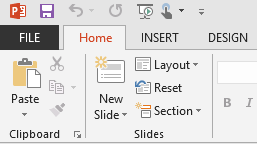
Fortunately, we don't have to bemoan without providing you with a solution! Although these Ribbon labels are in CAPs text case, you can change them to whatever case you desire. This will provide the PowerPoint interface with a much more cleaner look. Thanks to Ric Bretschneider, PowerPoint MVP for having discovered this technique (see Calming Down the Grandpa in Office 2013). In this tutorial, you'll learn how to change the CAPs Ribbon labels to Title case:
Do you want more keyboard shortcuts?
Explore our PowerPoint Keyboard Shortcuts and Sequences Ebook that is updated for all PowerPoint versions.
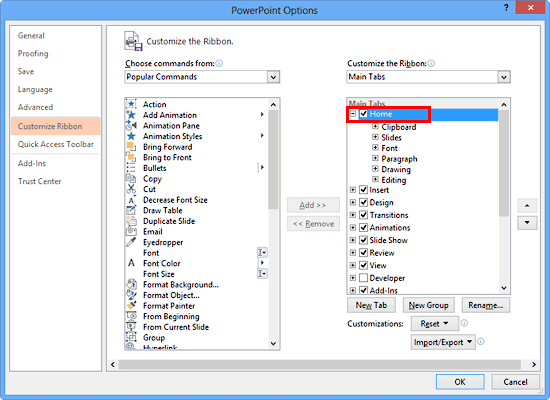
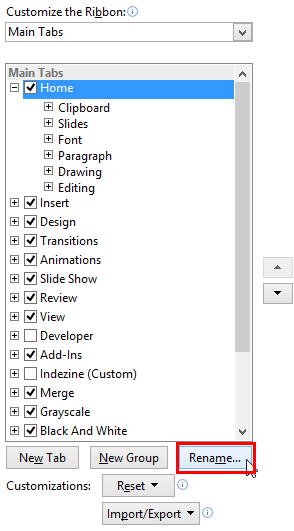
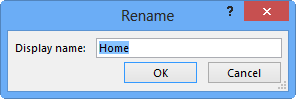
You can actually save your customizations and export these as a file that you can save for a rainy day! You can also share these customizations with others so that their Ribbon tabs look just like yours. It's a great idea to share these customizations between your computers too if you use more than one computer. Learn how to save and reset these customizations in our Reset, Export, and Import Ribbon Customizations in PowerPoint 2013 for Windows tutorial.
Microsoft adopted all-caps styling for Ribbon tabs in Office 2013 as a design choice. This decision was made to align with the overall user interface aesthetics of that Office version.
No, renaming the Ribbon tabs does not impact the functionality of PowerPoint. It's purely a cosmetic change to the interface.
Yes, the process for renaming Ribbon tabs is consistent across Office 2013 applications, including Word and Excel.
01 06 06 - Working with QAT and Ribbons: Change Ribbon Labels from CAPs to Title Case in PowerPoint (Glossary Page)
You May Also Like: Develop Your Public Speaking: A Few Thoughts on Fear | Crab PowerPoint Templates


Microsoft and the Office logo are trademarks or registered trademarks of Microsoft Corporation in the United States and/or other countries.