This is the print version of this page. All content is copyright Indezine.com 2000-2026.
Learn about the Recent option within Backstage view in PowerPoint 365 for Mac. Recent files help you continue working with files you used a while ago.
Author: Geetesh Bajaj
Product/Version: PowerPoint 365 for Mac
OS: Mac OS X
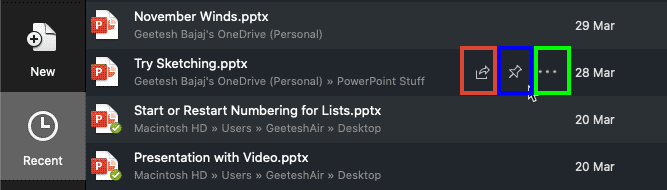
The Recent option within the Backstage view provides you with a list of recently opened presentations, so that you can quickly select the one that you want to work on. Additionally, the Recent option offers a few more useful functionalities.
Follow these steps to explore the Recent tab of Backstage view in PowerPoint 365 for Mac:
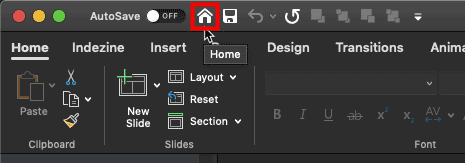
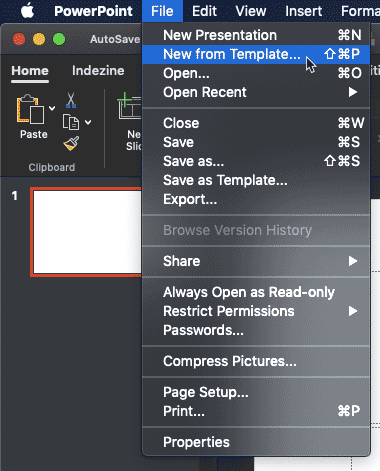

This is the default option and shows all recent presentations.
Here, you can see presentations that you have 'pinned' to the Recent tab. If you want any presentation to be available easily to you, you will pin the presentation file by:

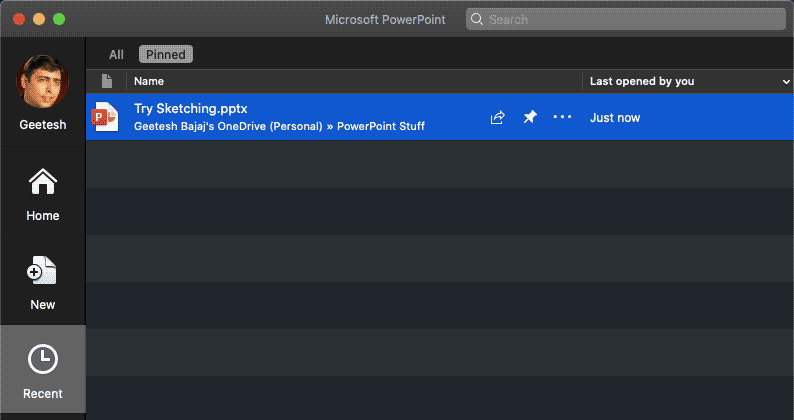
Type in a name or a partial name of a file to search the Recent files list.
You can click the Open button to open a selected file, or click the Cancel button to dismiss the Recent tab.
01 08 08 - File Types, File Menu, and Backstage View: Recent Tab of Backstage View in PowerPoint (Glossary Page)
Recent Tab of Backstage View in PowerPoint 365 for Windows
Recent Tab of Backstage View in PowerPoint 2019 for Windows
Recent Tab of Backstage View in PowerPoint 2016 for Mac
Recent Tab of Backstage View in PowerPoint 2010 for Windows
You May Also Like: How to Develop a Service Ethos That Will Enhance Your Career | Honduras Flags and Maps PowerPoint Templates


Microsoft and the Office logo are trademarks or registered trademarks of Microsoft Corporation in the United States and/or other countries.