
This is the print version of this page. All content is copyright Indezine.com 2000-2026.
Read the Indezine review of PowerShrink 2007.
Author: Geetesh Bajaj
Product/Version: PowerPoint
Introduction
New Features
Download and Installation
Using PowerShrink 2007
Pricing and Support
Conclusion
We have reviewed PowerShrink in the past -- so in this review, we will look at the new features that PowerShrink 2007 (aka PowerShrink 3) offers along with a brief walkthrough.
PowerShrink 2007 is a PowerPoint compression product from TopByteLabs Computing, a software company based in Germany. You can learn more about their products from their site.
My contact at TopByteLabs Computing for this review was Bronwyn Lane - thank you, Bronwyn.
BackPowerShrink 2007 provides plenty of new features:
Download the installer, run the setup routine and follow the instructions. You'll end up with a PowerShrink program group in your Windows Start menu (see Figure 1 below).
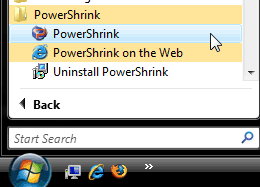
Figure 1: PowerShrink Start menu Group
You'll be prompted to enter your license key details or continue in trial mode.
You can download a 10 use trial version of the product from the PowerShrink website.
BackFollow these steps to use PowerShrink 2007:
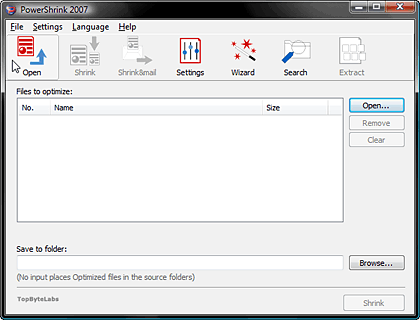
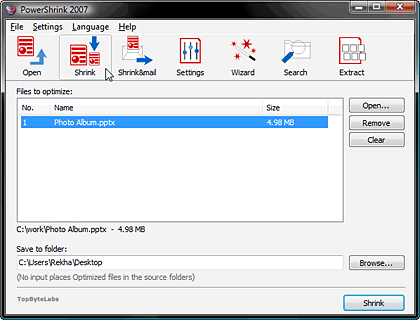

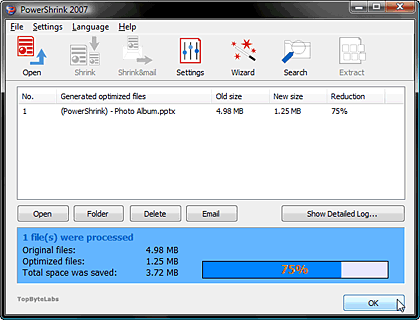
PowerShrink 2007 costs US$39.97 for single user licence, multiple user licences are also available.
Support options include an online FAQ and email support.
BackPowerShrink is a very useful application since it brings down file sizes considerably -- now that it also supports Office 2007 file formats, it can only be more useful. Do remember though that it doesn't work with pre-Office 2007 versions of Word and Excel although older versions of PowerPoint are supported.
And I love the option that lets you extract all images from Microsoft Office files with one click.
See Also: Conversation with Bronwyn Lane
You May Also Like: Latvia Flags and Maps PowerPoint Templates | MeetingPlace iCreate - Page 2


Microsoft and the Office logo are trademarks or registered trademarks of Microsoft Corporation in the United States and/or other countries.
