Indezine Logo


PowerShrink 1.3

Read the Indezine review of PowerShrink 1.3.


Author:

Product/Version: PowerPoint


Learn PowerPoint

Learn about self-closing PowerPoint presentations.


This is a review of the update - the full PowerShrink review can be found here.


The new 1.3 update is free to registered users of version 1.x - and the update can be downloaded from the PowerShrink site.

I asked Michael Weber of TopByteLabs Computing for a list of new features and improvements:
  • PowerShrink 1.3 has now Install/Uninstall support.
  • File size changed from 812 kb to 1399 kb.
  • No need for a Microsoft PowerPoint installation, PowerShrink 1.3 is a standalone tool.
  • Shell context menu integration for using PowerShrink directly from Explorer.
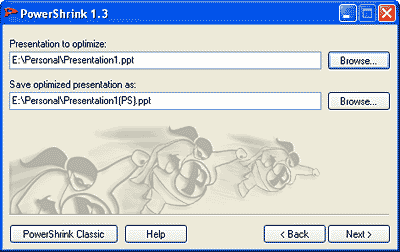
  • PowerShrink Wizard will guide the user through the "shrinking" process - see Figure 1.
  • Statistics after compression.
  • Integrated help file.
  • PowerShrink 1.3 still available as standalone EXE, but without Shell context menu integration and without help file.

PowerShrink Wizard
Figure 1: PowerShrink Wizard


You May Also Like: Laos Flags and Maps PowerPoint Templates | MeetingPlace iCreate


Popular Posts

Snow Effect in PowerPoint
Create a snow fall effect inside PowerPoint using animation techniques.

PowerPoint Transitions: Curtains
Explore the Curtains transition effect in PowerPoint.

Pivot Tables in PowerPoint: by Kasper Langmann
One of the most commonly used features in Microsoft Excel is the Pivot Table. A Pivot Table simply allows you to make better sense of data by giving you different options of how to view that data.

Get More SmartArt Graphics
Learn how you can get more SmartArt graphic variants.


Pictures in Presentations

Is a picture is worth a thousand words? You probably have heard this adage so often that we decided not to repeat this phrase throughout this book! Now here’s some more info: the human brain uses a larger part of its area to store visual information rather than textual content. And that’s possibly because a picture describes so much more than text.

Go and get a copy of our Pictures in Presentations ebook.


Microsoft and the Office logo are trademarks or registered trademarks of Microsoft Corporation in the United States and/or other countries.

Home | PowerPoint | Photoshop | PowerPoint Templates | PowerPoint Tutorials | Blog | Notes | Ezine | Media Kit | Feedback | Site Map | About Us | Contact Us

Link to Us | Privacy | Testimonials

PowerPoint Backgrounds | Christian PowerPoint Backgrounds | Business PowerPoint Presentation Templates

Plagiarism will be detected by Copyscape

©2000-2026, . All rights reserved.