Indezine Logo


SmartDraw 2010

Read the Indezine review of SmartDraw 2010.


Author:

Product/Version: PowerPoint


Introduction
About SmartDraw 2010
New Features in SmartDraw 2010
Pricing and Support
Conclusion

Introduction

SmartDraw 2010Visual content often scores higher than pure textual content, and this has been proved by several scientific studies and surveys. Yet it is not always easy to create and use visual content in slides, documents, or even web pages because the tools required in creating such content typically involve a long learning curve and familiarity with some new terminology. Our review product, SmartDraw 2010 overcomes these limitations and allows normal office people to create good-looking and effective business graphics. How does it fare? Read on.

Back

About SmartDraw 2010

SmartDraw 2010 is from SmartDraw, a company based in San Diego, CA, United States. You can download a trial version of Smart Draw 2010 from their site.

SmartDraw 2010 is the new, updated version available as a free upgrade for SmartDraw 2009.5 users. If you are using version 2009.5, you can download the upgrade from the SmartDraw site.

Our contact at SmartDraw for this review was Aaron Stannard. Thank you, Aaron.

Back

New Features in SmartDraw 2010

We have already reviewed several previous versions of SmartDraw, including SmartDraw 2009.5, SmartDraw 2008, and SmartDraw 2007. So rather than do a general review of this version, we will look at the new features in this version. We have divided these new features under several categories below:
Time Saving features

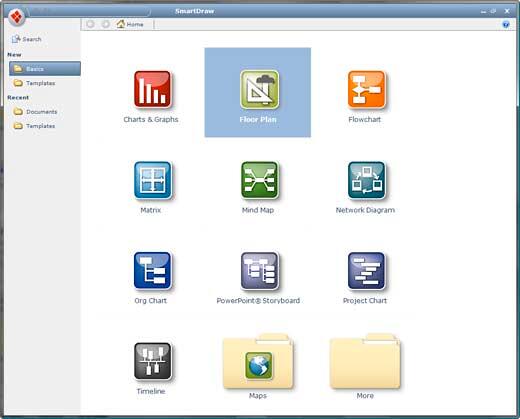
  • The new Templates Browser makes it easy to find the visual you need for your project, as shown in Figure 1, below.
  • The Search function helps you find the visual you are looking for much faster.
  • Now, you can add shapes to flowcharts, org charts, and other visuals by using keyboard shortcut keys. You can also use Ctrl + arrow keys to add shapes in different directions or press the Enter key to add a shape.
  • By default, shapes now have the new 3D style applied. You can change the styles based on your requirements.
  • Templates browser
    Figure 1: Templates browser

Project Management features

  • Tasks are automatically added as something is typed on the charts.
  • You can adjust the time scale of the task.
  • You can also hide the columns for compact charts.
  • Collapse and expand the sub-task for detail and summary.
  • Show the percentage of completion for each task.
  • Start the task in a Mind Map template, and later convert it to a Project Chart.
  • Import the task to Microsoft Project.

Presentation features

  • SmartDraw 2010 integrates with Microsoft PowerPoint adding new capabilities in making PowerPoint presentations easily.
  • You can export SmartDraw visuals to Microsoft PowerPoint with one click.
  • With the PowerPoint Storyboard option, you can author a full PowerPoint presentation.

Collaboration features

  • SmartDraw 2010 reads Visio files and allows the user to edit them.
  • The user can convert entire folders containing Visio files to SmartDraw visuals using Visio Converter.
  • SmartDraw integrates with Sharepoint just like other Microsoft Office applications.
  • The new Markup feature lets you comment.
Back

Pricing and Support

SmartDraw 2010 costs $197 for a single-user license, and multi-user licenses are available.

Support options include manuals, knowledge base, e-mail, phone support, and FAQ. The SmartDraw website also has extensive tutorial content.

Back

Conclusion

SmartDraw has always been an extremely capable program, and version 2010 adds great collaboration and workflow features that make the program contemporary and easier to use.

Back

You May Also Like: So Many Slides: Conversation with Robert Befus | Bougainvillea PowerPoint Templates


Popular Posts

Creating Slide Backgrounds in Photoshop for PowerPoint
Learn how to create slide backgrounds for PowerPoint in Photoshop.

Formatting Arrows (Arrowheads) in PowerPoint 2016 for Windows
Learn how to format arrowheads for lines in PowerPoint 2016 for Windows.

Creating Semi-Circles in PowerPoint 2013
Learn how to create a semi-circle in PowerPoint 2013.

Apply Two or More Animations to One Object at the Same Time in PowerPoint
Apply multiple animations to one slide object in PowerPoint, and make all animations play together.


Night Sky Starlit Backgrounds

The ZIP file that you will download contains five Night Sky Starlit Backgrounds in three resolutions: Full Size: 4000x2250 pixels (16:9), Widescreen Size: 1365x768 pixels (16:9), and Standard Size: 1024x768 (4:3). Also included are five PowerPoint Presentations with Night Sky Starlit Backgrounds, set to work with the Morph transition. Yes, these background designs can also animate between slides using PowerPoint's Morph transition.

Go ahead and get this product! You’ll see the price on the order page


Microsoft and the Office logo are trademarks or registered trademarks of Microsoft Corporation in the United States and/or other countries.

Home | PowerPoint | Photoshop | PowerPoint Templates | PowerPoint Tutorials | Blog | Notes | Ezine | Media Kit | Feedback | Site Map | About Us | Contact Us

Link to Us | Privacy | Testimonials

PowerPoint Backgrounds | Christian PowerPoint Backgrounds | Business PowerPoint Presentation Templates

Plagiarism will be detected by Copyscape

©2000-2026, . All rights reserved.