
This is the print version of this page. All content is copyright Indezine.com 2000-2026.
Read the Indezine review of SmartDraw 2007.
Author: Geetesh Bajaj
Product/Version: PowerPoint
Introduction
About SmartDraw 2007
Download and Installation
Working with SmartDraw 2007
Pricing and Support
Conclusion
It has been observed that presentations that contain graphical elements score higher than those that contain just text. By graphical elements here, we don't mean illustrations or pictures, but diagram-style graphics that show relationships and contain text as part of the graphic.
PowerPoint, by itself, contains a very capable diagramming feature, and the new SmartArt feature in PowerPoint 2007 is even more impressive. Even then, there are bound to be times when you want something that's easier to use, provides more options, and even works well with PowerPoint. That's exactly what SmartDraw 2007 aims to be.
BackSmartDraw 2007 is from SmartDraw, a company based in San Diego, CA, United States. SmartDraw, their flagship product is available in four different versions: Standard, Professional, Professional Plus, and the SmartDraw Suite. You can download a trial version of Smart Draw 2007 from their site.
If you are not a designer don't worry, for you'll find that SmartDraw 2007 has over a hundred professionally designed templates and a library of over 20,000 symbols and shapes. Once you use this assortment of content to create your own diagrams, these can be copied into other programs such as PowerPoint with one click.
Our contact at SmartDraw for this review was Bob Schuh. Thank you, Bob.
BackDownload the installer from the link given above, run the setup routine, and follow the instructions. You'll end up with a SmartDraw 2007 program group in your Windows Start menu, as shown in Figure 1, below.

Figure 1: SmartDraw 2007 Start menu Group
The application runs in a trial mode until you buy the product.
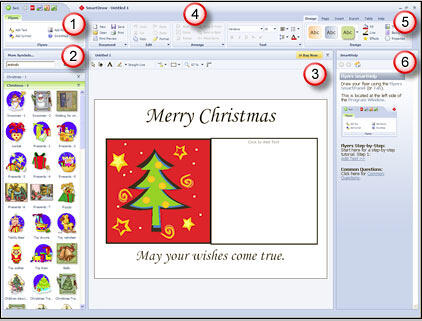
BackFollow these steps to use SmartDraw 2007 to create some great-looking graphics:



SmartDraw 2007 costs $297 for a single-user license.
Support options include manuals, knowledge base, e-mail, phone support, and FAQ. The SmartDraw website also has extensive tutorial content.
BackFor what it does, SmartDraw 2007 is a very capable product. Not only does it allow you to work with an amazing number of templates and prebuilt visual content, but it also allows you to export the created drawings to the program you use with one click.
BackYou May Also Like: Finding Your Presentation Metaphor | Toothache PowerPoint Templates


Microsoft and the Office logo are trademarks or registered trademarks of Microsoft Corporation in the United States and/or other countries.
