
This is the print version of this page. All content is copyright Indezine.com 2000-2026.
Read the Indezine review of SmartDraw 2009.5.
Author: Geetesh Bajaj
Product/Version: PowerPoint
Introduction
About SmartDraw 2009.5
New Features in SmartDraw 2009.5
Pricing and Support
Conclusion
SmartDraw has been long a mainstay of those who want to create professional-looking graphics fast and easy. And although PowerPoint and other Microsoft Office applications include many info-graphic options, they continue to lack several business graphic options such as mindmaps, storyboards, flowcharts, etc. SmartDraw has traditionally filled in these gaps, but now it has started offering more than just the gaps.
We look at the new SmartDraw 2009.5, especially the new Microsoft Office oriented interoperability features in this review.
BackSmartDraw 2009.5 is from SmartDraw, a company based in San Diego, CA, United States. You can download a trial version of Smart Draw 2009.5 from their site.
SmartDraw 2009.5 is the new, updated version available as a free upgrade for SmartDraw 2009 users. If you are using version 2009, you can download the upgrade from the SmartDraw site.
This site also has an older review on SmartDraw 2008.
Our contact at SmartDraw for this review was Sean Kattner. Thank you, Sean.
BackHere's a listing of the new features:
With SmartDraw 2009.5, you can create an entire presentation in SmartDraw's storyboard mode. You can insert, delete, and reorder slides in an interactive presentation outline, as shown in Figure 1, below. You can also insert images in selected slides, add text in the form of titles and text placeholders, choose a presentation theme, and do more.
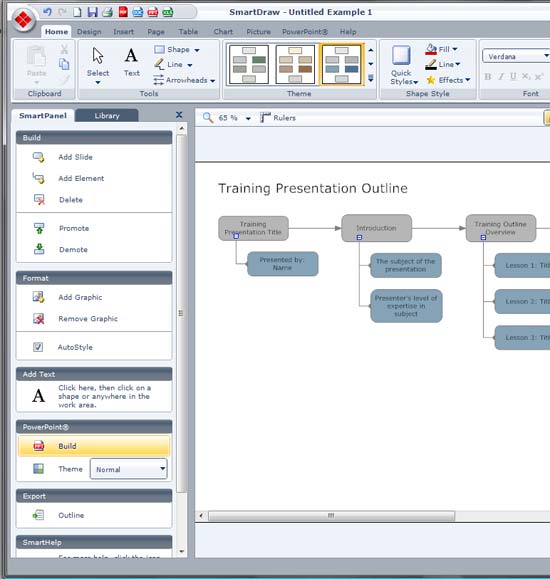
Figure 1: Storyboard
In addition, you can also retrieve an outline of the presentation storyboard as a text file.
Once the storyboard is created, fine-tuned, and finalized, you can see the entire presentation at-a-glance before exporting it to PowePoint. Figure 2, below, shows the Preview button under a specialized PowerPoint tab of the Ribbon in SmartDraw. A simple click will then produce the entire slideshow, where all images, animation, and text are exported to a new PowerPoint presentation with the storyboard intact.
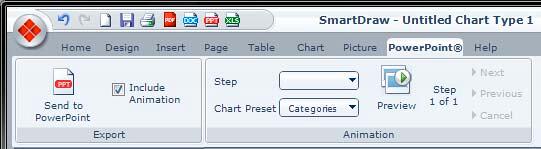
Figure 2: PowerPoint tab in the ribbon
This feature allows you to build a project chart in SmartDraw 2009.5's mindmap view. Later you can share your project plan with Microsoft Project users. You can also export your project chart to a Microsoft Project format file with one click, and import from Microsoft Project too, as shown in Figure 3, below.
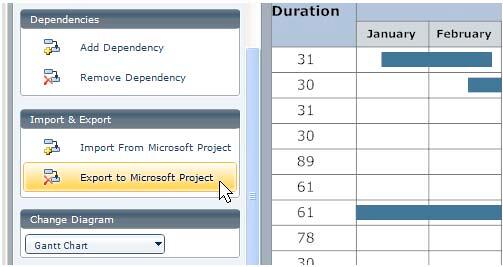
Figure 3: Export the project to Microsoft Project
You can show or hide the data table, as shown in Figure 4, below, make quick edits to the data, etc. Plus, you can now import data directly from Excel without having to cut and paste.
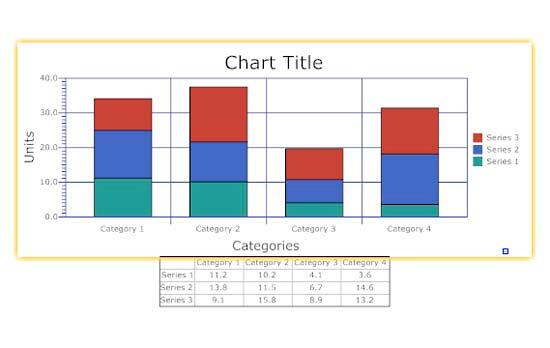
Figure 4: Show/hide data table
Instead of one label per chart element, you can now label groups of data—perfect for quarterly reports. You can also add images to your chart with a quick right-click option.
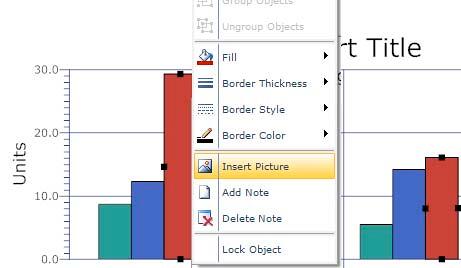
Figure 5: Insert Picture
SmartDraw 2009.5 costs $297 for a single-user license.
Support options include manuals, knowledge base, e-mail, phone support, and FAQ. The SmartDraw website also has extensive tutorial content.
BackSmartDraw was always an able program, and with this version, it raises the ante for measuring any other similar programs. That in itself is ironic, because there really aren't any similar programs! If you use Microsoft Office and need to create graphic content geared for Word, PowerPoint, Excel, and other Microsoft Office programs. Then SmartDraw is something you should look at very closely.
BackYou May Also Like: Creating Gigantic PowerPoint Decks: Conversation with Chantal Bossé | Buttercups PowerPoint Templates


Microsoft and the Office logo are trademarks or registered trademarks of Microsoft Corporation in the United States and/or other countries.
