This is the print version of this page. All content is copyright Indezine.com 2000-2026.
Leverage Excel's capabilities while running a PowerPoint slide show on the Mac.
Author: Geetesh Bajaj
Product/Version: PowerPoint
Content on this page is not recent and has been retained for historical reasons.
 James Gordon has been a Microsoft MVP (Most Valuable Professional) since 2000 and can be found in the Microsoft Macintosh newsgroups for Excel, PowerPoint, and Word. PowerPoint users will recognize Jim as the creator of the InsertPicture add-in for Macintosh. He has made other add-ins and templates for Excel, PowerPoint, and Word and is knowledgeable about graphs and mail merge. At SUNY University at Buffalo, Jim works helping faculty, staff, and instructors with a wide array of technologies for higher education.
This article was originally authored by Naresh Nichani and Brian Reilly for Microsoft Office for Windows. James consented to do a Mac version of the technique.
Although you can copy and paste an Excel sheet inside a PowerPoint slide, there's an alternative method. Microsoft Excel possesses an amazingly intuitive and powerful calculation engine and tons of formulae.
Let us say you need to present some financial projections and also do some what-if analyses on these financial projections.
Follow these steps to get started:
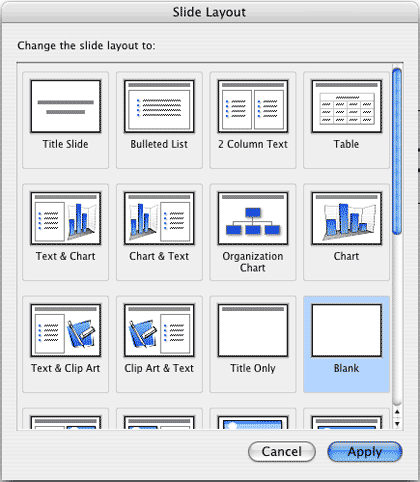

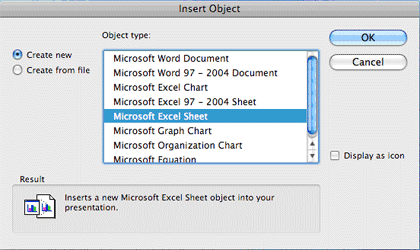
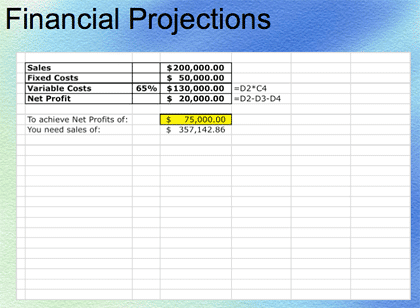
Remember, you don't have to manually input all the values above if you download the sample presentation.
Note: When in PowerPoint's Normal View you can edit the embedded Excel by double-clicking it. OpenSource Active-X has not been ported to the Mac, so you cannot edit or open the workbook while the slide show is running.
Power User Tip: Office 2004 and earlier supports Visual Basic for Applications as well as ODBC connections and web queries to a wide variety of databases. Using various combinations of these technologies it is possible to update workbooks automatically when the presentation runs so that live data feeds are possible. Visual Basic for Applications is not supported in Office 2008.
You May Also Like: Develop Your Public Speaking: A Few Thoughts on Fear | Suits PowerPoint Templates


Microsoft and the Office logo are trademarks or registered trademarks of Microsoft Corporation in the United States and/or other countries.