
This is the print version of this page. All content is copyright Indezine.com 2000-2026.
Learn about Office Themes, and how they work, specifically in PowerPoint. We will cover much more about Office Themes, or Themes, in the rest of this series.
Author: Geetesh Bajaj
Product/Version: PowerPoint
OS: Microsoft Windows and Mac OS X
This page explores the fascinating evolution of Office Themes in Microsoft PowerPoint, tracing their journey from early templates to the powerful, cross application design system we use today. You’ll learn how themes shape colors, fonts, and visual effects across Word, Excel, and PowerPoint, creating a unified, professional identity for all your documents.
Between Themes and Templates
More About Office Themes
What's an Office Theme THMX File?
Back in 1987, when Microsoft PowerPoint first appeared, templates were already part of the package. Think of templates as ready-made houses: the walls, rooms, and furniture placements were already set up, so users could move in and start creating slides without building everything from scratch.
Then came Microsoft Office 2007, and this release introduced Office Themes, a major makeover behind the scenes. If templates were houses, themes became the architectural blueprint and decorating kit combined. Instead of just giving you a finished room, themes controlled the colors, fonts, and effects across the entire neighborhood of Office apps, including Word, Excel, and PowerPoint. Suddenly, a presentation, spreadsheet, and document could all look like they belonged to the same corporate family reunion!
Here’s the fun part: themes didn’t replace templates. They moved in underneath them. Today, every PowerPoint template rides on top of a theme, much like a car body sits on a chassis, or a human body rests on a skeleton. The template provides the layout and structure, while the theme handles the visual DNA: colors, typography, and design effects that keep everything looking polished and consistent.
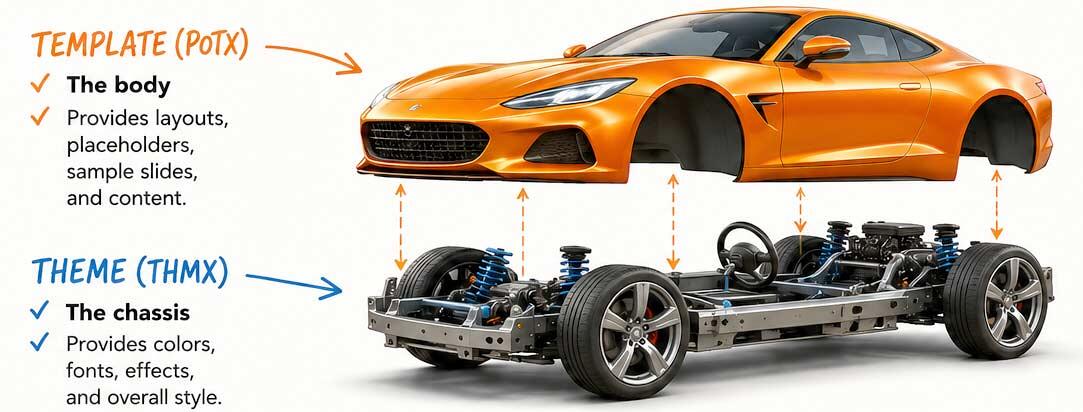
Figure 1: Themes did not replace PowerPoint templates
In other words, templates are the furnished apartments, while themes are the interior design rules that make every room match.
BackThe name, Office Theme isn’t just marketing jargon dreamed up in a meeting room with too much coffee. It’s called an Office Theme because the same colors, fonts, and visual effects can travel together across the entire Microsoft Office family, irrespective of whether you are working in Word, Excel, or Microsoft PowerPoint.
Think of it like a company uniform. Whether someone works in accounting, sales, or marketing, everyone wears the same colors and logo, so that the organization looks consistent and recognizable. Office Themes do the same thing for documents. Your PowerPoint slides, Word reports, and Excel spreadsheets can all look like they belong to the same corporate “team,” instead of looking like distant cousins who showed up at a family reunion wearing completely different outfits.
In this series of articles on Office Themes, we will explore three key areas:
Since tens of pages discuss these topics, you should look at the Themes index page for a detailed listing of these pages.
Before that, let us understand what THMX files are.
BackOffice Themes are special files identified by the THMX file extension. These files store important design elements such as document backgrounds, effects, fills, lines, colors, and fonts. When saved in the appropriate folder, THMX files appear as thumbnails within the Theme Gallery in Microsoft Office programs like Word, Excel, and PowerPoint, as shown in Figure 2, below.
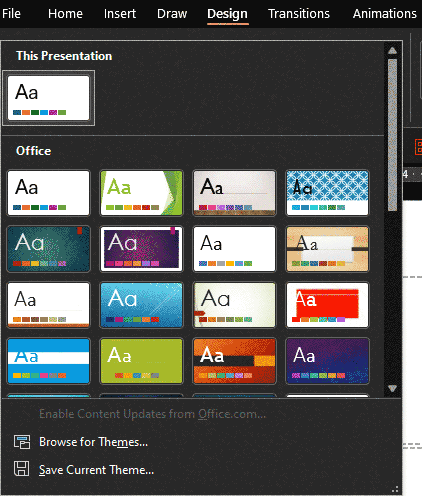
Figure 2: Themes gallery in PowerPoint
Click on the thumbnail, and the related Theme gets applied to the entire document or selected parts.
In some ways, this application of Themes seems to work like magic, but it really doesn't appear out of thin air. Behind this magical metamorphosis of documents lie deep secrets rooted within the very THMX files. This series of tutorials will make you aware of what happens behind the scenes.
BackIn the next page on this series, we explore where Office Themes and templates are located.
Related Links: Gates, Sinofsky Tout Office-As-Platform | Themes in Microsoft Office
Theme Basics: The Evolution of Office Themes (Glossary Page)
You May Also Like: Weather in PowerPoint | Argyle PowerPoint Templates


Microsoft and the Office logo are trademarks or registered trademarks of Microsoft Corporation in the United States and/or other countries.
