Indezine Logo


Where are Office Themes and Templates Located?

Explore default locations of built-in Office Themes on your computer. These are the Themes that have been installed as part of Microsoft Office versions.


Author:

Product/Version: PowerPoint

OS: Microsoft Windows and Mac OS X


Learn PowerPoint

Learn about Presentation Industry Events


Discover where Microsoft Office stores its built in Themes across Windows and macOS. This guide demystifies hidden system folders, version specific paths, and the logic behind how PowerPoint loads Themes.

Default Office Theme locations
Where Are Built-in Office Themes Located?


Default Office Theme locations

Microsoft PowerPoint includes a rich collection of built-in Office Themes, but locating the actual theme files on your computer can sometimes feel like navigating a maze. This guide explains where these files are stored on both Windows and macOS, and how different versions of Microsoft Office use different system folders for Themes.

You will learn why these locations are not always easy to find, how to access them, and where custom Themes are stored when you create your own. Whether you are troubleshooting, organizing assets, or simply exploring how Office works behind the scenes, this guide provides a clear and practical map to every built-in Office Theme location.

Have you noticed the Themes that Microsoft PowerPoint displays when you create a new presentation? These Themes appear in the Presentation Gallery as well as within the Themes drop-down galleries inside PowerPoint. But where are these Theme files actually stored? And how does PowerPoint determine which Themes are available to you?

These are common questions, especially since this information is not always easy to locate. Fortunately, this guide will help you understand where Themes are stored and how PowerPoint manages them behind the scenes.

If you also want to locate your custom Themes and templates, explore our Where Are Custom Office Themes and Templates Saved page.

Back

Where Are Built-in Office Themes Located?

Depending upon where you installed Microsoft Office, the built-in Themes may be located in almost maze-like hidden subfolders! By default, this translates to these folder locations:

Microsoft 365 on Windows 11 and 10

Office 2019 on Windows 10

Office 2016 on Windows 10, 8, and 7

Multiple locations may contain Themes installed with Microsoft Office on Windows:

  • C:\Program Files\Microsoft Office\Root\Document Themes 16
  • C:\Program Files\Microsoft Office\Document Themes 16
  • C:\Program Files (x86)\Microsoft Office\Root\Document Themes 16
  • C:\Program Files (x86)\Microsoft Office\Document Themes 16
  • C:\Users\˂Username˃\AppData\Roaming\Microsoft\Templates\LiveContent\16\Managed\Document Themes\˂LocaleID˃
  • C:\Users\˂Username˃\AppData\Roaming\Microsoft\Templates\LiveContent\16\User\Document Themes\˂LocaleID˃
  • C:\Users\˂Username˃\AppData\Roaming\Microsoft\Templates\LiveContent\16\Managed\Document Themes\˂LocaleID˃

<UserName> translates to your user name, as in the user name you use to log in to Windows, whereas LocaleID is the language code for your version of Microsoft Windows. You can find a list of Locale IDs here.

Microsoft 365 on macOS (Newer Versions)

Macintosh HD:Applications:Microsoft Office 2011:Office:Media:Office Themes

Office 2019 and 2016 on macOS (Also, older versions of Office 365)

Funnily enough, you cannot find any Themes anywhere within an Office 2019 or 2016 installation. Follow these steps to access the Themes:
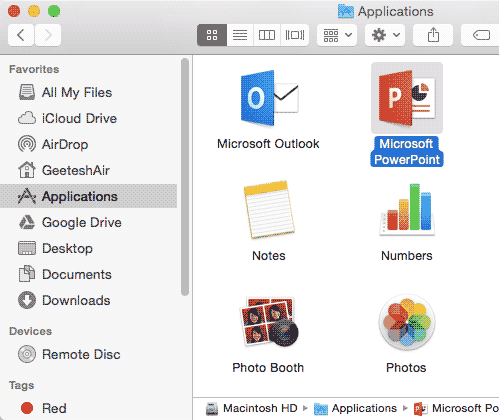
  1. Access the Macintosh HD:Applications folder. Locate the Microsoft PowerPoint icon, as shown in Figure 1, below.
  2. Microsoft PowerPoint icon
    Figure 1: Microsoft PowerPoint icon
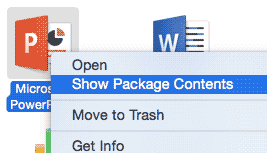
  3. Now Ctrl + click (or right-click) this icon, and choose the Show Package Contents option in the resultant menu, as shown in Figure 2, below.
  4. Show Package Contents
    Figure 2: Show Package Contents
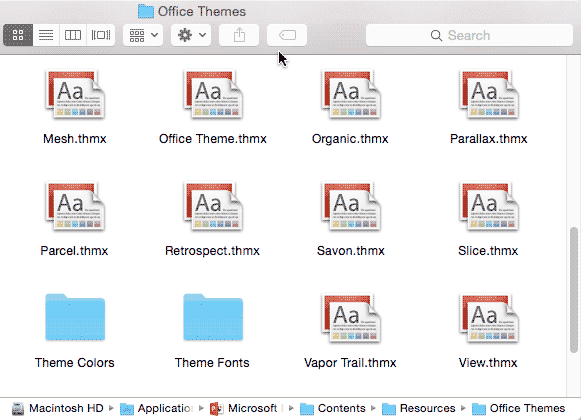
  5. You will now see the innards of the PowerPoint application! Browse to the Contents:Resources:Office Themes folder, where you will find all the Themes you have been looking for, as shown in Figure 3, below.
  6. Office Themes folder
    Figure 3: Office Themes folder

Office 2013 on Windows 10, 8, and 7

Multiple locations may contain the Themes installed with the program:

  • C:\Program Files\Microsoft Office\Root\Document Themes 15
  • C:\Program Files\Microsoft Office\Document Themes 15
  • C:\Program Files (x86)\Microsoft Office\Root\Document Themes 15
  • C:\Program Files (x86)\Microsoft Office\Document Themes 15
  • C:\Users\˂Username˃\AppData\Roaming\Microsoft\Templates\LiveContent\15\User\Document Themes\˂LocaleID˃
  • C:\Users\˂Username˃\AppData\Roaming\Microsoft\Templates\LiveContent\Managed\Document Themes\˂LocaleID˃
  • C:\Users\˂Username˃\AppData\Roaming\Microsoft\Templates\LiveContent\15\Managed\Document Themes\˂LocaleID˃

<UserName> translates to your user name, as in the user name you use to log in to Windows, whereas LocaleID is the language code for your version of Microsoft Windows. You can find a list of Locale IDs here.

Office 2011 on macOS

Macintosh HD:Applications:Microsoft Office:Office:Media:Templates:Office Themes

Office 2010 on Windows 8, 7, Vista, and XP

C:\Program Files\Microsoft Office\Document Themes 14

Office 2008 on macOS

Macintosh HD:Applications:Microsoft Office:Office:Media:Templates:Office Themes

Office 2007 on Windows 8, 7, Vista, and XP

C:\Program Files\Microsoft Office\Document Themes 12


Note: These paths assume that you installed to your C drive (on Windows) or the Macintosh HD drive (on Mac OS X). If you installed it on another drive, you will substitute the drive in your path. Also, you may have changed the name of your Microsoft Office folder to Microsoft Office 2016 or a similar name for other versions of Microsoft Office. In that case, your paths may differ on account of different folder names.

Related Links: Where Are Custom Office Themes and Templates Saved? | Which Themes are Installed within Office Versions?

Back

Theme Basics: Where are Office Themes and Templates Located? (Glossary Page)

You May Also Like: Develop Your Public Speaking: A Few Thoughts on Fear | Switzerland Flags and Maps PowerPoint Templates


Popular Posts

Set Minimum and Maximum Values on Value Axis in PowerPoint 2013 for Windows
Learn how to set the Minimum and Maximum values on Value Axis of Charts in PowerPoint 2013 for Windows.

Crop Pictures (Mask to Shape) in PowerPoint 2011 for Mac
Learn how to crop pictures using Mask to Shape option in PowerPoint 2011 for Mac.

Playing Video Across Slides in PowerPoint 2016 for Windows
Play a video clip across slides in PowerPoint 2016 for Windows.

Set Document Resolution in PowerPoint 2016 for Windows
Learn how to set document resolution in PowerPoint 2016 for Windows.


Jeopardy-Like PowerPoint Template (25 Questions)

Want to play a Jeopardy-like game using PowerPoint slides? Yes, this is absolutely doable but making PowerPoint slides with all the interactivity and layouts takes too much work. Fortunately, we have done the work for you. just download our Jeopardy-like 25 (5x5) question PowerPoint template, replace the placeholders provided for questions, answers, and categories, and you’re done! You'll still need a real human being to track scores and you could soon be playing this amazing game as part of a fun exercise, a training program, or even a quiz show.

Download and play your own Jeopardy-like game


Microsoft and the Office logo are trademarks or registered trademarks of Microsoft Corporation in the United States and/or other countries.

Home | PowerPoint | Photoshop | PowerPoint Templates | PowerPoint Tutorials | Blog | Notes | Ezine | Media Kit | Feedback | Site Map | About Us | Contact Us

Link to Us | Privacy | Testimonials

PowerPoint Backgrounds | Christian PowerPoint Backgrounds | Business PowerPoint Presentation Templates

Plagiarism will be detected by Copyscape

©2000-2026, . All rights reserved.