
This is the print version of this page. All content is copyright Indezine.com 2000-2026.
Add audio to your slides in PowerPoint 2007 for Windows. You can choose from several audio file formats, and the process is easy.
Author: Geetesh Bajaj
Product/Version: PowerPoint 2007 for Windows
OS: Microsoft Windows XP and higher
Sound files of various types such as MP3, WMA, or WAV files can be used in PowerPoint 2007. As far as possible, work with a presentation that has been saved at least once, and then copy any sound/music file you want to loop to the same folder as the presentation.
Follow these steps to insert sound in PowerPoint 2007 for Windows:
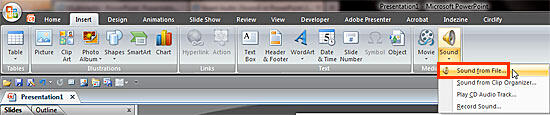
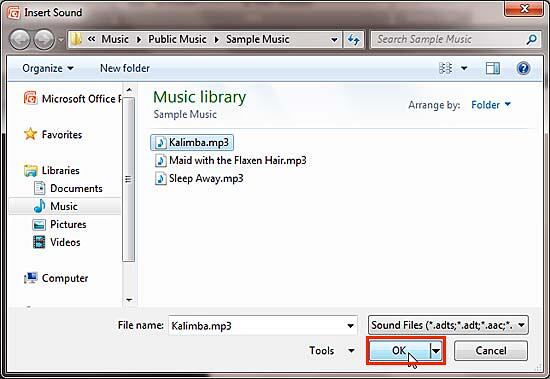
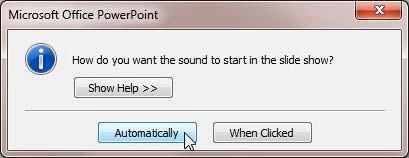

14 09 01 - Audio in PowerPoint - Basics: Insert Audio (Sound) in PowerPoint (Glossary Page)
Insert Audio (Sound) in PowerPoint 365 for Windows
Insert Audio (Sound) in PowerPoint 365 for Mac
Insert Audio (Sound) in PowerPoint 2019 for Windows
Insert Audio (Sound) in PowerPoint 2019 for Mac
Insert Audio (Sound) in PowerPoint 2016 for Windows
Insert Audio (Sound) in PowerPoint 2016 for Mac
Insert Audio (Sound) in PowerPoint 2013 for Windows
Insert Audio (Sound) in PowerPoint 2011 for Mac
Insert Audio (Sound) in PowerPoint 2010 for Windows
Insert Audio (Sound) in PowerPoint 2003 and 2002 for Windows
Insert Audio (Sound) in PowerPoint for the Web
You May Also Like: Insert PDF for PowerPoint: Conversation with Jean Haney | Environment PowerPoint Templates


Microsoft and the Office logo are trademarks or registered trademarks of Microsoft Corporation in the United States and/or other countries.
