Indezine Logo


Access Files from Cloud Locations in PowerPoint for iPad

Learn how to work with various cloud locations in PowerPoint for iPad.


Author:

Product/Version: PowerPoint for iPad

OS: Mac OS X


You can access your PowerPoint files saved on a cloud location such as iCloud Drive, or even from a saved Place such as OneDrive or Dropbox. Additionally, there's a little-known option that also lets you access your PowerPoint files from other cloud services such as Box, Google Drive, etc., within PowerPoint for iPad.

Follow these steps to access these other cloud services from within PowerPoint for iPad:
  1. Follow the first two steps, as explained in our Working with iCloud in PowerPoint for iPad tutorial.
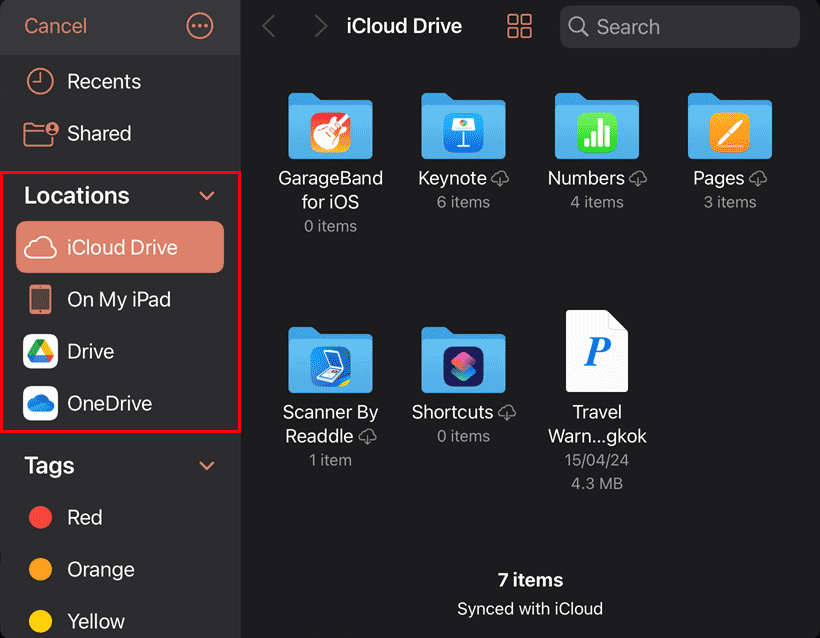
  2. This action will open your file dialog box, as shown in Figure 1, below. Within the left pane, you will find a list of Locations, as shown highlighted in red within Figure 1.
  3. List of Place locations in PowerPoint for iPad
    Figure 1: List of locations
  4. Other than iCloud Drive, you will find some more cloud-based locations such as Drive (Google Drive) and OneDrive, as shown in Figure 1, above. Do note that these locations are not connected via your Microsoft PowerPoint installation, but via your iPad installation.
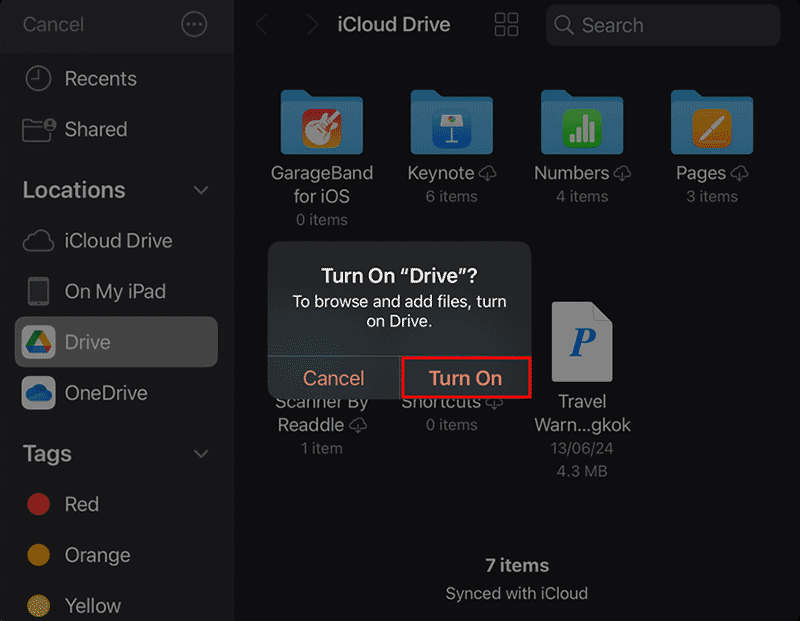
  5. Now, let us use another cloud location, such as Drive, which is essentially Google Drive. Once you tap the Drive option for the first time, you will see a message window, as shown in Figure 2, below, that asks if you want to Turn On “Drive”? Click the Turn On option, as shown highlighted in red within Figure 2.
  6. Add Google Drive as a cloud location
    Figure 2: Turn on Google Drive
  7. Tap the Done option, as shown highlighted in red within Figure 3, above.
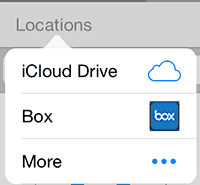
  8. Now, when you tap the Locations option, you will see another cloud location available here, as shown in Figure 4, below. Compare with Figure 2, previously shown on this page.
  9. Box is now an available cloud option
    Figure 4: Box is now an available cloud option
  10. Now, you can open and save existing PowerPoint presentations saved on your Box drive.
Note: For some reason, Box was the only cloud service we could connect with, and all attempts to connect with Google Drive failed. But this can happen due to changes that all cloud services make to their iOS apps. And that's the precise reason why some cloud apps show up in the Locations list, and others don't.

People Also Ask:

Can I access PowerPoint files from cloud locations on iOS?

Yes. PowerPoint for iOS supports OneDrive, SharePoint, iCloud Drive, Dropbox, and other connected cloud services.

Can I add iCloud Drive to PowerPoint for iOS?

Yes. Enable iCloud Drive in Files, then access PowerPoint presentations under Browse | iCloud Drive.

Can I work offline with cloud files in PowerPoint for iOS?

Yes, if the file is downloaded locally before going offline; changes sync when reconnected.

01 08 26 - File Types, File Menu, and Backstage View: Access Files from Cloud Locations in PowerPoint (Glossary Page)

You May Also Like: Effective Ways to Use Presentation Tools for Teaching and Learning | Malaysia Flags and Maps PowerPoint Templates


Popular Posts

Creating Slide Backgrounds in Photoshop for PowerPoint
Learn how to create slide backgrounds for PowerPoint in Photoshop.

Formatting Arrows (Arrowheads) in PowerPoint 2016 for Windows
Learn how to format arrowheads for lines in PowerPoint 2016 for Windows.

Creating Semi-Circles in PowerPoint 2013
Learn how to create a semi-circle in PowerPoint 2013.

Apply Two or More Animations to One Object at the Same Time in PowerPoint
Apply multiple animations to one slide object in PowerPoint, and make all animations play together.


Pictures in Presentations

Is a picture is worth a thousand words? You probably have heard this adage so often that we decided not to repeat this phrase throughout this book! Now here’s some more info: the human brain uses a larger part of its area to store visual information rather than textual content. And that’s possibly because a picture describes so much more than text.

Go and get a copy of our Pictures in Presentations ebook.


Microsoft and the Office logo are trademarks or registered trademarks of Microsoft Corporation in the United States and/or other countries.

Home | PowerPoint | Photoshop | PowerPoint Templates | PowerPoint Tutorials | Blog | Notes | Ezine | Media Kit | Feedback | Site Map | About Us | Contact Us

Link to Us | Privacy | Testimonials

PowerPoint Backgrounds | Christian PowerPoint Backgrounds | Business PowerPoint Presentation Templates

Plagiarism will be detected by Copyscape

©2000-2026, . All rights reserved.