This is the print version of this page. All content is copyright Indezine.com 2000-2026.
Learn how to repair Office and PowerPoint 2010 for Windows.
Author: Geetesh Bajaj
Product/Version: PowerPoint 2010 for Windows
OS: Microsoft Windows XP and higher
Microsoft Office 2010 was released on June 15, 2010. It is the successor of the previous version, Office 2007 and among the most used programs across the globe. However, after using the Office 2010 programs such as PowerPoint, Word, and Excel repeatedly, there may be times when these Office 2010 applications face some serious issues such as crashes, corrupted files, etc. And in some scenarios you may not be able to run any Office 2010 application. At this state of time you may wish to perform some magical process that will resolve the issue.
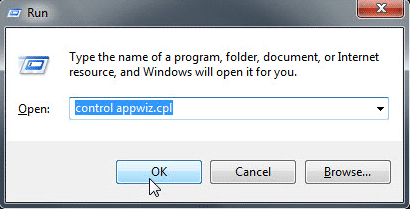
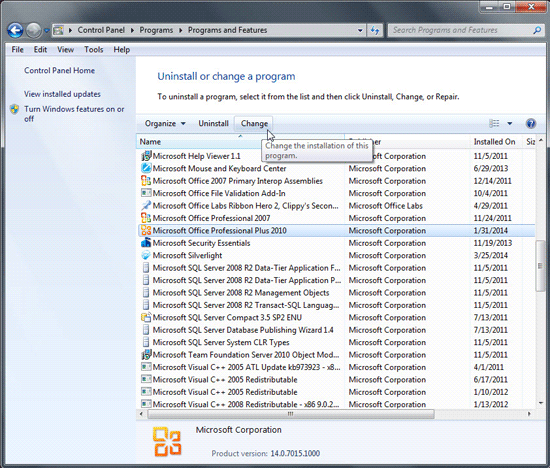
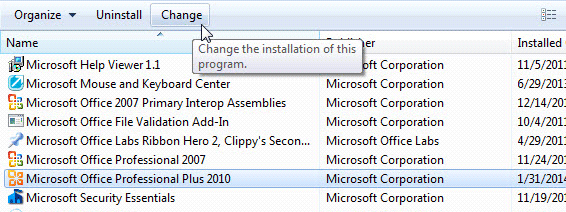
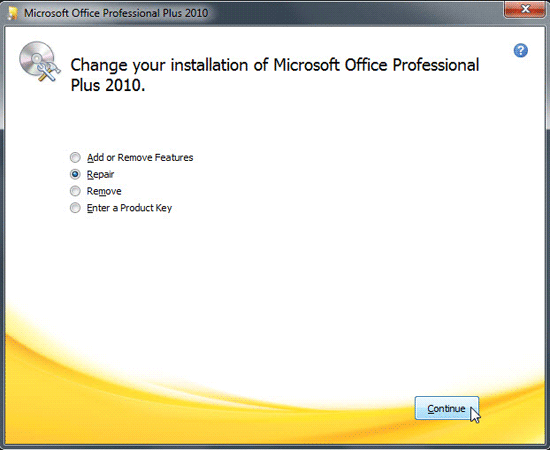
Fortunately there is an easy way to resolve these issues and it's called a Repair installation. In this tutorial, we explain how this task can be performed.
ditionally you can also rename or delete your PCB file in PowerPoint 2010 for Windows to counter problems with error messages related to add-ins or customizations when PowerPoint is loading.
Close all Office programs before performing the Repair installation process.
See Also:
Repair, Install, and Update PowerPoint and Office: Repair Office and PowerPoint (Index Page)
Repair Office and PowerPoint 2016 for WindowsYou May Also Like: Take Lessons From Digital UX to Improve Your Public Speaking | Lebanon Flags and Maps PowerPoint Templates



Microsoft and the Office logo are trademarks or registered trademarks of Microsoft Corporation in the United States and/or other countries.