
This is the print version of this page. All content is copyright Indezine.com 2000-2026.
Read the Indezine review of ShortcutTools 2.0.
Author: Geetesh Bajaj
Product/Version: PowerPoint
If you create your share of PowerPoint presentations, you know that you end up doing repetitive tasks all the time -- for the most common commands such as aligning, distributing, grouping, or resizing objects, you have to access the menus and toolbars hundreds of times. The new PowerPoint 2007 makes great improvements in accessing these options quicker -- but the align, distribute, and grouping tools are now more difficult to access than in the previous versions of PowerPoint.
PowerPoint ShortcutTools 2.0, the product I am reviewing is a PowerPoint add-in which allows users to set defined keyboard shortcuts for specific PowerPoint commands.
BackShortcutTools 2.0 is from Arcasoft Solutions, a company based in Zurich, Switzerland. You can learn more, and download a 30 day trial version of ShortcutTools 2.0 from their site.
ShortcutTools 2.0 is a PowerPoint add-in for Microsoft PowerPoint 2002 (XP), 2003, and 2007. It provides a set of shortcut keys for the most commonly used commands in PowerPoint. It also allows users to set their own keys.
My contact at Arcasoft Solutions for this review was Bernhard Stähli - thank you, Bernhard.
BackDownload the installer from the their site, run the setup routine, and follow the instructions.
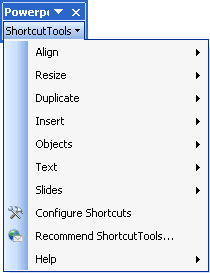
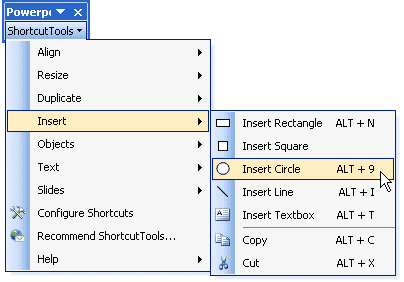
When installed, the add-in creates an PowerPoint ShortcutTools toolbar within PowerPoint as shown in Figure 1 -- if you don't find it there, choose View | Toolbars | PowerPoint ShortcutTools.

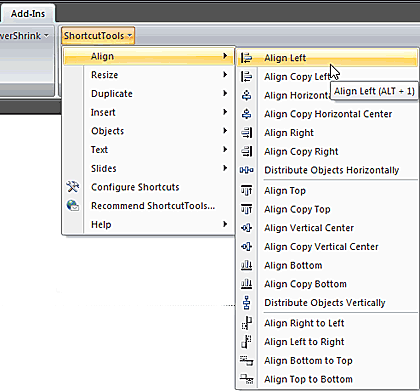
Similarly PowerPoint 2007 users will find the ShortcutTools in the Add-Ins tab of the Ribbon (see Figure 2).
Follow these steps to use ShortcutTools:
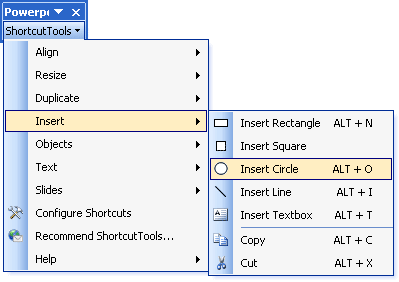
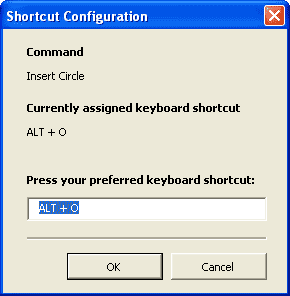
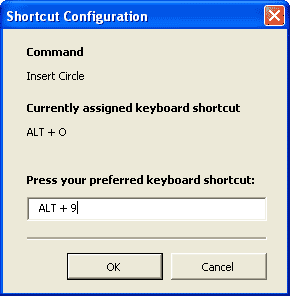
Follow these steps to configure available shortcuts -- remember you cannot configure or edit shortcuts for options that have no shortcuts available within ShortcutTools:
PowerPoint ShortcutTools 2.0 costs $39.90 for a single-user license. Multiple user licenses are available.
Support is through e-mail, although a community forum is being created.
BackPowerPoint Shortcut Tools 2.0 is a good investment if you need to use the same tools repeatedly while creating presentation -- it will provide your wrist with some rest, and speed up your workflow. It's the quickest way to get to the Align options in PowerPoint 2007 (that's what I would use it for!).
BackYou May Also Like: Nauru Flags and Maps PowerPoint Templates | MathType 6


Microsoft and the Office logo are trademarks or registered trademarks of Microsoft Corporation in the United States and/or other countries.
