Indezine Logo


Alarm Clock for PowerPoint

Download 3 animated clocks created using PowerPoint shapes. These animated PowerPoint alarm clocks are theme-aware and contain ringing timers to add engagement and timing controls.


Author:

Product/Version: PowerPoint


Alarm Clock for PowerPoint

  • PowerPoint Animation: Alarm Clock
  • PowerPoint Animation: Alarm Clock

Download (128 kb)


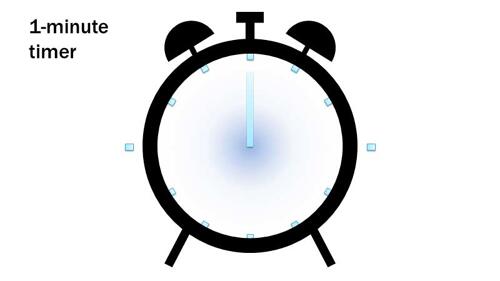
This sample presentation includes 3 animated clocks that are equipped with old-fashioned alarm bells that ring after either 1, 2, or 5 minutes – depending upon the clock you choose! Use these in a quiz session, a quick break, or adapt them to run a longer time and use for an assignment time – or even a lunch or tea break! These clocks have been created using basic PowerPoint shapes and are made Theme aware so that when you copy them to your presentation, they appear in harmony with the overall appearance of your slide content.

Download and use these clocks in your presentation. You can also change their color and look by applying PowerPoint's fills, lines, and effects – play around the fills and effects available and decide which one works best for you. Have fun!

More Sample Presentations

Click below to view this presentation on YouTube

PowerPoint Animated Alarm Clock. PowerPoint Animated Alarm Clock
[an error occurred while processing this directive]
[an error occurred while processing this directive]

You May Also Like: How Beatboxing Can Help Us Master Successful Business Communication: by Ally Yates | 7 Ways To Get Business Networking Really Wrong


Popular Posts

Playing Video Across Slides in PowerPoint 2016 for Windows
Play a video clip across slides in PowerPoint 2016 for Windows.

Set Document Resolution in PowerPoint 2016 for Windows
Learn how to set document resolution in PowerPoint 2016 for Windows.

Creating Anchor Points for Connectors in PowerPoint 2010 for Windows
Learn how to create Anchor Points for connectors in PowerPoint 2010.

Working With Slide Numbers in PowerPoint 2016 for Windows
Learn how to add Slide Numbers on slides and Masters and more tricks on making them work to your will in PowerPoint 2016 for Windows.


Organic Shapes with Brush Edges

You get 8 shape types plus lines as part of this Organic Shapes collection. Each of these 8 shape types have 10 variants. So you end up with 80 hand-drawn shape options! Again each of these 80 shapes have 12 brush stroke styles! Plus you get the lines and arrows in 12 brush stroke styles too. Combine all variations to end up with more than 3000 possibilities.

Buy and Download for $99+ (83 MB)


Microsoft and the Office logo are trademarks or registered trademarks of Microsoft Corporation in the United States and/or other countries.

Home | PowerPoint | Photoshop | PowerPoint Templates | PowerPoint Tutorials | Blog | Notes | Ezine | Media Kit | Feedback | Site Map | About Us | Contact Us

Link to Us | Privacy | Testimonials

PowerPoint Backgrounds | Christian PowerPoint Backgrounds | Business PowerPoint Presentation Templates

Plagiarism will be detected by Copyscape

©2000-2026, . All rights reserved.