
This is the print version of this page. All content is copyright Indezine.com 2000-2026.
Read the Indezine review of Wondershare PPT2Flash Professional.
Author: Geetesh Bajaj
Product/Version: PowerPoint
Introduction
About PPT2Flash Professional
Download & Installation
Using PPT2Flash Professional
How PPT2Flash Fared
Pricing and Support
Conclusion
PPT2Flash Professional is a PowerPoint add-in which allows you to convert your PowerPoint presentations into Flash SWF movies with all the slide objects and movements recreated. It works with all PowerPoint for Windows versions from 2000 to 2007.
BackPPT2Flash Professional is from Wondershare, a company based in Guangdong, China that creates custom applications for the enterprise market. Learn more about their products and download a free trial version of PPT2Flash Professional from their site (link no longer exists).
My contact at Wondershare for this review was Sabrina Fu - thank you, Sabrina.
BackDownload the installer from the link given above, run the setup routine and follow the instructions. If you are using PowerPoint 2007, you'll end up with a PPT2Flash Professional tab on the Ribbon as you can see in Figure 1.
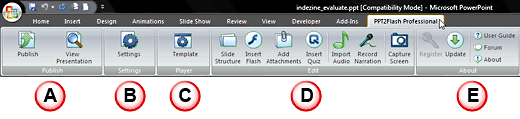
This group of options allows you to publish presentations to Flash, and view them.
This brings up the Conversion Settings dialog box where you can tweak various output options.
Here you can select a template for the Flash output.
This is where you can make changes, add Flash SWF movies on slides, insert quizzes, import audio, record narration, or do screen captures. Note that you insert quizzes with Quiz Creator -- and that is a separate product.
This group allows you to register and update the program -- in addition, there are direct links to the user guide and online forums.
At Indezine, we use an evaluation presentation as a benchmark to determine how any PowerPoint to Flash converter product works. Learn more about this benchmark presentation developed with our FlashPPT site here.
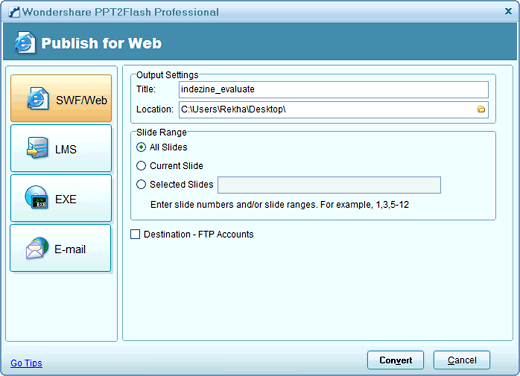
We'll share results of this benchmark later on this page -- first, let's explore how you do the actual Flash conversion using PPT2Flash.
This benchmark presentation had 20 slides with content of various types: pictures, clip art, shapes, narration, music, Flash movies, videos, etc. Each slide was given between 0 to 5 points each for a total of 100 points, and 50 extra points were allotted to the program interface, support options, output, PowerPoint 2007 compatibility, and pricing.
PPT2Flash Professional scored a total of 118 points to get 78.6% ratings.
PPT2Flash Professional gained in many areas except that inserted Flash SWFs did not work on slides converted from PowerPoint 2007 -- and that's a known bug in PowerPoint 2007 that Microsoft is aware of. Also, while entrance and exit animations played well, there were problems with emphasis and motion path animations. Finally while background music worked, it did not loop.
In other areas, such as maintaining transparency of both inserted and native PowerPoint slide objects, PPT2Flash did an amazing job. Inserted video files converted well too -- and text quality and positioning of shapes was very accurate.
BackPPT2Flash Professional costs $199.95. Multi-user and academic pricing options are available.
Support is through email, an online FAQ, and user forum.
BackPPT2Flash Professional provides most features you may want in a PowerPoint to Flash converter product -- and works best in situations where you want to create small output files in Flash SWF that you can put on your website, CD, or send as an email.
BackYou May Also Like: Iran Flags and Maps PowerPoint Templates | Add Quiz using Adobe Presenter


Microsoft and the Office logo are trademarks or registered trademarks of Microsoft Corporation in the United States and/or other countries.
