
This is the print version of this page. All content is copyright Indezine.com 2000-2026.
Read the Indezine review of PowerCONVERTER, Page 1 of 2.
Author: Geetesh Bajaj
Product/Version: PowerPoint
Introduction
Who Creates PowerCONVERTER?
A Detailed Look
Download And Installation
Presentations are created to be shown - yet 'presentation delivery' encompasses a lot more than a running a PowerPoint presentation on a laptop attached to a projector. Newer distribution strategies have advanced to embrace broadcasting, CD ROM and most significantly the internet. Nowadays, it is not unusual for projected presentations to be viewed straight off a browser using a live internet connection. And yet - web presentations continue to evolve!
Microsoft PowerPoint, as a default presentation standard is placed comfortably in this scenario, and all sorts of specialized presentation output seems to emanate from its core. One such solution is PowerCONVERTER.
PowerCONVERTER is a PowerPoint add-in that converts your presentations into Flash movies - that's a sort of product statement. Anyway, one should expect a lot more in these technology and convenience driven times - so why not take PowerCONVERTER for a ride and ascertain its worthiness. Let's proceed.
BackPowerCONVERTER is from PresentationPro - a professional design and rich media company from Atlanta, United States. PresentationPro clients include various Fortune 500 companies such as Southern Company, Hewlett Packard, Microsoft, Proctor & Gamble, Ariba, Price Waterhouse Coopers, WorldCom and Dupont. Also, PresentationPro has since long been a superlative source of original readymade and custom presentation templates. Their site is an excellent resource of such content:
They offer a convenient subscription model to access the content on their site - these include static and animated presentation templates and 3D art optimized for straight import into PowerPoint.
A few months ago, PresentationPro started a new initiative to harness possibilities under a category they term 'PowerPoint Web Tools' - PowerCONVERTER is the first offering under this category which will include a slew of new products. Running a site like Indezine does entail keeping myself aware of new possibilities in the world of PowerPoint - so when Gary White of PresentationPro asked me to review their PowerCONVERTER product, I agreed immediately.
BackPresentationPro's web presentation tools actually comprise three tools - these are PowerCONVERTER, EmailPRESENTER and OnlinePRESENTER. All three tools work in tandem to create PowerPoint to Flash solutions which go beyond just plain conversion.
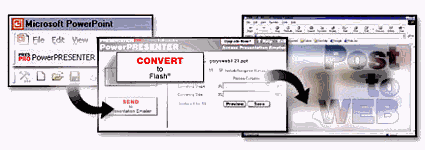
The PowerCONVERTER part is a PowerPoint add-in which installs itself as a one-click button within your PowerPoint interface. It actually leads you through the conversion and saving process. In addition, it also allows you to upload your converted web presentation to PresentationPro servers, thus aiding you in the actual web delivery of your finished presentation. A complete solution indeed!
BackA trial download for PowerCONVERTER is available - its limitations include the inability to process more than 10 slides within a given presentation. Also, in trial mode, the product allows only 5 PowerPoint to Flash conversions.
When you buy their product, PresentationPro will send you a unique key which will unlock all the features from the product. We look at the pricing model later in this review.
To download a trial, do visit the following site (link no longer exists).
Installation is a straightforward routine - just activate the downloaded file to automatically install the product into your copy of PowerPoint. PowerCONVERTER installs without any problem into PowerPoint 97, 2000 and 2002(XP). Should you face any difficulties, you can contact PresentationPro's excellent support system - we'll discuss it later in this review.
Once the installation is completed, PowerCONVERTER prompts you to reboot your system. The booted system opens with a new PowerCONVERTER splash screen which allows you load PowerPoint immediately.
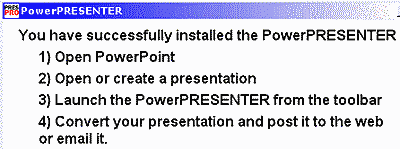
You could either use PowerCONVERTER in trial mode or opt to purchase it online.
BackYou May Also Like: Dominican Republic Flags and Maps PowerPoint Templates | Circulate PowerPoint Add-in


Microsoft and the Office logo are trademarks or registered trademarks of Microsoft Corporation in the United States and/or other countries.
