Indezine.com - logo PowerPoint Stuff
  Home PowerPoint Photoshop Other Studio Info
  Templates Blog Ezine Learn Cool Personality Listings Members Notes Bank Articles


Clip Media

PowerPoint Backgrounds with Professor Franklin's Instant Photo Effects

by Geetesh Bajaj

Let's create a background for a PowerPoint presentation using Professor Franklin's Instant Photo Effects. You can read a full review of Instant Photo Effects elsewhere on this site:

Professor Franklin's Instant Photo Effects

This tutorial will show you how Instant Photo Effects can create quick visuals that you can use as backgrounds for PowerPoint presentations.

To follow this tutorial step-by-step, you might want to download this picture of a newspaper crossword I clicked with my digital camera. Right-click the thumbnail below and choose 'Save Target As...'


  1. Open the picture in Instant Photo Effects - this picture has already been resized to 1024 x 768 pixels. If you are using some other picture, you can resize in Instant Photo Effects using the Tools | Resize Image... option.

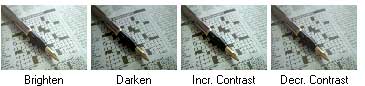
  2. Before anything else, we'll process this image in the Darkroom - click the Darkroom category canister and choose Brightness/Contrast from the Style Previews. Click the 'Brighten' icon on the Variation Previews toolbar twice to make the image suitably faded, so that any text with our PowerPoint presentation can be clearly readable and visible.


  3. Our next stop is the Photography category canister - within this choose the Duotone option from the Style Previews.

  4. You'll find several picture icons beneath the actual image that show how various colours will look when applied to our image. I am choosing the Turquoise option.


  5. Click on the 'Apply Changes..." button and save your image to a JPG or PNG file.

  6. Within PowerPoint, use the image as a presentation background. You'll find more info about PowerPoint backgrounds here...


Clip Media: ClipMedia Index | AbleStock | AbsolutVision | Big Box of Art | ESchoolMaps | Professor Franklin's | Free Images/Textures | GraphicsDesk | Image Express | Photo-Objects | Photo-Objects Vol III | PowerDESIGNS. Creating Backgrounds: Reticulation Effects | Photo-Brush Triangulars | Dingbats in Photoshop | TIFF with Channel | Shapes From Illustrator | Corel Painter. Creating Graphics: Expression PNGs | Spirographs | Photoshop TIFs | Xara PNGs | Corel PhotoPaint | Macromedia Fireworks. Ideas: 11 Steps To Presentations | Fullscreen in Flash | Creativity Un-Block | Using Copyrighted Material | Editable Charts | Unblocking Creativity | Color Combinations | Presentation Colors | Color Theory | Visuals. Sound Stuff: Sound Index | Sound Conversion | Sound Codecs | MIDI to WAV Realizers | SoundFonts | Sound Fades. Resources: Animated GIFs | Background Tiles | Fonts. Autorun Stuff: Autorun Splashes | Stardust AutoPlay.


  Home | PowerPoint | Photoshop | Templates | Blog | Notes | Ezine | Studio | Advertise | Feedback | Info | Site Map
Store  | RSS | Privacy | Testimonials
Free PowerPoint Backgrounds | Free PowerPoint Templates | Free Christian PowerPoint Backgrounds

  ©2000-2008, Geetesh Bajaj. All rights reserved.
    since November 02, 2000