
This is the print version of this page. All content is copyright Indezine.com 2000-2026.
Issue 035 of PowerPoint and Presentation Stuff newsletter.
Previous Ezine Page | Next Ezine Page
Freebies Again
Tony Dunckel talks about SnagIt, PowerPoint and Microsoft
Trigger Animations in PowerPoint
Quick News
Events & Seminars
Let's get started with the best things!
All subscribers of this mailing list can download two free PowerPoint backgrounds that are going to be part of new unreleased PowerPoint template collections at ppted.com - all you need to do is go and download them!


 Tony Dunckel, Product Marketing Manager of TechSmith SnagIt speaks about using SnagIt to capture content for PowerPoint presentations. Here
are some excerpts:
Tony Dunckel, Product Marketing Manager of TechSmith SnagIt speaks about using SnagIt to capture content for PowerPoint presentations. Here
are some excerpts:
Geetesh: Can you explain how SnagIt helps people incorporate the two worlds of screenshots and presentations?
Tony: When you look at the different types of learners, visual comprehension is an essential component of almost all of them. The fact is people remember what they see longer than what they hear, and putting those words and pictures together makes for a lasting impression. To that point, using SnagIt to add screenshots, images, logos, and many other media types to PowerPoint presentations helps create that perfect balance between visual and non-visual communication.
SnagIt provides a multitude of ways in which people can capture different shapes and formats of media on their computers, from images of windows, menus, scrolling windows, icons and objects to text, video, Web sites, and even printed output. The flexibility these various options offer enables users to capture whatever content complements the presentation's message.
SnagIt has also enhanced the integration of screenshots into presentations by including an add-in for Microsoft PowerPoint. This add-in, which resides directly on a user's PowerPoint toolbar, provides the most important capture options to users and allows them to capture images and automatically embed them into PowerPoint with just a single mouse click. SnagIt will even allow users to specify if the image capture should be inserted as a graphic within an existing slide or to start a new slide, with all the common slide types available. And for those that have had difficulty turning a screen capture image into a complete slide, SnagIt offers a handy feature that will take an image and stretch it to fit the entire slide. The goal of adding these conveniences has been to create better integration between the screen capture process and presentation authoring.
Geetesh: Do you use SnagIt - how do you use it.
Tony: Honestly, I use SnagIt almost hourly. That's the great thing about a useful utility product - you can always find ways to use it to make things easier. In the office, the ways I use SnagIt are really endless and although my profession calls for the use of numerous screen captures, I've found just as many ways to use the product in my personal life. To show you how integral it is, I've broken down how I use SnagIt into a bit of a timeline:
Morning
Afternoon
Evening
This is certainly just a sampling of the ways I routinely use SnagIt, but it provides a flavor of the diverse ways in which SnagIt helps me do tasks that would be otherwise impossible - and makes communication with colleagues and within presentations clearer than ever.
Read the complete interview here.
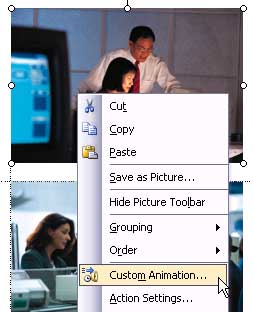
BackTrigger animations work with PowerPoint 2002 and above. In this exercise, we'll look at a basic trigger animation. You can download the sample presentation here. (around 75 kb)
You'll need two images to illustrate the trigger animations - I've used images downloaded from Microsoft Office Online's Clipart section.



Winning Presentations Seminar
January 15 and 16; February 19 and 20, 2004, Boston, USA
Claudyne Wilder, Wilder Presentations
Presentations / Training 2004 Conference & Expo
March 1 to 3, 2003, Atlanta, USA
VNU Expositions
Training Conference
PowerPoint Live
October 10 to 13, 2004, San Diego, California, USA
Rick Altman, R Altman Digital Consulting
PPT Live
During the preparation of this issue of the PowerPoint Ezine, I received assistance, content or feedback from Claudyne Wilder and Tony Dunckel (all in alphabetical order). I would like to use this platform to thank them for their help.
BackYou May Also Like: Zeetings Acquisition by Canva: Conversation with Robert Kawalsky | 3-D Format Options for Shapes in PowerPoint 2007 for Windows


Microsoft and the Office logo are trademarks or registered trademarks of Microsoft Corporation in the United States and/or other countries.
