
This is the print version of this page. All content is copyright Indezine.com 2000-2026.
Explore an introduction to Theme Builder. Theme Builder lets you create and edit Themes outside of Microsoft Office applications.
Author: Geetesh Bajaj
Product/Version: PowerPoint
OS: Microsoft Windows XP and higher
Theme Builder is an application created by Microsoft to create and edit themes. The full name of the application is Microsoft Theme Builder, but for reasons of simplicity, we'll call it Theme Builder throughout this series of pages. As of now, Theme Builder is a Windows only application, but any Themes edited and created within this application work in Mac versions of Office too.
Theme Builder was first publicly announced by Senior Product Lead for PowerPoint, Ric Bretschneider on the MSDN site on December 17th 2007.
With Theme Builder, you can create Office Themes from scratch that cover all the basics.
Download a copy of the latest release from the Microsoft Connect site, as shown in Figure 1, below.
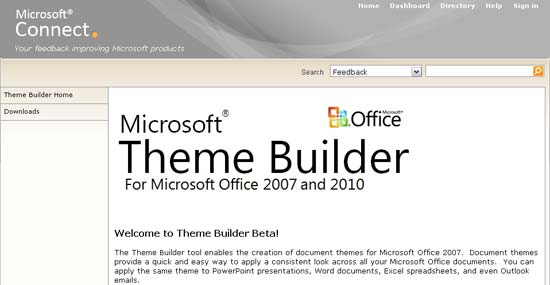
Figure 1: The Microsoft Connect page for Theme Builder (January 2011)
You'll end up downloading the Theme Builder.msi file. Activate this file to begin the setup for Theme Builder. When setup is completed, you will see a Theme Builder shortcut in the Windows Start Menu.
Launch Theme Builder by clicking on this shortcut. Figure 2, below, shows the Theme Builder interface. It opens with a blank Theme that you can edit and save as needed.
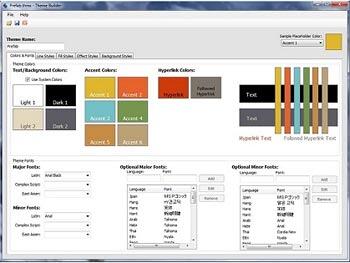
Figure 2: The Theme Builder interface
The Theme Builder interface contains five tabs that lets you work with different theme elements. These tabs are:
In the next series of pages, we'll show you how you can use Theme Builder to create amazing themes using these elements.
Theme Builder does not let you edit individual PowerPoint nuances like Slide Layouts, placeholders, etc. To do so, you'll have to apply the theme to a PowerPoint presentation, edit the layouts and placeholders inside PowerPoint, and then export the changes to a Theme file again.
See Also: Saving Themes In PowerPoint, Word, and Excel 2011 for Mac | Theme XML Files
04 05 01 - Theme Builder: Installing and Using Theme Builder (Glossary Page)
You May Also Like: Why Should You Be Using and Mastering PowerPoint’s Triggers? | Olive PowerPoint Templates


Microsoft and the Office logo are trademarks or registered trademarks of Microsoft Corporation in the United States and/or other countries.
