
This is the print version of this page. All content is copyright Indezine.com 2000-2026.
Explore patterned lines, a lesser-known hidden option in PowerPoint 365 for Windows.
Author: Geetesh Bajaj
Product/Version: PowerPoint 365 for Windows
OS: Microsoft Windows 10 and higher
Remember patterned lines in PowerPoint? Those quirky, zigzagged, polka-dotty outlines that gave your shapes a little extra flair—like dressing your rectangles in funky socks? Well, here’s the scoop: the last time you could officially add them was in PowerPoint 2023 for Windows. After that, poof! The feature vanished from the interface like your favorite snack disappearing from the vending machine.
Not quite! Patterned lines are like that secret menu item at your favorite café. They’re still supported in every version of PowerPoint—you just can’t apply them to shapes the usual way. Think of it like this: PowerPoint still knows how to display patterned lines, as you can see within Figure 1, below. If you open an old presentation with those funky outlines, they’ll show up just fine—like a vintage vinyl record playing on a modern Bluetooth speaker.
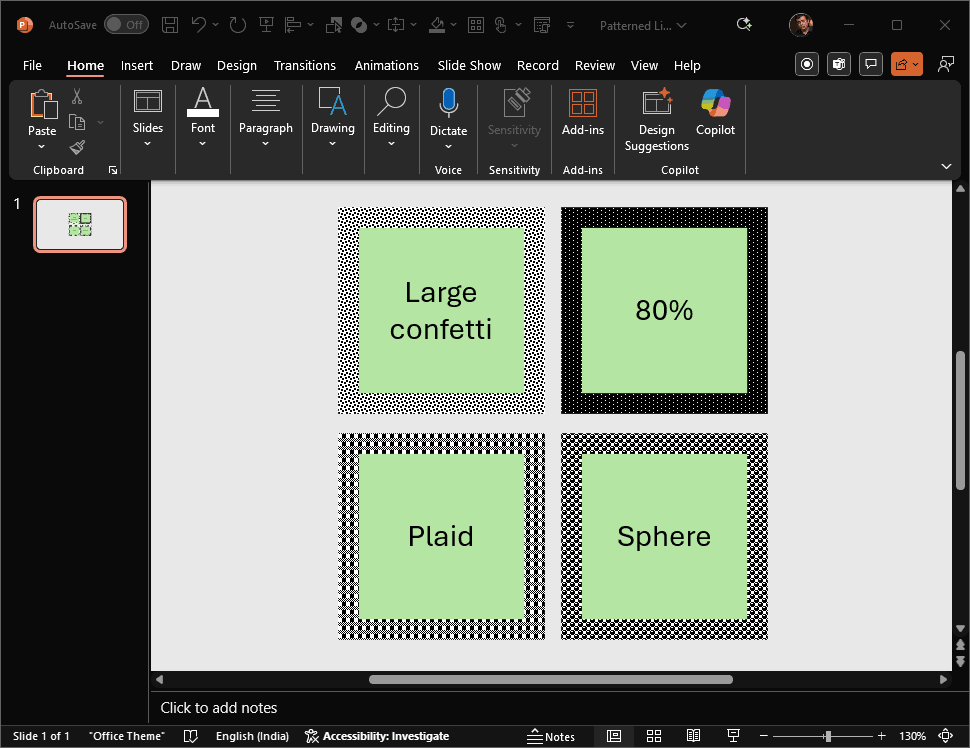
Figure 1: Patterned lines in PowerPoint 365
But if you want to add new patterned lines? That’s where things get tricky. The button, the menu, the magic wand—it’s all gone. Microsoft quietly retired the interface option, leaving longtime users feeling like they lost a favorite pair of design shoes.
So yes, patterned lines are missing from the toolbox, but they’re not extinct. In this tutorial, we’ll explore clever workarounds to bring them back—like digital archaeology for your slides.
No, patterned lines and gradient outlines cannot be applied together.
No, you can only choose from built-in PowerPoint pattern styles.
PowerPoint offers multiple built-in patterns, including stripes, dots, zigzags, and crosshatch styles.
19 04 07
You May Also Like: Making the Most of Your Potential | Using the Morph Transition with Characters in PowerPoint 365 for Windows



Microsoft and the Office logo are trademarks or registered trademarks of Microsoft Corporation in the United States and/or other countries.
