
This is the print version of this page. All content is copyright Indezine.com 2000-2026.
Introduction
About Opuzz
The Music Clips
Using Opuzz
Pricing and Support
Conclusion
Do you want to use a music clip in your presentation? Where can you get some great clips? And would they be copyright-free? Will they cost the earth and more? Finally, is it an effective strategy to use music at all in the first place?
These questions are not uncommon. Anyone who has thoughts on including some music clips in PowerPoint presentations does have a list of similar questions. In this article, we'll look at a vendor of royalty music clips, and answer those questions at the same time.
First, we'll look at the whole music concept. Yes, an appropriate music track can enrich most presentations. It can even hold the attention of the audience. However, getting the right kind of music for the presentation in terms of duration, quality, availability and copyright is very important, Opuzz, the music service that we are reviewing on this page can help you attain this objective.
Opuzz.com, based in Miami, Florida, USA provides over a hundred CDs and DVDs containing royalty free music clips. In addition, you can also download the tracks you need as they offer individual, immediate downloads as well. Learn more about Opuzz from their site, shown in Figure 1, below.
In addition, I recently interviewed Vivian MacPartland of Opuzz. Here's a link to that inteview. Vivian also coordinated with me for this review. Thank you, Vivian.
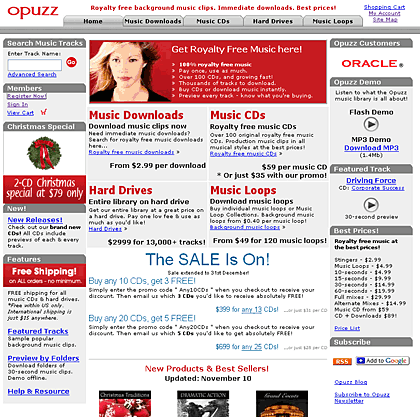
Figure 1: The Opuzz site
Opuzz provides music clips with multiple edit versions, extra options, and music loops. These allow flexibility in the usage of these clips. Each track is available in edit versions of 10, 15, 30, and 60 seconds, full mix, alternate mixes, stingers and multiple loop versions. These variations enable users to mix and match sounds.
For example, the stingers can be used as transition sounds in PowerPoint, and the loops can be used within the slides themselves. And yes, the intros and outros can be used for the first and last slides. The result would be a presentation with a coordinated background score that provides many more music choices.
View our Sound Across Slides page to learn how can have a looping sound play across successive slides.
You can start previewing all tracks in the Opuzz library without the need to register. All tracks can be previewed in its entirety or downloaded so you know exactly what you get before purchase. The voice watermark on the preview tracks will not be there in the final purchase tracks. By registering as a member (free), you are given some free tracks to start off with.
Viv sent us a few samples, and the quality was amazing. They worked flawlessly in our presentations. A word of caution here: don't use a background music score in every presentation. Some presentations are more suitable than others. These include scenarios such as:
Most music clips are available as full sets or individual tracks. These are available as both CDs and downloads. CDs cost $59 and below, immediate downloads start at $2.99 and above, music loops are available for $0.40 and above per music loop, and you can order the entire library on a hard drive for $2999, comprising 13,000 tracks.
Support is through email, online FAQ, and telephone.
Opuzz has music tracks that are priced sensibly. The quality is also awesome and the variations available in each track means that you can use them very easily in your PowerPoint presentations.
You May Also Like: The Art of Skillful and Sincere Speaking – on Video or in Person | Western Plaids PowerPoint Templates


Microsoft and the Office logo are trademarks or registered trademarks of Microsoft Corporation in the United States and/or other countries.
