
This is the print version of this page. All content is copyright Indezine.com 2000-2026.
Artlandia SymmetryShop is an automatic pattern creator.
Author: Geetesh Bajaj
Product/Version: PowerPoint
Creating patterns in Adobe Photoshop is not as inspiring a task as we would have liked it to be. You need to use the Edit | Define Pattern option and that merely gives you a copy of the defined area. Photoshop by itself has few options to create repeating symmetrical patterns, and those options can be time-consuming as well. Artlandia SymmetryShop aims to fulfill that void, and once you understand how it works, it's everything you could have wanted in an automatic pattern creator.
SymmetryShop is a Adobe Photoshop plug-in from Artlandia that works from within Photoshop's Automate submenu. Artlandia, an Illinois, USA based company creates graphic design software to create patterns. They also sell patterns.
Other than SymmetryShop, Artlandia also creates SymmetryWorks, a similar add-in that works from within Adobe Illustrator. You can learn more about Artlandia at their site.
You can download the plug-in file for SymmetryShop from the Artlandia website. It's a ZIP file that you need to unarchive and place in Photoshop's plug-in folder. Make sure that you quit Photoshop before copying the plug-in. The plug-in will be available inside Photoshop's File | Automate submenu the next time you run Photoshop.
The steps detailed work identically for both the Windows or Mac versions of SymmetryShop. For this tutorial, we are using the Windows version.
By default, the plug-in runs in a demo mode that limits which configuration options you can change and apply. The full, registered version has no such limitations. Registration provides you with an Artlandia online account and an unlock key. The unlock key is tied to your Photoshop serial number so if you upgrade or change your version of Photoshop, you'll have to get in touch with Artlandia's support department.
Here's how you can create symmetrical patterns using this Photoshop plug-in.
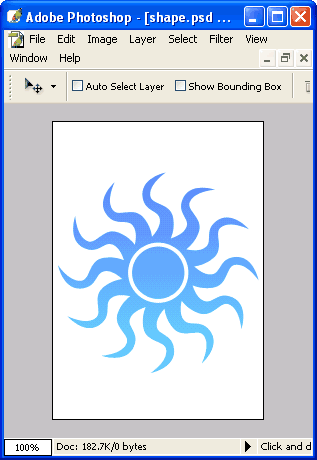
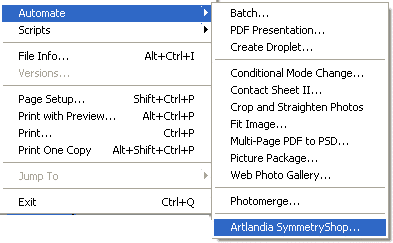
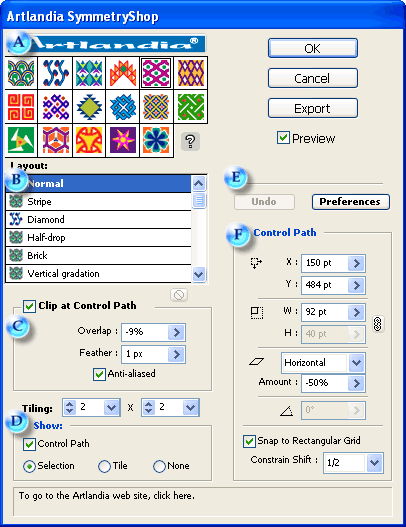
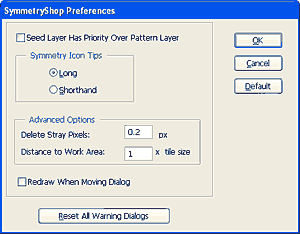
Figure 5, below, shows a shape and the sample pattern created from a shape using SymmetryShop in Adobe Photoshop. As you can see, the possibilities are endless.


Figure 5: A shape and a pattern
SymmetryShop really shines when you select something in the artwork rather than letting the plug-in to select a simple geometric region for you as we did in this review for reasons of simplicity. Then, you can create patterns like what you can see in Figure 6, below.

| Photoshop Versions: | PhotoShop 6.0 or higher versions |
| Platforms: | Windows, Mac |
| Site: | Artlandia |
| Price: | $291.00 (CD-ROM with printed user guide) $265.00 (download only) |
| Trial Version: | Available |
You May Also Like: Video Advertising with PowerPoint | Graffiti PowerPoint Templates



Microsoft and the Office logo are trademarks or registered trademarks of Microsoft Corporation in the United States and/or other countries.
