Create PowerPoint Backgrounds with Photo-Brush
Reviewed: Geetesh Bajaj
February 25th 2009
Photo-Brush is a great new image editing application - it has its share of special effects - let's try out a simple way to create PowerPoint backgrounds with Photo-Brush. Such backgrounds can be used in any other multimedia or presentation program.
You can download a 30 day trial version of Photo-Brush from:
Step 1
Start Photo-Brush. Create a new file using File -> New. The 'New' dialog box opens.

Choose a width and height ratio of 800 x 600 or as per your requirement. Choose White as your canvas colour.
Step 2
Choose the brush tools from the Tools palette and paint streaks with random colours. You don't have to be able to paint perfect curves or lines - we're just using these streaks as a way to input colour into a blank canvas. Retain plenty of white area within your canvas.

Step 3
Once your streaks cover the canvas as in the example shown above, we're ready to apply our first filter.
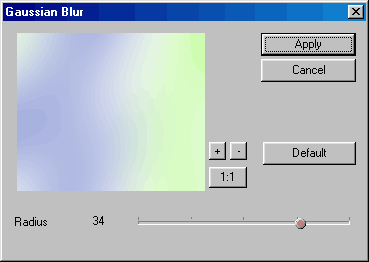
Choose Filters -> Blur -> Gaussian Blur. Adjust your settings to duplicate those displayed in the screenshot below:
Step 4
We now have a gaussian blurred canvas with all colours merging into each other.
Choose Filters -> Special -> Triangular Mosaic. Replicate settings as under or tweak as desired. The objective is to end up with a mosaic which is simple and uncluttered, since its intended use is in a presentation.

Step 5
Save your image in a format such as BMP, JPG or PNG and format the background of your PowerPoint presentation. Detailed instructions on changing PowerPoint backgrounds are available in Indezine's PowerPoint And Backgrounds page.


