
This is the print version of this page. All content is copyright Indezine.com 2000-2026.
Joel Harband showcases his Speech-Over Studio product.
Author: Joel Harband
Product/Version: PowerPoint
Speech-Over StudioTM
Conclusion
The Speech-Over and Record-Over software products implement the Voice Effect Marshalling technology to let course developers produce professional-quality, perfectly-synchronized voice narration for e-learning and training presentations that is easy to update. In addition, the Speech-Over product lets developers use text-based voices for added speed and flexibility.
Developers use the simple dialog below to add voice narration clips to individual selected text or graphic screen objects. Separate dashboards are available for microphone recording, importing pre-recorded files, and generating text-based speech, as shown Figure 02. General voice clips are added by selecting the screen.
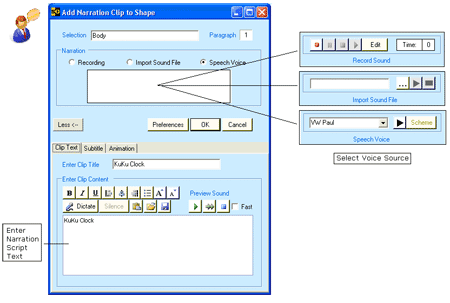
Figure 2: Dialog for Adding a Voice Narration Clip
The same dialog adds a visual animation to the object when none exists. The voice effect is automatically inserted with the object's visual effect in the slide animation sequence, synchronizing the voice with the animation. The voice effect can be set to trigger before, after, or with the visual effect. as shown Figure 03.
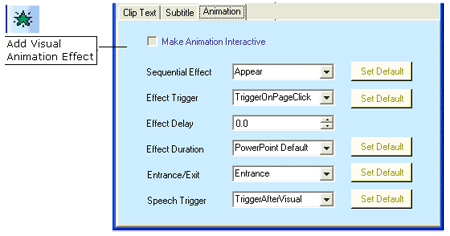
Figure 3: Dialog for Adding a Visual Animation Effect
The narration clips on a slide are displayed as rows on a matrix in the Clip Organizer. The Figure 04 below shows the correspondence between the narration clips and the visual and voice effects in the Custom Animation screen
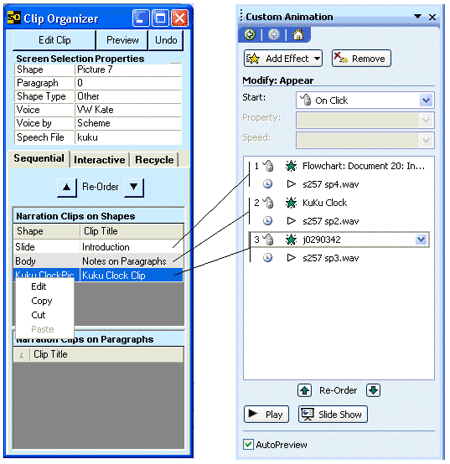
Figure 4: Narration Clips on the Clip Organizer
Speech-Over can make many changes in the slide narration without re-recording by re-arranging the component narration clips and re-marshalling them:
The Speech-Over product can utilize text-based voices in combination with VEM to produce voice narration cost-effectively without any production delays. Narration script text is entered or dictated and is stored in a database.
Narration script text can be automatically written on the PowerPoint notes pane as very effective formatted speaker notes. In the resulting slide show, objects are animated one by one, and their voice-overs join together to create a continuous synched narration for the slide, producing a very effective synched talking presentation.
BackDevelopers of rapid e-learning and training courses can take full advantage of voice narration for more effective learning in a fast and cost-effective way with Tuval Software Industries' Speech-Over and Record-Over products. Tuval's Voice Effect Marshalling technology synchronizes voice-overs automatically, handles voice-over changes easily, and makes it simple to mix multiple voices on a slide. The Speech-Over product can combine text-based voices with VEM to eliminate recording and professional voice-overs. Voice narration is produced and updated by text editing any place, any time - cost-effectively and without production delays. To find out more about the Speech-Over and Record-Over products, visit www.speechover.com.
BackYou May Also Like: New Features in SlideSource: Conversation with Robert Befus | Timeline Slides from PresenterMedia: Conversation with Judd Albrecht


Microsoft and the Office logo are trademarks or registered trademarks of Microsoft Corporation in the United States and/or other countries.
