
This is the print version of this page. All content is copyright Indezine.com 2000-2026.
Robert Lane and Dr. Stephen Kosslyn explore the rules of grammar. They combine storytelling with a series of explanatory images
Author: Robert Lane and Dr. Stephen Kosslyn
Product/Version: PowerPoint
Syntax represents the rules of grammar that determine how different types of words (nouns, verbs, etc) go together to form sentences. In visual language, syntax is how we organize what the audience sees and what we say about it.
A picture story relies on proper syntax. It combines the incredible power of storytelling with a progressive series of explanatory images. The images gradually help tell the story, step-by-step, as it unfolds—as though reading through a children’s picture book. Including this kind of device in performances is like a magnet for audience attention.
Here’s a picture story of how a Canadian couple unexpectedly found themselves running a business:
Kristin and her husband always enjoyed an active lifestyle, but when their first baby came along, everything changed. The logistics of being a parent soon seemed to threaten the outdoor pleasures they so cherished.
Kristin looked at many different baby-carrying products, but always came away unsatisfied. She wondered whether there was a more natural, convenient, safer way to carry, and breastfeed her baby during outings. Sure enough, a little experimentation and good sewing skills eventually produced a lightweight sling that worked nicely
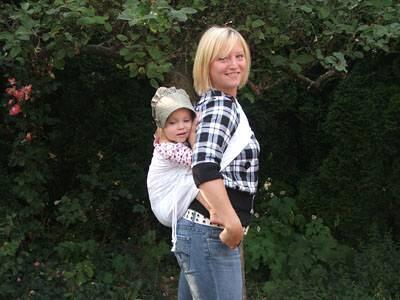
Figure 3
Figure 3, and all images below courtesy of West Coast Slings.
The sling worked well, that is until towering six-foot-six Travis tried it on. It ended up being way too small for him. So, back to the drawing board Kristin went, adding adjustable ties for extra flexibility, as shown in Figure 4, below.
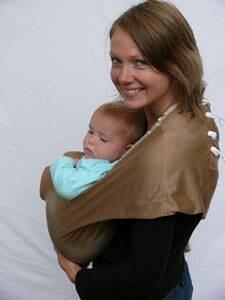
Figure 4
Then, the Canadian winter set in and it made sense to add a detachable fleece covering for warmth, as shown in Figure 5, below.
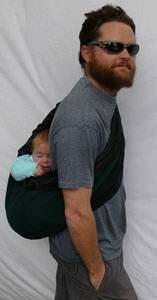
Figure 5
That innovation lead to making another removable layer—this time waterproof, keeping baby protected from both rain and wind, as shown in Figure 6, below.
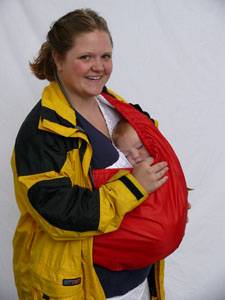
Figure 6
A third removable layer joined the team a short time later, offering lightweight 95% UV-protection for summer treks, as shown in Figure 7, below.
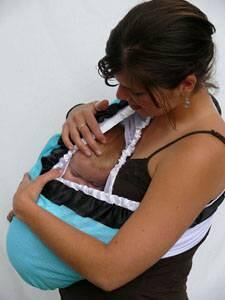
Figure 7
It didn’t take long before other mothers saw the possibilities and wanted their own slings. Kristin and her mother found themselves devoting long hours to sewing sling after sling, until they couldn’t keep up with demand. They then made a decision to contract with a manufacturer and soon were off and running with their company: West Coast Slings. Today, these images tell their story, a journey that started with a humble sewing machine in a living room and went all the way to Las Vegas tradeshows.
Could words alone convey this journey with the same force? Not really. The organized progression of pictures brings the unfolding story to life so that the viewer doesn’t have to try to imagine what is being described. Why not do the same favor for your audiences?



Microsoft and the Office logo are trademarks or registered trademarks of Microsoft Corporation in the United States and/or other countries.
