
This is the print version of this page. All content is copyright Indezine.com 2000-2026.
In this interview, Brad discusses the ToolBook product from SumTotal Systems, and its PowerPoint related abilities.
Product/Version: PowerPoint
 As Vice President and General Manager of ToolBook, Brad Crain is responsible for
ToolBook products, including strategy, research and development, and
product management.
As Vice President and General Manager of ToolBook, Brad Crain is responsible for
ToolBook products, including strategy, research and development, and
product management.
Brad previously held various positions at Click2learn/Asymetrix including Director of Learning Management Systems Engineering and Directorof Enterprise Products. Previously, Brad held various engineering positions at Ashton-Tate and Software Publishing Corporation. Crain holds bachelor degrees in Computer Science and Applied Mathematics from University of California, Berkeley USA.
Geetesh: ToolBook is one of the very few programs that has evolved itself to become meaningful and contemporary with each release. Can you tell us a little about the history of the program.
 Brad: Sure. A team lead by Paul Allen, the co-founder of Microsoft, created ToolBook. The first ToolBook release came out in
1990. Since then, numerous versions have been introduced to the market - the current ToolBook release as of this writing (Dec 2008) is version 9.5,
with a future release already under development. ToolBook is a product of SumTotal Systems.
Brad: Sure. A team lead by Paul Allen, the co-founder of Microsoft, created ToolBook. The first ToolBook release came out in
1990. Since then, numerous versions have been introduced to the market - the current ToolBook release as of this writing (Dec 2008) is version 9.5,
with a future release already under development. ToolBook is a product of SumTotal Systems.
Our customers use ToolBook to create learning content (tutorials, online courses, CBTs, software simulations, assessments) so the ToolBook team has continued to evolve the product feature set to be very easy to use, yet powerful, for those uses.
Geetesh: What are your favorite new features in the present release of Toolbook, other than the PowerPoint integration.
Brad: The ability to create content for use on Apple iPhone and Google Android devices is one of my favorites. We make it very easy for people to create content for these devices. It is exciting to see how people are using this new feature.
I've seen companies producing mobile content to help users be more energy aware (aka going green), take amusement park staff training and numerous examples in the health care field. As an Apple iPhone user myself, it is an exciting time for mobile learning and I’m glad SumTotal is providing a solution in this space.
Geetesh: Tell us about your PowerPoint integration feature, and how do you think this will help users create an easier workflow. Also, why did you single out PowerPoint as such an important import route?
Brad: Our customers have a lot of content produced in PowerPoint which they want to use in their learning activities. With ToolBook's new PowerPoint import features, you simply select the "Publish to ToolBook" add-in from within PowerPoint, fill out a few options, and then select go.
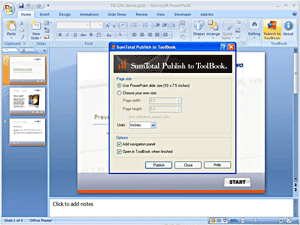
Once the publishing process is complete, the PowerPoint file is converted to the ToolBook format where it is fully editable - assessments and other interactivity can then be added using ToolBook. This is a tremendous time saver, allowing users with PowerPoint content to produce learning content in minutes.
Geetesh: Tell us about your support infrastructure. How many ways can users get support, and how long does it take for them to get the answers they are looking for?
Brad: SumTotal has a great support team that always gets high ratings from our customers. Customers can access the Support team through phone, the web and email. Turn-around time is immediate or within a few hours.
Here is a document listing our support services.
Geetesh: Apart from support, do you offer training?
Brad: Yes, we do. There are a many training options – customers can come to an authorized training centers, a SumTotal trainer can come to the customer’s office, training can be done online, or CDROM based training curriculum can be made available. ToolBook VARS are provided training as well.
Geetesh: Is there any message you have for the PowerPoint users at Indezine? Also, is there any trivia you would like to share. To end on a lighter note, or maybe just an unconventional story about ToolBook being used in a particular scenario.
Brad: If Indezine’s PowerPoint users need to create online learning, they should explore ToolBook. A free trial version is available on www.toolbook.com.
I appreciate the opportunity the Indezine staff has provided us to talk about ToolBook.


Microsoft and the Office logo are trademarks or registered trademarks of Microsoft Corporation in the United States and/or other countries.
