
This is the print version of this page. All content is copyright Indezine.com 2000-2025.
Read the Indezine review of Cumulus Office Suite, Page 1 of 2.
Author: Geetesh Bajaj
Product/Version: PowerPoint
Getting Started with DAM
About Canto
Cumulus and the Office Suite
A Basic Catalog
Cumulus Office Suite Module
Compund Document Filter
Canto Cumulus is among the world's best known digital asset management (hereafter, DAM) tools. So, what is DAM? DAM involves cataloging, access and retrieval of digital media assets. Such media assets could be pictures, sounds, movies, documents and even presentations.
There are several DAM tools available to catalog media in general - and there are various specialized tools that catalog a particular type of media. And then there's Cumulus from Canto, a program that starts life as a general all-purpose DAM tool. But that's just the beginning, because if your needs get specialized, Canto probably has an add-on module that can extend possibilities. It's one such module - the Cumulus Office Suite that allows you to add Microsoft Office compound documents to an asset catalog that provided me with motivation to do this review. Let's first learn a little more about Canto.
BackCanto is known mainly for its Cumulus program that they named after a cloud. Founded in 1990, Canto operates from USA, Germany, France, Japan and Dubai. Its products are sold worldwide - at last count, over a million Cumulus licenses were sold. In addition, more than 10,000 Cumulus client/server systems are installed worldwide. Put together, Cumulus and it modules/products manage archiving and access for all sorts of digital assets used in production, publishing, communication, broadcast and other workflow environments.
You can learn more about Canto at their web site.
For this review, I coordinated with Cheryl England and Robert Welch from Canto who helped me in every possible way. Thank you so much.
BackOn this page, we'll explore the new PowerPoint related features of the Cumulus Office Suite. However, to use Cumulus Office Suite, you need to have the basic version of Cumulus installed.
Cumulus 5.5 is available both as a boxed and download product - I downloaded my copy of Cumulus. Installation is a quick affair. When you run the program for the first time, you can register and activate the product.
Now let's look at Cumulus Office Suite. Even without this add-on module, Cumulus can catalog Microsoft Office documents including Word, Excel, PowerPoint, Access and Publisher. Cumulus can also catalog Microsoft Office Binders. However, the Office Suite adds a whole new perspective to cataloging Microsoft Office documents. For instance, PowerPoint presentations can be catalogued right to the slide level. What's more, Cumulus plugs right into PowerPoint through a convenient add-in that lets you create new presentations from cataloged slide assets. You can also import graphic content into PowerPoint straight from a Cumulus asset catalog.
The Cumulus Office Suite needs to be bought separately - it also comes with its own installation routine and serial number.
BackThe Cumulus manual has an excellent 18 page tutorial that exposes you to the program's interface and capabilities. If you have a downloaded PDF manual like me, you might want to print the pages before using the tutorial. If you don't want to get through the tutorial, here's an excerpt from Canto's product brochure:
In Cumulus, when you “Catalog Assets“ you add media files to a catalog. The file or the asset itself is not stored in the catalog but instead a substitute – a record – is stored in the catalog. When cataloging, a thumbnail of the asset is created and the asset’s information – what is known as metadata –is read and stored. Metadata can be the copyright information, keywords, and even the entire text of a PDF file. Furthermore Cumulus will save the information on the original’s location, so that you always know where to find it, even if the respective CD is not inserted or a file server is not available at the time.
When you start Cumulus for the first time, you are prompted to create a new catalog - thereafter, Cumulus just loads with the last loaded catalog. Also, Cumulus has no Save or Save As options in its File menu! All catalogs are saved the minute you make changes.
If you want to save your catalog under a new name, you can use the Catalog | Backup option.
BackOnce you install the Office Suite module, all PowerPoint presentations, slides and notes are considered as individual assets. You can either insert such assets from the Catalog Assets option or just drag and drop PowerPoint files from Windows Explorer to an open Cumulus catalog.
All assets show up as thumbnails (see screenshot).
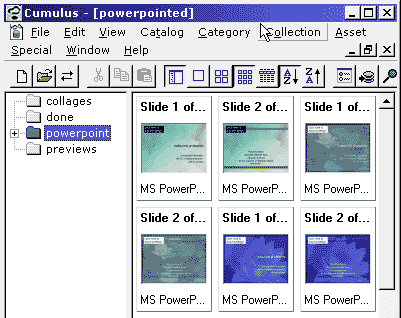
The Cumulus Office Suite basically consists of two concepts - the Compound Document Filter and PowerPoint Integration. Let's explore these in detail.
BackThe Compound Document Filters allows you to add Microsoft Office compound documents including linked and embedded resources within a Cumulus catalog. It automatically stores document description information like title, subject, keywords, headings, author, document creation date, revision details, etc. The following formats are supported:
Word 95/6.0 for Windows or later, Word 98 for Mac or later - documents (*.doc), templates (*.dot) and wizards (*.wiz)
PowerPoint 3.0 for Windows or later, PowerPoint 98 for Mac or later - presentations (*.ppt), templates (*.pot), wizards (*.pwz), add-ins (*.ppa) and shows (*.pps)
Excel 95/5.0 for Windows or later, Excel 98 for Mac or later - spreadsheets (*.xls), templates (*.xlt) and add-ins (*.xla)
Outlook 97 for Windows or later - item templates (*.oft) and items (*.msg)
Access 97 for Windows or later - wizards (*.mdz) and projects (*.adp)
Office Binder 97 for Windows or later - documents (*.obd), templates (*.obt) and wizards (*.obz)
Publisher 97 for Windows or later - documents (*.pub)
BackYou May Also Like: Gorilla PowerPoint Templates | Circlify




Microsoft and the Office logo are trademarks or registered trademarks of Microsoft Corporation in the United States and/or other countries.
