
This is the print version of this page. All content is copyright Indezine.com 2000-2026.
Read the Indezine review of Macromedia Breeze, Page 1 of 3.
Author: Geetesh Bajaj
Product/Version: PowerPoint
Introduction
Some History And More
Breeze Presentation and Breeze Training
Requirements
I recently did an article on PowerPoint repurposing for Presentations magazine - the thought behind the article was that millions of PowerPoint presentations cannot be repurposed because people are not very aware of solutions that allow one to take existing PowerPoint content further.
Breeze is one such solution - rather it is a solution that creates Flash based rich media content from your PowerPoint presentations. Such rich media content can be delivered online to audiences along with several niceties like password protection, reporting, search, quizzes, etc. All put together, Breeze provides an easy and elegant solution to quickly inform, educate and train anyone - be it your partner, colleague, client, customer or student. Let's now look at Breeze from a more enhanced point of view.
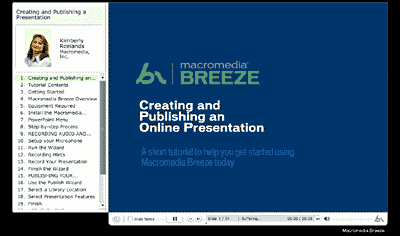
In a previous life, Breeze was called Presedia Producer. Sometime in 2001, I did a full page review on Presedia - I wanted to replace that review with the Breeze review since it's essentially the same product - but there have been so many improvements since then and I thought the Presedia review might be of archival interest to some of you. Look here.
I also would like to thank the folks at Macromedia, especially Aaron Wessels, Eric Vidal and Keith Kitani (in alphabetical order) for helping me with this review - thank you so much.
BackBreeze comes in two versions - Breeze Presentation and Breeze Training. Is one a subset of the other?
Breeze Presentation is the basic platform that provides many essential features that many users would require. Breeze Training is a component within the platform, but has to be purchased separately. As Eric puts it across - "..the customer has to buy the platform before purchasing the Training module.."
We'll first look at Breeze Presentation - later on this page, we'll look at additional capabilities available within Breeze Training.
BackTo create Breeze content, you'll need either PowerPoint 97 or higher on a system that's based on Windows 98 or higher. The Breeze add-in for PowerPoint comprises the desktop component of Breeze installed on your system - the rest of the solution is server based. On your system, you'll require a microphone and sound card to record narrations and an active net connection to upload content.
To view Breeze content, you need a browser on any OS that can play Flash 4 content - this includes almost all Windows, Macintosh and Linux systems.
You'll find more info about Breeze at the Macromedia site:
BackYou May Also Like: Comoros Flags and Maps PowerPoint Templates | PPTools Starter Set


Microsoft and the Office logo are trademarks or registered trademarks of Microsoft Corporation in the United States and/or other countries.
