
This is the print version of this page. All content is copyright Indezine.com 2000-2026.
AKVIS Magnifier upscales the images with advanced enlargement algorithms. It does so whilr preserving sharpness and removing unwanted noise and compression artifacts.
Author: Geetesh Bajaj
Product/Version: PowerPoint
If you tried resizing an image larger than its actual size, you might have come across the problem where the quality of the image gets degraded and pixelated.
AKVIS Magnifier, a Photoshop-compatible plug-in upscales the images with advanced enlargement algorithms, preserving the edge-to-edge image sharpness while improving image appearance by removing unwanted noise and compression artifacts.
AKVIS Magnifier is from AKVIS, a company based in Russia that specializes in graphics programs. Apart from Frame Suite, AKVIS also creates other Photoshop-compatible plug-ins like Retoucher, Chameleon, Stamp, Sketch, Enhancer, Decorator, and Coloriage.
You can download a free 10-day trial version of Magnifier from the AKVIS site.
My contact at AKVIS for this review was Kat Kharina. Thank you, Kat.
Follow the steps to use AKVIS Magnifier:
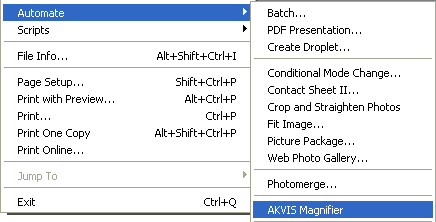
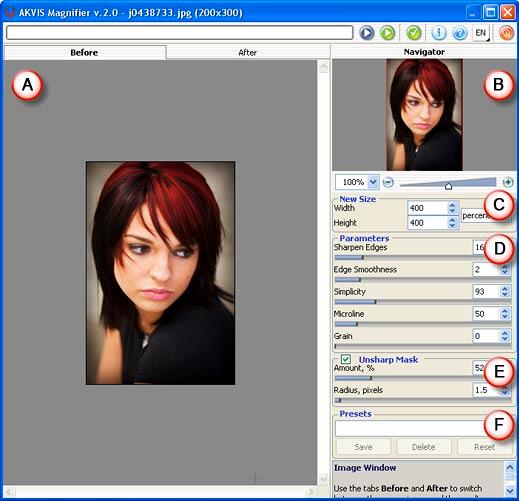

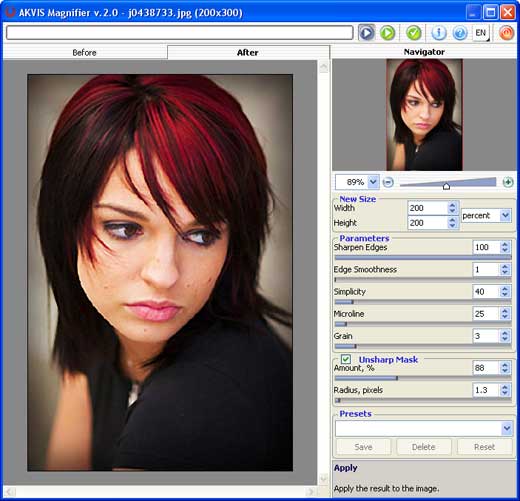

| Photoshop Versions: | 6+ |
| Platforms: | Windows, Mac |
| Site: | AKVIS |
| Price: | US $129 and above |
| Trial Version: | 10 days |
Photoshop: AKVIS Plug-ins (Glossary Page)
You May Also Like: What You Need to Know About Leadership Before Becoming a Leader | Zambia Flags and Maps PowerPoint Templates


Microsoft and the Office logo are trademarks or registered trademarks of Microsoft Corporation in the United States and/or other countries.
