Learn how to show file extensions in:
Windows 8
Windows 7
Windows Vista
Windows XP
There are many tasks that can be performed in various versions of Microsoft Windows only if you are able to see the file extensions of file types. By default, all the new versions of Windows hide file extensions. However, it is easy to change these defaults. In this article, we'll show you how you can do that for Windows 8, 7, Vista, and XP.
Show File Extensions in Windows 8
Follow these steps to show file extensions in Windows 8:
- Within Windows 8, press the Windows + E shortcut key. Doing so brings up the Explorer window, as shown in Figure 1.
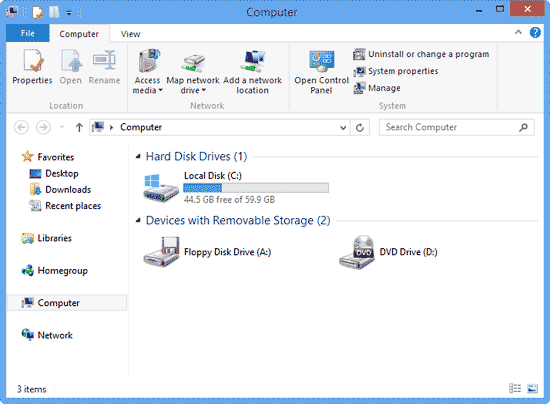
Figure 1: Explorer window in Windows 8 - Within the Explorer window select the View tab (highlighted in red within Figure 2). Locate the Show/hide group. Here, you can see the File name extensions check-box, which is deselected (highlighted in blue within Figure 2).

Figure 2: View tab within the Explorer window - To make file extensions visible, make sure you select the File name extensions check-box, as shown highlighted in blue within Figure 3.
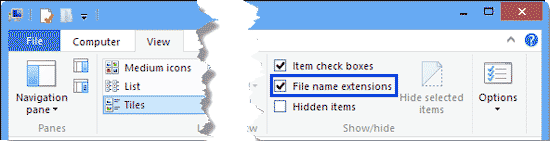
Figure 3: File name extensions check-box selected
Back
Show File Extensions in Windows 7
Follow these steps to show file extensions in Windows 7:
- Within Windows 7, press the Windows + E shortcut key. Doing so brings up the Explorer window. Choose Organize | Folder and Search Options, as shown in Figure 4.

Figure 4: Folder and search options - This opens the Folder Options dialog box (see Figure 5). Select the View tab, and scroll down the Advanced Settings list. Then, locate and deselect the Hide extensions for known file types (highlighted in red within Figure 5) check-box. Click OK.

Figure 5: Hide extensions for known file types
Back
Show File Extensions in Windows Vista
Follow these steps to show file extensions in Windows Vista:
- Go to My Computer, or you can also press the Windows + E shortcut key to bring up an Explorer window. Then, choose Organize | Folder and Search Options, as shown in Figure 6.
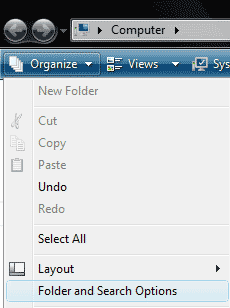
Figure 6: Folder and Search Options - This opens the Folder Options dialog box (see Figure 7). Select the View tab, and scroll down the Advanced Settings list. Then, locate and deselect the Hide extensions for known file types (highlighted in red within Figure 7) check-box. Click OK.
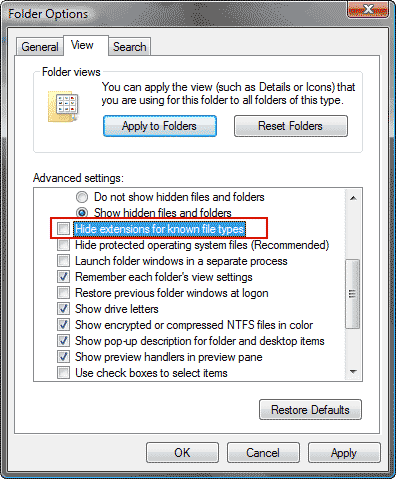
Figure 7: Hide extensions for known file types
Back
Show File Extensions in Windows XP
Follow these steps to show file extensions in Windows XP
- Go to My Computer and choose Tools | Folder Options, as shown in Figure 8.
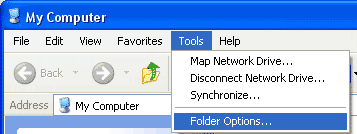
Figure 8: Folder Options - Scroll down the Advanced Settings list, and deselect the Hide extensions for known file types check-box (highlighted in red within Figure 9). Click OK.

Figure 9: Hide extensions for known file types
Back