Missing Mini Toolbar in PowerPoint 2010
Learn how to get back your missing Mini Toolbar in PowerPoint 2010.
Author: Geetesh Bajaj
Product/Version: PowerPoint 2010
OS: Windows 7 / Vista
August 5, 2011
August 5, 2011
Is your Mini Toolbar in PowerPoint 2010 missing altogether? Well, the Mini Toolbar is a great interface option that lets you quickly choose text formatting options, and since it shows up right next to the selected text, it is certainly very convenient -- and there's no reason why you should not have this Mini Toolbar at your beck and call whenever you need it!
The main reason why you may not be seeing any Mini Toolbar is because it may have been disabled by you (or maybe someone else) within PowerPoint's Options dialog box -- to get this option back, you need to go back to the Options dialog box -- follow these steps to get back your Mini Toolbar:
- Choose the File | Options menu option, as shown in Figure 1.
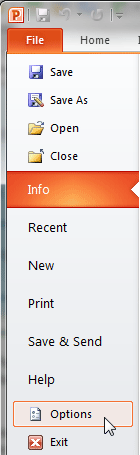
Figure 1: Options File menu option
- This brings up the PowerPoint Options dialog box -- make sure you are on the General tab as shown in Figure 2.

Figure 2: PowerPoint Options dialog box
- If the Show Mini Toolbar on selection option is unchecked, check it now (as shown highlighted in red in Figure 2, above).
- Click OK to get back to your presentation slide.
- Select any text on the slide -- if there's no text go ahead and add a new slide, choose a layout that provides a text placeholder, and type in any text you want. Thereafter, select the text -- and then right-click.
- You will now see the Mini Toolbar as shown highlighted in red in Figure 3.

Figure 3: Mini Toolbar showing up after right clicking the text
See Also: Missing Mini Toolbar in PowerPoint 2013 for Windows
 PowerPoint Keyboard Shortcuts and Sequences:
PowerPoint 2013, 2011, 2010, 2007 and 2003
Have your ever used keyboard shortcuts and sequences in PowerPoint? Or are you a complete keyboard aficionado? Do you want to learn about some new shortcuts? Or do you want to know if your favorite keyboard shortcuts are documented?
Go and get a copy of our PowerPoint Keyboard Shortcuts and Sequences E-Book.
PowerPoint Keyboard Shortcuts and Sequences E-book


