
This is the print version of this page. All content is copyright Indezine.com 2000-2026.
Read an exclusive book excerpt from Cutting Edge PowerPoint 2007 for Dummies.
Author: Geetesh Bajaj
Product/Version: PowerPoint
Structure and Workflow
What Can You Use PowerPoint For?
Giving People What They Like to See
The words structure and workflow might sound a little intimidating, but they are merely a way of ensuring that your presentation elements are working together.
A typical presentation structure combines the elements I mention at the beginning of this chapter into something like what you see in Figure 1-3.
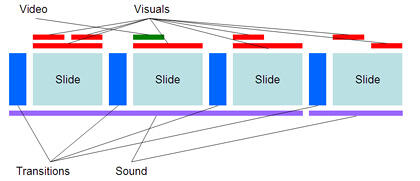
Figure 1-3: A typical presentation structure.
Figure 1-3 is just an example — almost every presentation has a unique structure depending on the content of the presentation and the audience. On the other hand, the presentation workflow for most presentations remains unchanged, which is what I explain next.
The presentation workflow decides the sequence of the elements that I explain earlier in this chapter. In addition, it includes some more abstract elements such as delivery and repurposing. Chapters 14 and 15 discuss these vital concepts.
Figure 1-4 shows a typical presentation workflow.
As you can see, the workflow begins with concept and visualization and ends with delivery and repurposing. But that's not entirely true — repurposing can often be the same as the concept and visualization of another presentation! That's food for thought — and the stimulus for thoughts on another interesting subject.
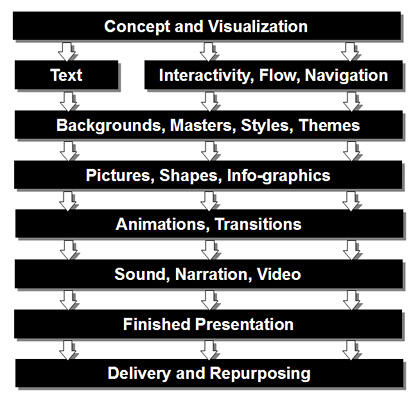
Figure 1-4: A typical presentation workflow.
You can use PowerPoint to create all sorts of presentations:
Of course, you can use PowerPoint for so much more — electronic greeting cards, quizzes, posters, and even multiplication tables. You're limited only by your imagination. PowerPoint is a great tool to present your ideas.
The simplest secret of creating great presentations is to give audiences what they like to see. If you give them anything else, they're bound to complain with bouts of loud-mouthed vengeance and stupidity. Okay — I admit that was an exaggeration. They're more likely to doze off and snore loudly while you're presenting!
So what do audiences like to see? That's what I discuss next.
More than anything else, audiences want sincerity and truth. Just because you put that sentence in a 48-point bold font in a contrasting color doesn't mean that your audience will believe what it says. If there's something in common among audiences of any place, age, and sex, it's that they want something they can believe — and if there's even a hint that something mentioned in your presentation is gobbledygook, you can wave goodbye to the remaining 999 slides in that presentation! (And please don't make such long presentations.)
Of course, there are rare exceptions to that rule. A few centuries ago, audiences didn't believe that the earth was round — or that people could find a way to fly. If what you're presenting is similarly groundbreaking, I'll let you put that in your next PowerPoint presentation. And I'm so proud that you are reading this book.
Never use any content that can be thought of as discriminatory toward race, gender, age, religious beliefs, weight, and so on. Not only will discriminatory phrases or even images reflect badly on you, they'll also hijack the entire focus of your presentation.
To enliven your message, use as many of these style and design guidelines as you can balance on a single PowerPoint slide:
Correct spelling, accurate grammar, and good word choice
Nothing is as embarrassing and shameful as a misspelling on a slide — especially considering that PowerPoint includes an excellent spell checker. But even beyond the spell checker, make sure that the spellings work for the country and audience you are presenting to. Thus, color is perfectly fine in the United States, but make that colour if you're presenting in the United Kingdom or in India.
Avoid repeating the same word on a slide when possible. For example, if you see a phrase like “report results in weekly reports,” you need to do some editing! You can use PowerPoint's thesaurus (accessible on the Review tab of the Ribbon) to find alternatives if you find yourself repeating certain words.
Don't read the slide aloud to your audience while you're giving your presentation. Slight differences in language and wording can make all the difference. Audiences want you to take the content further by sharing your experiences, opinions, and ideas on the subject.
See Also:
PowerPointing with the Best of Them - 2 of 3
PowerPointing with the Best of Them - 1 of 3
You May Also Like: How to Use the Zoom Transition in PowerPoint? | Austria Flags and Maps PowerPoint Templates


Microsoft and the Office logo are trademarks or registered trademarks of Microsoft Corporation in the United States and/or other countries.
