
This is the print version of this page. All content is copyright Indezine.com 2000-2026.
Read the Indezine review of Speech-Over Studio.
Author: Geetesh Bajaj
Product/Version: PowerPoint
Conventional PowerPoint presentations are heard and seen, and most of the time the "heard" part is the speaker for the presentation explaining content in detail while the "seen" presentation works as a framework. That's a great solution when you have a captive audience of tens, hundreds or even thousands. But what about those who did not attend that presentation, or those who you would have wanted to see and hear it?
Many speakers feel that there are hundreds of people out there who might have loved to be part of their audiences, but due to reasons of time, geography and resources, that might not be always possible. True, you can email them a copy of your presentation, but then the "heard" part is lost. What about narrating your voice into PowerPoint then? Well, how many speakers are open to the idea of recording narrations anyway - common excuses to avoid doing that range from improper microphones to just a plain lack of interest!
That's where Speech-Over Studio, our product for review can help.
BackSpeech-Over Studio is a PowerPoint add-in product that lets you add professional-sounding narration to a PowerPoint presentation without any microphone or recording. Based on your text input alone, Speech-Over Studio can generate a narration that is synchronized with the presentation’s screen objects.
Speech-Over Studio is created by Tuval Software Industries, an Israel based software company that is headed by Dr. Joel Harband.
More information about the product and the company can be found on their web site.
BackA trial version of Speech-Over Studio is available for download from the Speech-Over Studio web site.
Installation is a quick affair and adds the Speech-Over menu within your PowerPoint interface (see below).
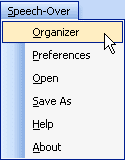
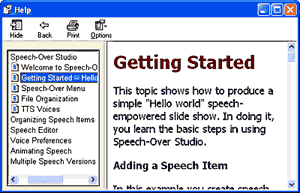
Using Speech-Over Studio is not terribly intuitive, but the Hello World tutor in the help file does get you started. To access the tutor, choose the Speech-Over | Help option in PowerPoint and select the Getting Started - Hello World option.
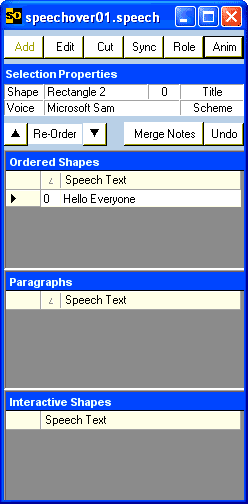
Thereafter, all you need to do is select a text box or placeholder, or other screen object and choose the relevant commands in the Speech-Over Organizer panel to enter or edit the speech text for the selected object. This panel is accessed using the Speech-Over | Organizer option (see below).
All speech recordings are generated automatically in a sub-folder - recipients of your presentations generated using Speech-Over Studio don't require the actual product to hearthe narratives - they should be fine with just PowerPoint or even the free PowerPoint Viewer.
BackSpeech-Over Studio is priced at US$ 90 - each license allows three copies of the software to be installed concurrently. Ordering is through secure server and purchase details are sent immediately to your mail inbox.
Support is through email - a comprehensive online FAQ is also available on the Speech-Over site.
BackSpeech-Over Studio is a fine product and its licensing terms of three concurrent installations is generous. The program interface would benefit from being a little more contemporary. If you are prepared to look beyond that, Speech-Over is a great product.
BackYou May Also Like: Palestine Flags and Maps PowerPoint Templates | Neuxpower NXPowerLite 4


Microsoft and the Office logo are trademarks or registered trademarks of Microsoft Corporation in the United States and/or other countries.
